It is a telecommunication network, which allows autonomous digital devices (nodes) to exchange data between each other using either wired or wireless connections to share resources (hardware or software) interconnected by a single technology e.g. internet.
Delivery and Accuracy: Must deliver error-free data to correct destination.
Performance: Transit time, response time, number of users, type of transmission medium, capabilities of connected hardware's and efficiency of software.
Reliability: Low frequency of failure and quick to resolve.
Security: Protection from unauthorized access and damage and development.
Refers to the way in which a network is laid out physically. Topology of a network is the geometric representation of relationship of all the links and linking devices to one another.
Each device has a dedicated point-to-point link only to a central controller, usually called a hub. The devices are not directly linked to one another.
In a ring topology, each device has a dedicated point-to-point connection with the two devices on either side of it.
A signal is passed along the ring in one direction, from device to device, until it reaches its destination. Each device in the ring incorporates a repeater.
When a device receives a signal intended for another device, its repeater regenerates the bits and passes them along.
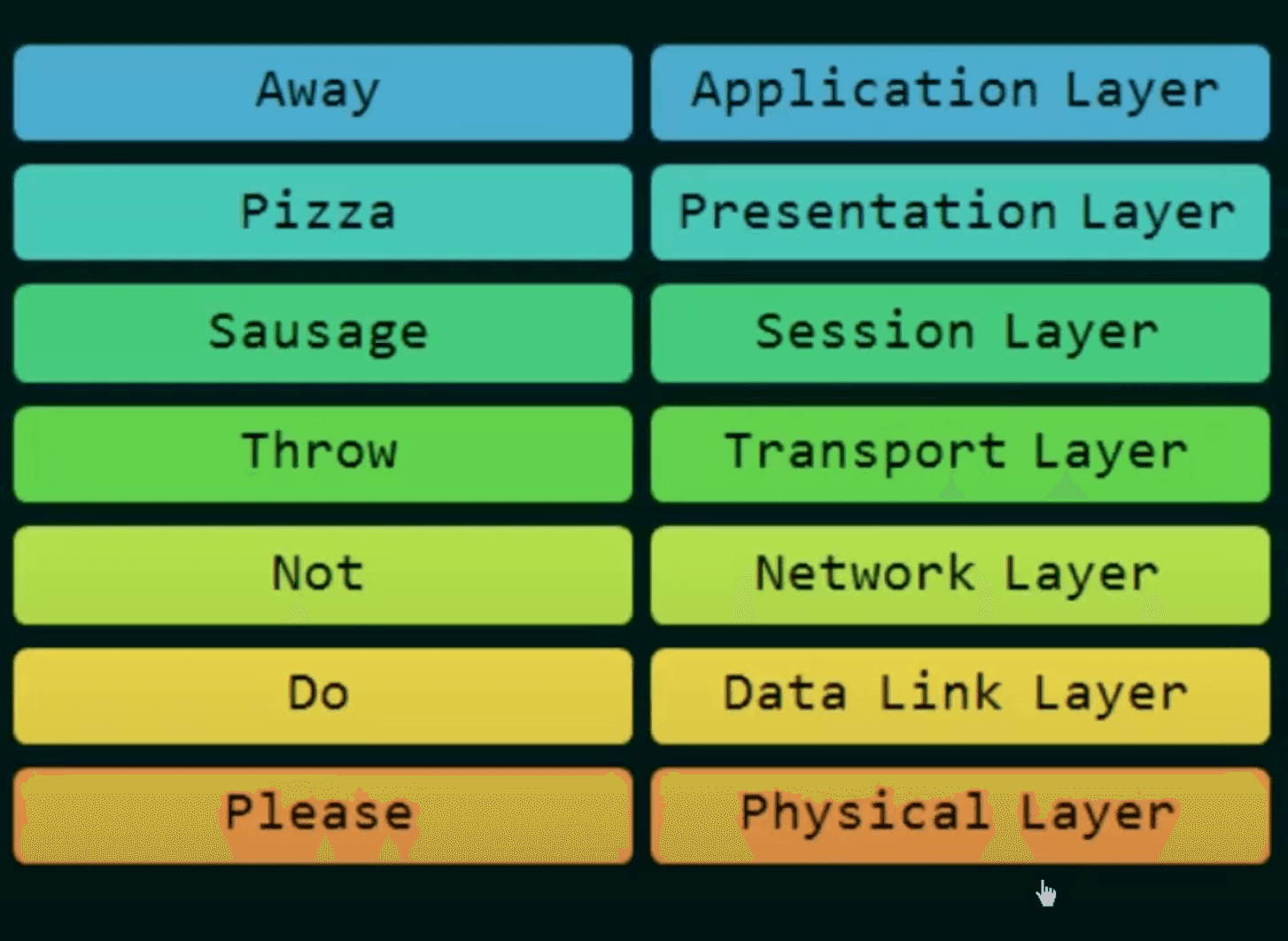
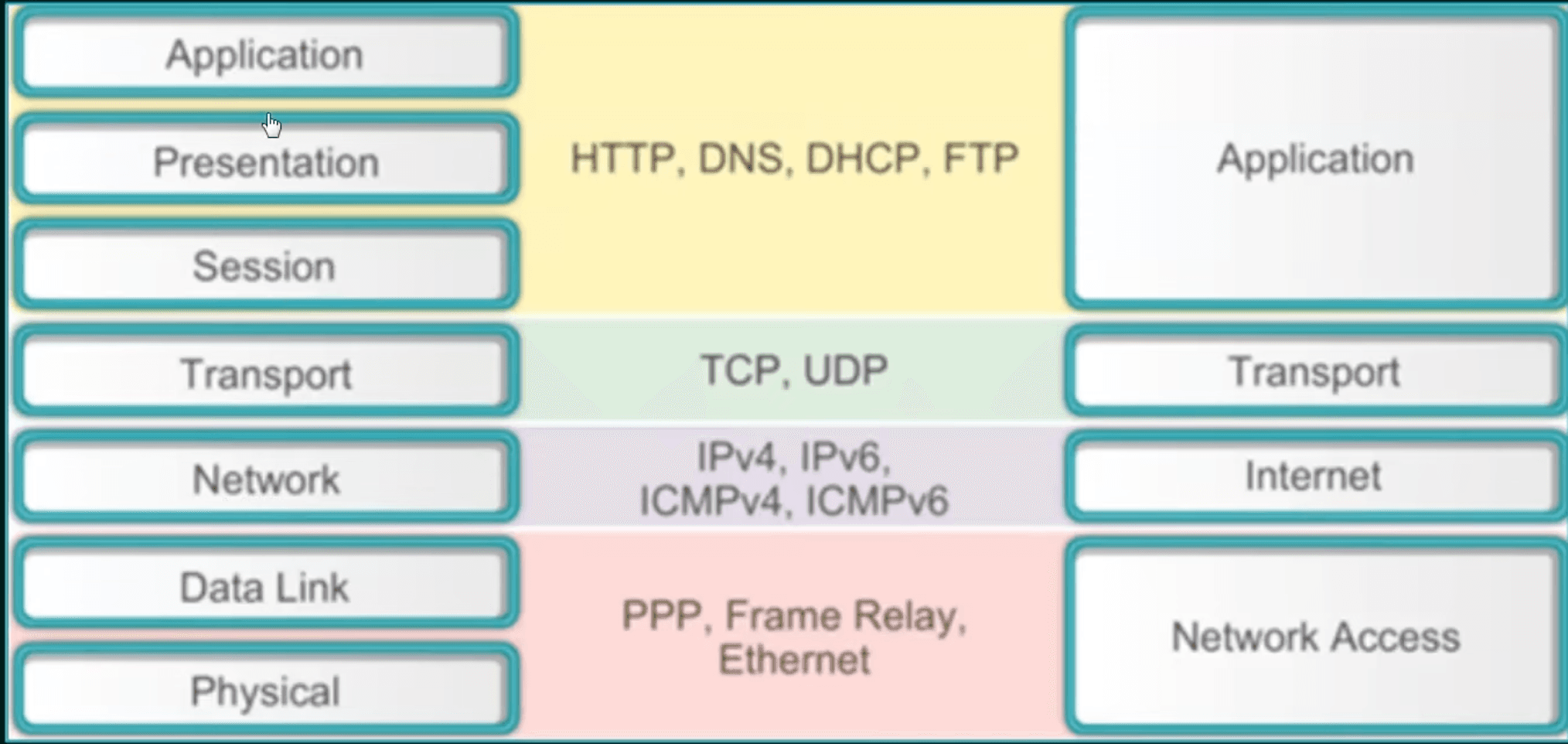
It is a model for understanding and designing a network architecture that is flexible, robust, and interoperable (exchange data b/w diff machines of diff types or OS).
Developed by ISO (International Standards Organization)
The OSI Model is not a protocol. It is only a guideline.
The purpose of the OSI model is to show how to facilitate communication between different systems without requiring changes to the logic of the underlying hardware and software.
The OSI Model was never fully implemented.
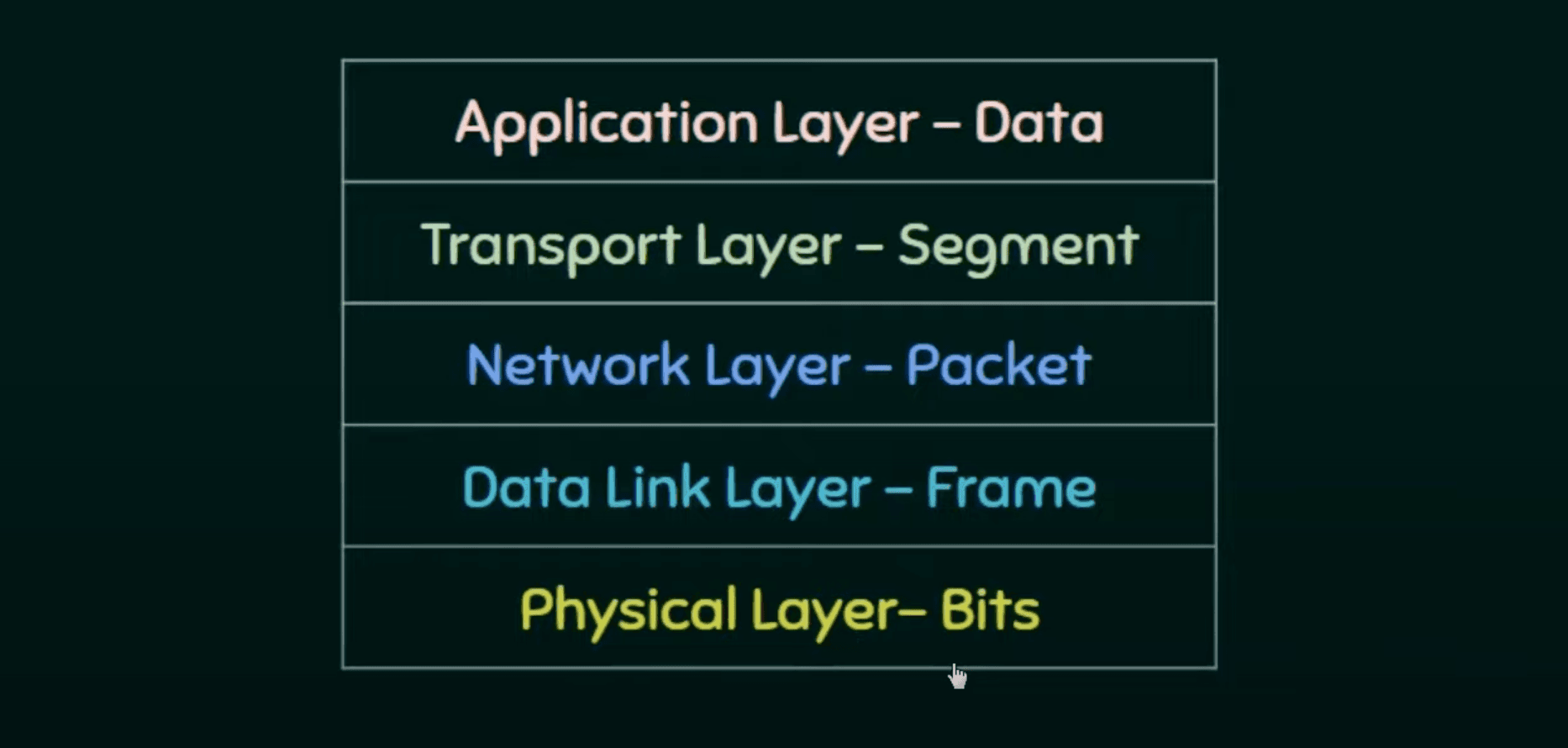
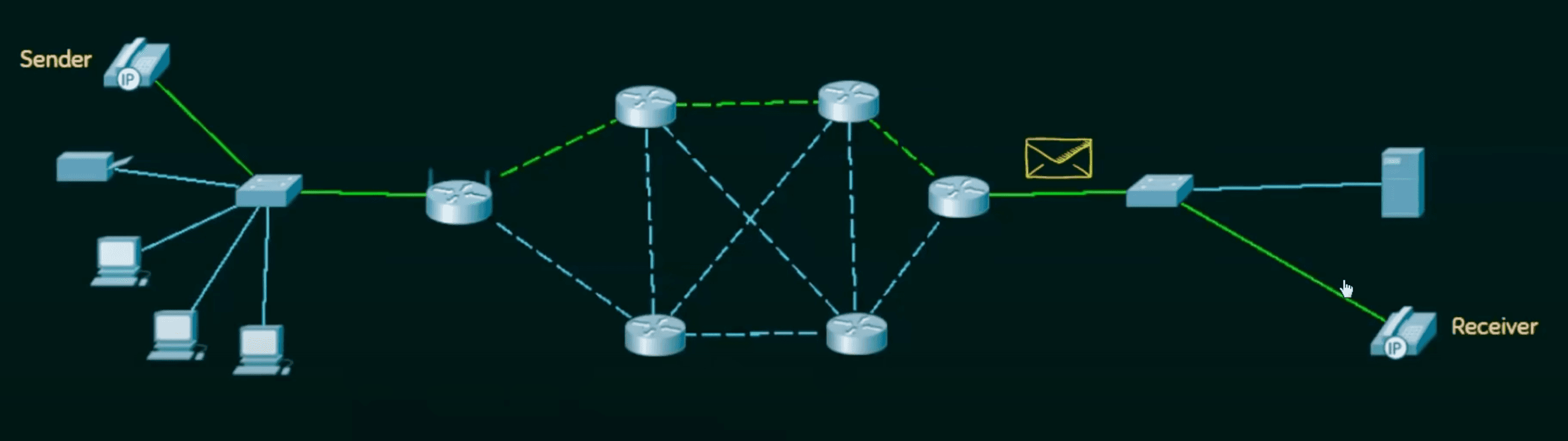
First data is encapsulated from Application Layer -> Physical Layer
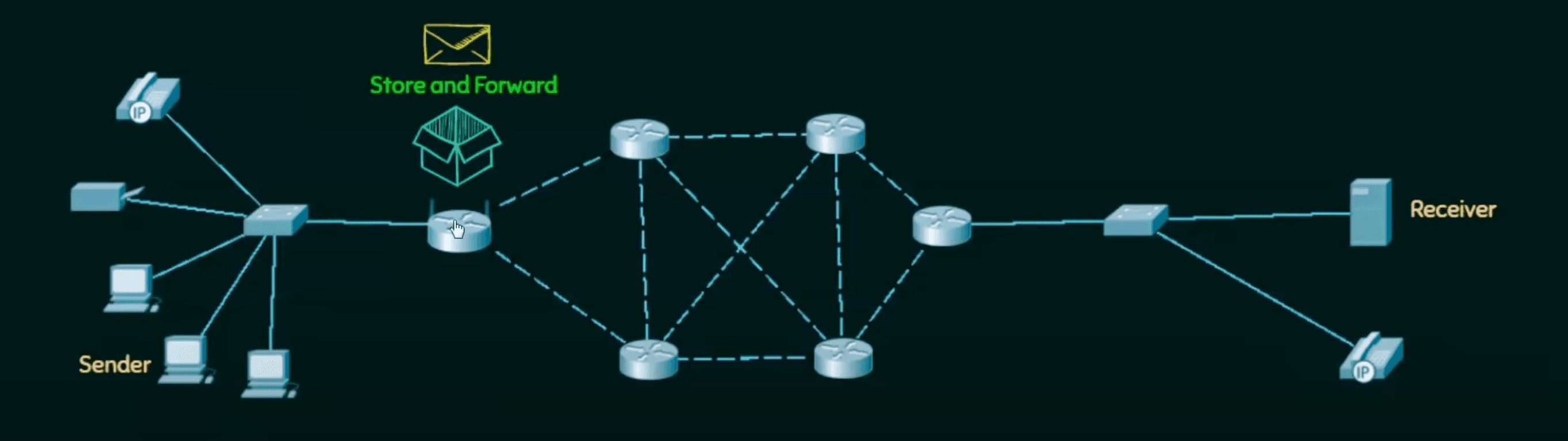
Then which is then forwarded using intermediary nodes (routers) which modify only the last three layers. Network, Data Link, and Physical
Finally data is de-encapsulated to extract the data.
Twisted pair cable: consists of two conductors (copper) with plastic insulation. Telephone line.
Coaxial cable: central core conductor of solid wire enclosed in insulation sheath. Cable TV.
Fibre optical:
Made of glass or plastic.
Transmit signal in the form of light.
Using principles of total internal reflection.
Up to 1600 Gbps: higher bandwidth, less signal attenuation, no noise problem, no corrosion, light weight, greater immunity to tapping
Installation and maintenance, unidirectional light propagation, cost
When multiple nodes or stations are connected and use a common link, we need a multiple-access protocol to coordinate access to link.
Propagation Delay
Time taken by bit for travel from point A to point B in transmission media.
Tp=Propagation SpeedDistance
Transmission Delay ( TT or Tfr )
Time taken by sender to send all bits in packets. If first bit is put on line at time t1 and last bit on t2 , then TT=t2−t1
Each station senses medium before sending frame to reduce collisions.
The possibility of collision still exists due to propagation delay. Frames take time to send to each station, hence station may find the medium idle to collision with the incoming frame.
1-persistence method: continuously sense station and send as soon as it becomes idle. Simple but high changes of collision if multiple stations are detecting simultaneously.
Non-persistence method: Senses station at random intervals, and sends if idle. Reduces change of collision significantly.
P-persistence method: Continuously senses if station is idle and starts generating probability p at time slots to send frame per station if it's probability if more than p .
In the worst case scenario, it will take station twice of propagation delay to detect if there was a collision. That's why we send the frame of that size to detect and reduce collisions.
TT=2×Tp
Energy level is zero for idle; normal for transmission; and abnormal for collision (double normal).
Hard to detect collisions using energy in wireless medium (lost in transmission). That's why we try to avoid using these strategies.
Interframe Space (IFS)
Collisions are avoided by deferring transmission even if channel is idle by a periodic time called IFS. Can prioritize using variable.
Contention Window
The contention window is an amount of time divided into slots. A station that is ready to send chooses a random number of slots as its wait time. Which doubles with time.
If the station finds the channel busy, it does not restart the process; it just stops the timer and restarts it when the channel is sensed as idle. This gives priority to the station with the longest waiting time.
Acknowledgement
Use positive acknowledgements and time-out timer to guarantee receiver receives the frame.
Receiver keeps a temporary buffer until incoming data is processed.
Slower than transmission rate.
Sends acknowledgement if buffer is almost full, for smooth data flow.
In DLL, Error control is commonly implemented through the Automatic Repeat Request (ARQ) process, where detected errors trigger the retransmission of specific frames to maintain data integrity.
If the connection is not stable, the Selective Repeat ARQ is better as it only resends the frames that didn't arrive correctly, saving time and data.
Receiver stores frames in wrong order until they can be arranged properly. Hence, require equal room for sending and receiving frames to work more efficiently. i.e. 2m−1
Each frame has its own countdown timer and sends negative acknowledgements if lost.
Error detecting codes designed to detect up to two errors or correct one single error.
Relationship between n and k in hamming code is k=2r−r−1 .
Eg: for bits n = 7 and k = 4.
For r=3 ; k=23−3−1=4
Parity bits =20,21,…2r−1=1,2,4
P1 bit takes one and leaves one. i.e. 1,3,5,7
P2 bit takes one and leaves one. i.e. 2,3,6,7
P3 bit takes one and leaves one. i.e. 4,5,6,7
We can place data bits at 3, 5, 6, 7. And maintain all three parities. If any bits changes, check parity from 3 to 1. And write down 1 and 0 based on error. The forming binary number in the error bit.
Technology for connecting devices in wired LAN or MAN.
First standardized as IEEE 802.3 in 1983.
Initially coaxial cable, now twisted and even optical fiber cables.
From 2Mbps to 100Gbps.
Offers several wiring and signaling options.
1500 Max transfer unit.
Data is segmented into frames with source and dest address with error handling.
Wi-Fi, a wireless protocol standardized as IEEE 802.11, alternate to ethernet in LAN.
Operators uses bus topology.
No acknowledgement by default.
Standard Ethernet
Connectionless and unreliable.
Frames are sent independently.
No acknowledgement are sent if data is corrupted or lost.
Simple and easy to install and reconfigure.
Not suitable for real time application, possibility of collisions.
No idea of priority.
Preamble: Alerts the station that frame is going to start. Establish bit synchronization.
Start Frame Delimiter (SFD): 10101011, marks beginning of frame.
Destination and Source Addresses: MAC address of source and destination.
Length: To define variable sized frame.
Data: Variable size (46 bytes to 1500 bytes) as payload. Either add 0's or fragment data if out of range. Minimize limit to avoid vulnerable time and max limit to prevent monopoly of shared medium.
CRC: Cycle redundancy check for error detection.
Token Bus
IEEE 802.4
Designed to work over a bus topology but shares the token-passing access method for controlling the network traffic.
No collisions.
Provides predictable network timing compared to ethernet, useful for real time apps.
Up to 10Mbps.
Token Ring
IEEE 802.5
Operates over a star or ring topology, where data packets are circulated in one direction from one device to the next until they reach their destination.
No collisions.
From 4Mbps to 100Mbps.
Still replaced by ethernet due to speed and simplicity.
Fiber Distributed Data Interface (FDDI)
Standard for data transmission in LAN.
Optical fibers, also copper (CDDI).
Range up to 200 kilometers.
Dual ring architecture.
Token passing. No collision. Real time and predictable.
At the sender, data are converted to a digital signal using the Manchester scheme; at the receiver, the received signal is interpreted as Manchester and decoded into data.
The duration of the bit is divided into two halves. The voltage remains at one level during the first half and moves to the other level in the second half. The transition at the middle of the bit provides synchronization.
By G.E. Thomas: Go up at 0 and down at 1.
By IEEE: Go down at 0 and up at 1.
Operates as an unreliable connectionless datagram protocol, offering a best-effort delivery service which doesn't guarantee packet safety or order.
IPv4 treats each datagram independently.
IPv4 packets might experience corruption, loss or delay causing network congestion.
Coupled with reliable protocol like TCP, forming TCP/IP protocol stack for secure data delivery.
Packets used by IP is called a Datagram.
Of variable length consisting of two parts: header and payload (data).
Headers (20 to 60 bytes) contains essential information for routing and delivery.
Version Number (VER) (4 bits)
Defines version of IP protocol. (0100 or 0110)
Header Length (HLEN) (4 bits)
Total length of datagram header (in bytes) scaled down by 4 factor.
Minimum length of IP header = HLEN = 0100 -> 4 x 4 -> 20 bytes
Maximum length of IP header = HLEN = 1111 -> 15 x 4 -> 60 bytes
Service type (8 bits)
First 3 bits represent precedence/priority. 000 to 111.
Total Length (16 bits)
Total length of IP datagram in bytes.
Minimum total length = 20 bytes of header + 0 bytes of data = 20 bytes
Maximum total length = max value by 16 bits = 65535 bytes.
Length of Data=Total length−(HLEN)×4
Identification (16 bits)
Identifies datagram originating from a source host (even after fragmentation) and helps reassemble at destination.
Fragmentation
Process of dividing datagram into fragments during transmission.
offset (13 bits) shows relative position of fragment w.r.t whole datagram.
Since size that be huge, we store index scaled down by a factor of 8.
Flag field (3 bits)
Bit is reserved (not used)
D-bit (Do-not fragment bit): tells not to fragment this datagram, if set (1).
M-bit (More fragment bit): tells this is not the last fragment, if set.
Time-to-live (TTL) (8 bits)
Dictates remaining number of hops (via router) left.
Each routes keeps decrementing this value.
And datagram is discarded if TTL hits zero.
Preventing datagram from circulating infinitely.
And to restrict it's journey.
Protocol (8 bits)
When the datagram arrives at destination, this value helps to define which protocol the payload should be delivered to (at transport layer). Eg: UDP or TCP.
Header Checksum (16 bits)
This field only verifies the header (not the payload) at every router. Datagram is discarded if not verifies, otherwise is altered to accommodate changes in header.
Variable Part (Options + Padding) (0 to 40 bytes)
End of Option - 1 byte - padding at end.
Record route - to trace datagram's path - up to 9 router addresses.
IPv6 is the next-generation Internet Protocol designed to address limitations of IPv4, particularly in address space and header efficiency. It still operates as an unreliable connectionless datagram protocol with best-effort delivery, but with significant improvements.
Each packet is made up of:
Base Header
Payload
Upper layer data
Extension Header (optional)
Header Format:
Fixed header size of 40 bytes — simpler than IPv4's variable header (20–60 bytes).
Version (4 bits): Always set to 6.
Traffic Class (8 bits): Similar to IPv4's service type.
Flow Label (20 bits): To identify and manage packet flows for Quality of Service (QoS).
Payload Length (16 bits): Specifies the length of the data following the header.
Next Header (8 bits): Identifies the type of the next header (could be a transport layer protocol like TCP/UDP or an extension header).
Hop Limit (8 bits): Replaces IPv4's TTL.
Source & Destination Addresses (128 bits each): Ensure precise routing across a vast network.
No fragmentation by routers: Unlike IPv4, routers do not fragment IPv6 packets. Instead, sending host performs Path MTU Discovery to determine the appropriate packet size.
Extension Headers:
Allow additional functionalities (e.g., routing, security, fragmentation) without bloating the fixed header.
Placed between the fixed header and the upper-layer protocol header, providing a flexible mechanism to extend IPv6 capabilities.
Echo request and reply: Essential diagnostic tools enabling network managers and users to pinpoint network issues and confirm that IP protocols in sender and receiver systems are in sync.
Router Solicitation and Advertisement: A router periodically broadcasts this message to inform hosts about its existence.
Address-Mask Request and Reply: The router receiving the address-mask-request message responds with an address-mask-reply message, providing the necessary mask for the host.
Timestamp Request and Reply: to synchronize clocks on two machines.
Definition: Routing between different autonomous systems.
Characteristics:
Handles complex policy decisions and scalability issues across diverse administrative domains.
Emphasizes policy, security, and scalability over rapid convergence.
Examples: BGP (Border Gateway Protocol).
RIP treats all routes the same and cost of each hop is 1. While OSPF gives us the administration to assign cost for passing through a network and choose most optimal path.
Each node maintains a vector (table) of minimum distance to every node.
TO | COST | NEXT
Each router periodically sends its routing table (TO | COST) to its directly connected neighbors.
Triggered Update A node sends its two-column routing table to its neighbors anytime there is a change in its routing table. (update or failure)
Routers update their tables based on the best information received from neighbors.
Key Features:
Simplicity: Relatively easy to implement with low overhead.
Periodic Updates: Information is exchanged at regular intervals, which can lead to slower convergence.
Common Issues:
Count-to-Infinity Problem: In the event of a route failure, routers might gradually increase the metric for a bad route before realizing it’s unreachable.
Routing Loops: Incorrect or outdated information can cause data packets to circulate indefinitely.
Definition: A condition in which two routers (or nodes) continuously update each other with routing information, leading to constant changes (oscillations) in their routing tables.
Cause:
Occurs when a change (like a link failure) in one router’s routing table is repeatedly propagated back and forth between two routers.
Without proper controls, each router may erroneously believe a better route exists through its neighbor, triggering further updates.
Impact:
Routing Loops and Oscillations: Leads to longer convergence times and unstable network performance.
Mitigation Techniques:
Implementing mechanisms such as split horizon and route poisoning to break the feedback loop.
Definition: Occurs when offered load > network capacity, leading to queue buildup, delay, and packet loss.
Symptoms: High latency, jitter, dropped packets, throughput collapse.
When network demand exceeds capacity, packets queue up, causing delays and losses. Effective congestion control prevents or reacts to overload, ensuring smooth and fair data flow.
Goal: Shape traffic before it enters the network to limit bursts and smooth peaks.
Leaky Bucket
Mechanism: Packets enter a queue and exit at a constant rate. If the queue is full when a new packet arrives, it’s dropped.
Effect: Eliminates sudden spikes; enforces a strict, steady output rate.
Analogy: A bucket with a small hole—water drips out evenly regardless of how fast it’s poured in.
Token Bucket
Mechanism: Tokens accumulate at a set rate up to a maximum. Sending a packet consumes a token; if none are available, packets wait or are discarded.
Effect: Allows occasional bursts (up to stored tokens) while enforcing a long‑term average rate.
Analogy: Earning tokens in a jar—you can spend them in a burst but refill happens steadily.
Traffic Policing & Shaping
Policing: Drops or marks packets that exceed a rate limit.
Shaping: Buffers excess packets and releases them at the allowed rate to smooth traffic.
Random Early Detection (RED)
Mechanism: Monitors average queue length. When it crosses a lower threshold, randomly drops or marks incoming packets (increasing probability as the queue grows). Above a higher threshold, it drops all.
TCP is stream transfer protocol. It creates environment between two processes to share data. Providing flow control, error control and congestion control.
These three messages guarantee both endpoints have agreed on each other’s initial sequence numbers and are synchronized for reliable, in‑order data transfer. Now bi-directional data transfer takes place.
It’s a way to scramble data in 64‑bit chunks so nobody can read it without the secret key.
How it works, step by step:
Shuffle the bits: First, DES shuffles the 64 bits of your message in a fixed pattern.
Split it in two: You get a left half and a right half (32 bits each).
Repeat 16 times:
Take the right half and stretch it out from 32 to 48 bits.
Mix in 48 bits of the secret key (you do a simple “exclusive OR”).
Pass that through lookup tables (called S‑boxes) that swap each 6‑bit piece for 4 different bits.
Shuffle those 32 bits again.
Then you “XOR” that with the left half, swap sides, and move to the next round.
Swap one last time: After 16 rounds, swap left and right back.
Unshuffle: Finally, DES reverses the original shuffle to give you the encrypted block.
The key
You start with a 56‑bit secret. Each round the key gets rotated and sliced so you use a different 48‑bit piece every time.
Why it matters
When it came out, this was super secure. Today, a 56‑bit key is easy to guess, so DES is mostly a teaching tool or used inside stronger systems (like Triple DES).
Definition: Uses a key pair—one public, one private.
Public Key: freely distributed; for encryption or signature verification.
Private Key: kept secret; for decryption or signature creation. (with receiver)
Core Concepts
One‑Way Functions: easy to compute in one direction (key generation → encryption) but hard to invert without the private key.
Key Distribution Solved: public key can be shared openly.
How it works, step by step:
Key pair creation: You generate a matching public/private duo.
Encryption:
If Alice wants to send you a secret, she grabs your public key and uses it to scramble her message.
Only your private key can un‑scramble (decrypt) it.
Digital Signature (the flip side):
You write a message and “sign” it with your private key—this creates a special code.
Anyone can check that code with your public key to prove it really came from you and wasn’t tampered with.
Provides authentication and non‑repudiation.
Why it matters
It’s the backbone of HTTPS, email signing, code signing, and basically any system where you need to talk securely without first shaking hands in person. But it’s slower than simple swaps or shuffles, so in practice you often use it just to agree on a fast symmetric key, then switch to that for bulk data.
Advantages
Solves key distribution (no secret sharing needed).
What is it?
You keep the original letters of your message but shuffle their positions around in a secret way.
How it works, step by step:
Pick your shuffle method:
Rail Fence: Write your message in a zig‑zag across, say, 3 lines.
Column Shuffle: Write your message in rows under a secret column order (like “3142”), then read down columns in that secret order.
Encrypt:
For “HELLOWORLD” with 3‑rail zig‑zag you’d write:
H L O LE L W R DL O _ _
Then you read row‑by‑row (“HLOL ELWRD LO”) → jumbled text.
Decrypt: Receiver repeats the same zig‑zag or column steps in reverse to restore the original.
Key idea
You’re not changing letters—just where they sit. Without knowing how you zig‑zagged or which columns you picked, it’s just a confusing mess.
Why it matters
Beats frequency analysis (since letters stay the same), but if someone figures out your shuffle pattern, they undo it easily—so often you combine this with substitution.
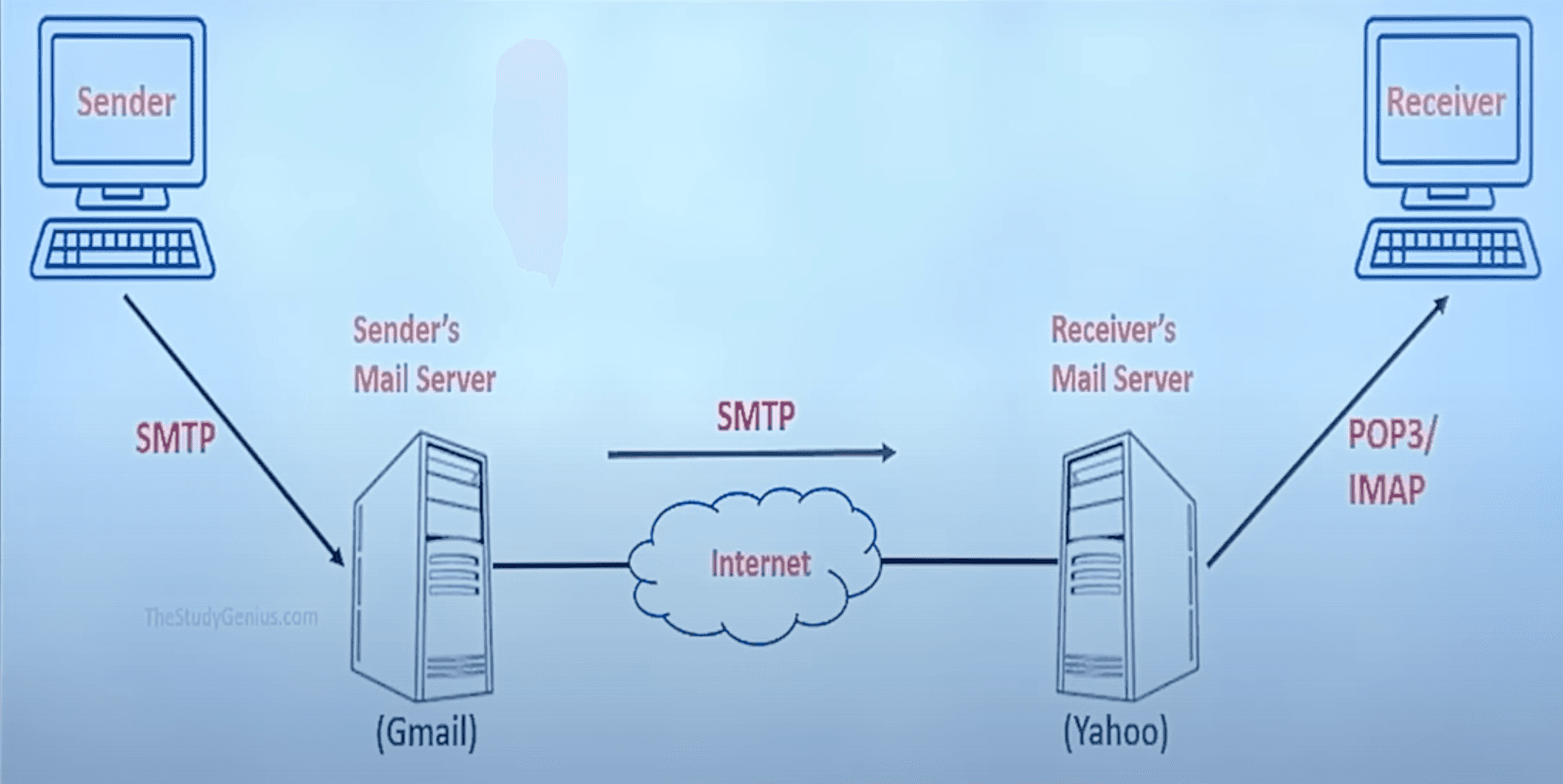
Enables users to access the network and provide services like electronic mail, file access and transfer, surfing www, etc. Communication requires two programs.
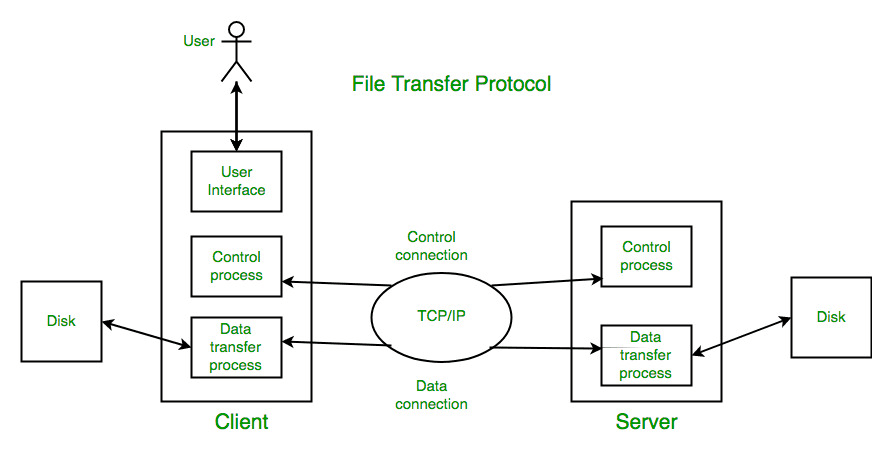
Client/server protocol that allows you to transmit and receive files from a host computer.
FTP authentication may be done via usernames and passwords.
Uses PORT 20 for data and 21 for control connection.
Use TCP for File transfer.
But no encryption and no security.
Use SFTP for security (add a secure socket layer b/w FTP and TCP)
Data connection is non-persistent. Control is persistent
Stable
Control Connection
For sending control information like user identification, password, commands to change the remote directory, commands to retrieve and store files, etc., FTP makes use of a control connection. The control connection is initiated on port number 21.
Data connection For sending the actual file, FTP makes use of a data connection. A data connection is initiated on port number 20. FTP sends the control information out-of-band as it uses a separate control connection. Some protocols send their request and response header lines and the data in the same TCP connection. For this reason, they are said to send their control information in-band. HTTP and SMTP are such examples.
DNS is the Internet’s “phonebook.” It turns human‑friendly names (like www.example.com) into machine‑friendly IP addresses (like 93.184.216.34) so your browser can find servers.
Repeater - boosts strength of signals as it travels through a communication channel. Don't interpret data.
Hub - Network hardware device to connect multiple Ethernet devices together. Sends data to all ports.
Bridge - Used to connect two different LANs. Works at Data Link Layer.
Switch - connects multiple devices on a network and uses MAC address to send data directly to the right device. Smart as sends only to specific devices.
Router - moves data between different networks, directly it based on destination information using routing table.
Gateway - Networking hardware or software for telecommunication network that allows data to flow from one discrete network to another. Can communicate using more than one protocols to connect multiple networks and can operate any of the seven layers of OSI Model.