Web Technology
Syllabus
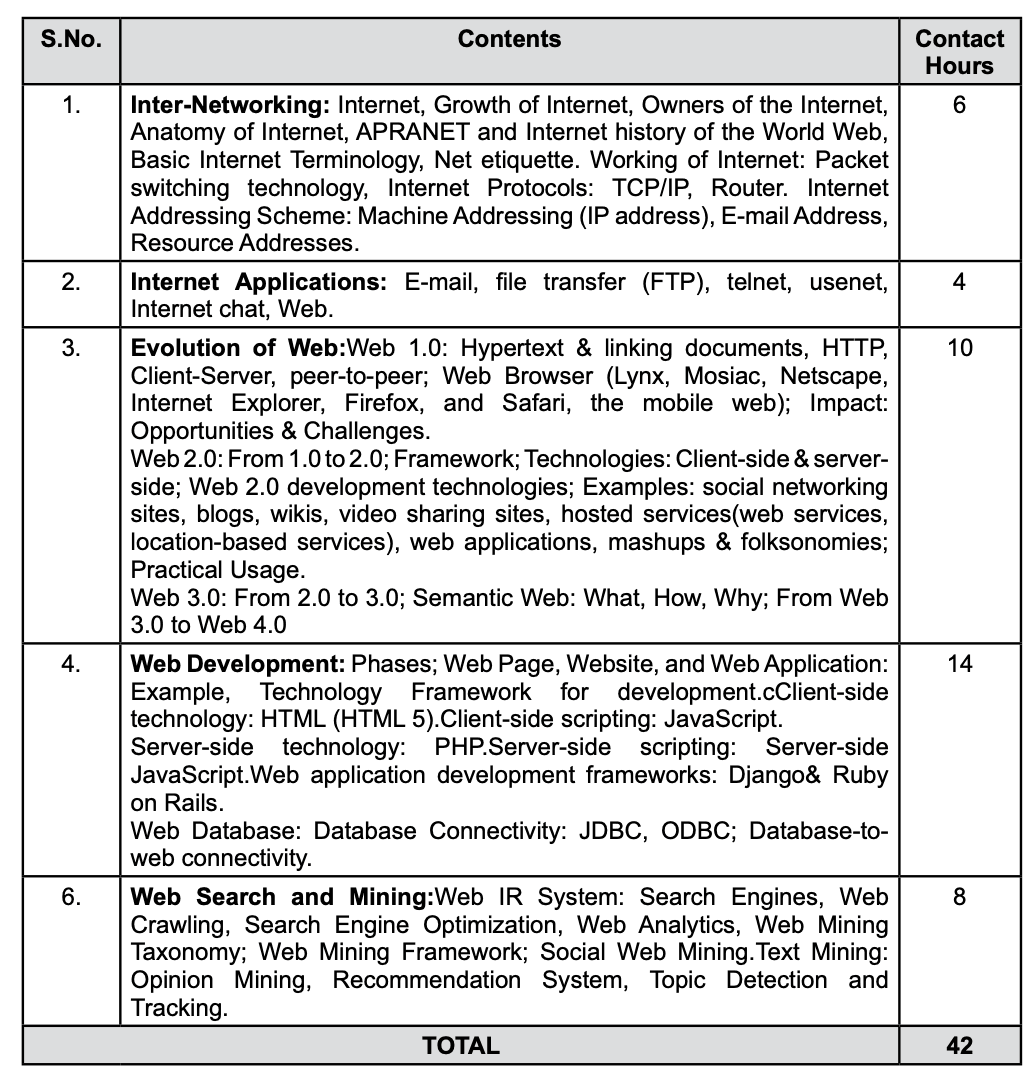
UNIT 1
Internet
The Internet is a global network of interconnected computers that communicate using standard protocols. It allows users to access and share information, use web services, and communicate via emails, chats, and video calls. Think of it as a giant web connecting devices worldwide.
The Internet refers to the global information system that is logically linked together by a globally unique address space based on the Internet Protocol (IP) or its subsequent extensions/follow-ons and is able to support communications using the Transmission Control Protocol/Internet Protocol (TCP/IP) suite or its subsequent extensions/follow-ons, and/or other IP-compatible protocols; and provides, uses or makes accessible, either publicly or privately, high level services layered on the communications and related infrastructure described herein.
How the Internet Works?
Basically a lot of data is stored at lots of servers all over the world.
For example, Google is stored at multiple locations inside many high level computers called servers.
This data could be transferred to us using satellites but that would mean too much delay.
That's why we have laid out Optical Fiber cables on over the world. From mountains to under the ocean. These fiber transmit data to our internet routers or nearby cell towers. Though which we can request and update information.
That's basically Internet.
To identify unique addresses, each device connected to internet is given an IP address.
Similarly all servers / websites are given as IP addresses. Eg: Google's 8.8.8.8
But these address's are too hard to remember, that's why we assign them with unique Domain Names. Eg: www.google.com
And we use a telephone book called DNS server (Domain Name System) to find the corresponding IP address.
After getting the IP address, the browser forwards the request to server. And so on..
The server sends the data is the form of a huge amount of 0's and 1's.
This data is sent in small chunks called packets. Each packet chooses the shortest path to reach your device and is again reassembled using their Serial numbers.
Protocols set the rules for this complex flow of data packets. Like, conversion, address allocation, routers, etc.
Internet Growth
- 1960s-70s: Started as ARPANET, a small research network to connect universities.
- 1980s: Expanded into educational and research networks.
- 1990s: Became public. The introduction of the World Wide Web (WWW) in 1991 by Tim Berners-Lee brought browsers, web pages, and hypertext links, making the Internet user-friendly.
- 2000s-Present: Massive growth with mobile devices, social media, cloud computing, and IoT (Internet of Things).
The number of users has exploded from a few researchers to over 5 billion people today!
Owners of Internet
No one person or organization "owns" the Internet. It’s a decentralized system managed by:
- ISPs (Internet Service Providers): Provide access to the Internet.
- ICANN (Internet Corporation for Assigned Names and Numbers): Manages domain names and IP addresses.
- Governments and Organizations: Create laws and policies.
- Content Providers: Companies like Google, YouTube, and Facebook provide services and data that flow through the Internet.
Anatomy of Internet
When information is sent across the Internet, the Transmission Control Protocol (TCP: the networking-language computers use when communicating over the Internet) first breaks the information up into packets of data. The client computer sends those packets to the local network, Internet service provider (ISP), or online service. From here, the packets travel through many levels of networks, computers, and communications lines until they reach their final destinations. Many types of hardware help the packets on their way. These are:
Hubs, which link groups of computers together and let them intercommunicate through multiple ports.
Bridges, which link local area networks (LANs) with each other.
Gateways, which act like bridges, but also convey data between dissimilar networks.
Repeaters, which amplify the data at intervals so that the signal doesn't weaken.
Routers, which ensure packets of data arrive at their proper destination across different technologies, media, and frame formats.
Servers, which deliver web pages and other services as requested.
Client computers, which make the initial request for Internet services, and run applications to handle those services.
Cables and/or satellite communications, which make the hardware connections.
All hardware units need common operating methods, basic instructions called protocols that specify to all parties how the data will be handled.
ARPANET
- Created in 1969 by the Advanced Research Projects Agency (ARPA) in the U.S.
- Aimed to connect researchers and share data.
- Introduced packet switching (splitting data into packets to send faster and more efficiently).
- First node-to-node communication happened in October 1969 between UCLA and Stanford.
Evolution of the Internet
- 1970s: Introduction of TCP/IP protocol (backbone of modern Internet).
- 1980s: NSFNET (National Science Foundation Network) extended ARPANET for academic use.
- 1990: ARPANET shut down, and the Internet as we know it began.
- 1991: The World Wide Web was invented by Tim Berners-Lee.
History of the World Wide Web
- Invented in 1989 at CERN by Tim Berners-Lee to allow researchers to share documents.
- Introduced three core technologies:
- HTML (HyperText Markup Language): For web pages.
- HTTP (HyperText Transfer Protocol): To access web pages.
- Web Browser: Software to view web pages (like Chrome or Firefox).
- Revolutionized how we interact with the Internet, making it accessible and useful for everyone.
Basic Internet Terminology
- IP Address: A unique numerical label assigned to each device on the Internet (e.g., 192.168.1.1).
- Domain Name: The human-readable address for websites (e.g.,
google.com), linked to IP addresses via DNS. - URL (Uniform Resource Locator): The full web address used to access resources (e.g.,
https://www.example.com). - HTTP/HTTPS: Protocols for transferring web pages. HTTPS is secure (uses encryption).
- DNS (Domain Name System): Translates domain names into IP addresses.
- Bandwidth: The amount of data transferred over a network in a given time (measured in Mbps or Gbps).
- Firewall: A security tool to block unauthorized access to a network.
- ISP (Internet Service Provider): A company that provides Internet access.
- Router: A device that connects your local network to the Internet.
- Cache: Temporarily stored data for faster future access.
Net Etiquette (Netiquette)
Netiquette refers to polite and responsible behavior online:
- Respect Privacy: Do not share someone’s private information without consent.
- Avoid Spamming: Don’t send irrelevant messages or overuse group chats.
- Use Proper Language: Avoid offensive, vulgar, or all-caps text (seen as shouting).
- Acknowledge Sources: Credit original creators for their work (e.g., images, articles).
- Think Before Posting: Ensure your comments/posts are respectful and appropriate.
- Secure Your Accounts: Use strong passwords and don’t share login information.
- Stay Safe: Avoid clicking on suspicious links and report harmful behavior.
Working of the Internet
The Internet functions like a global postal system, where data is sent in small packets to the destination.
Switching
- Switching in Computer Networks helps in deciding the best route for data transmission if there are multiple in a larger network.
- One to one connection
Circuit Switching
- Before data transmission, connection will be established.
- Eg: Telephone Network
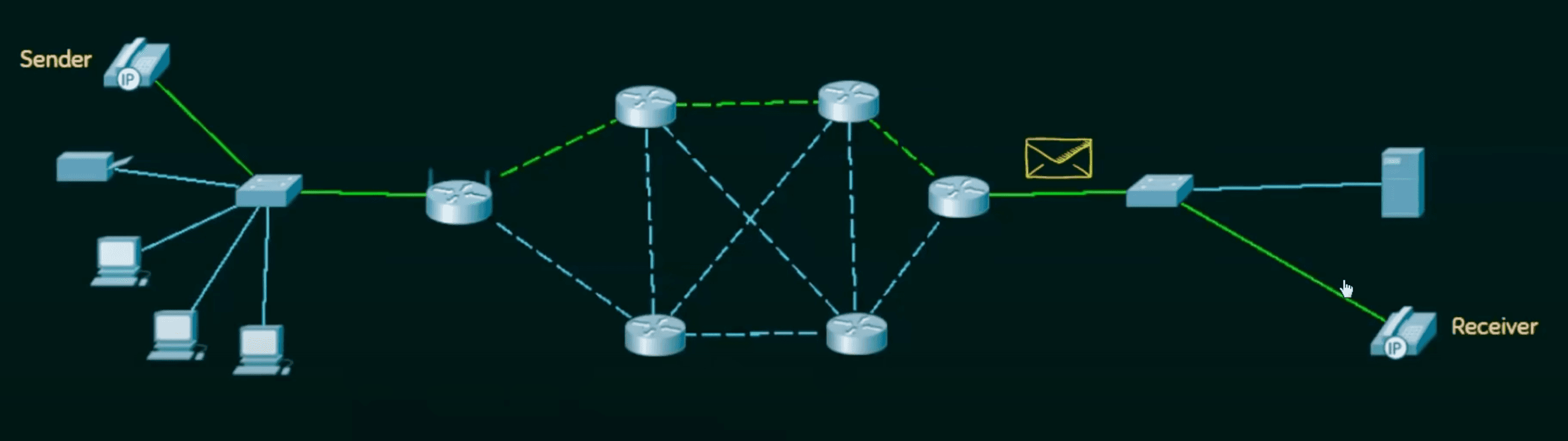
- Connection
- Data Transmission
- Disconnection
Message Switching
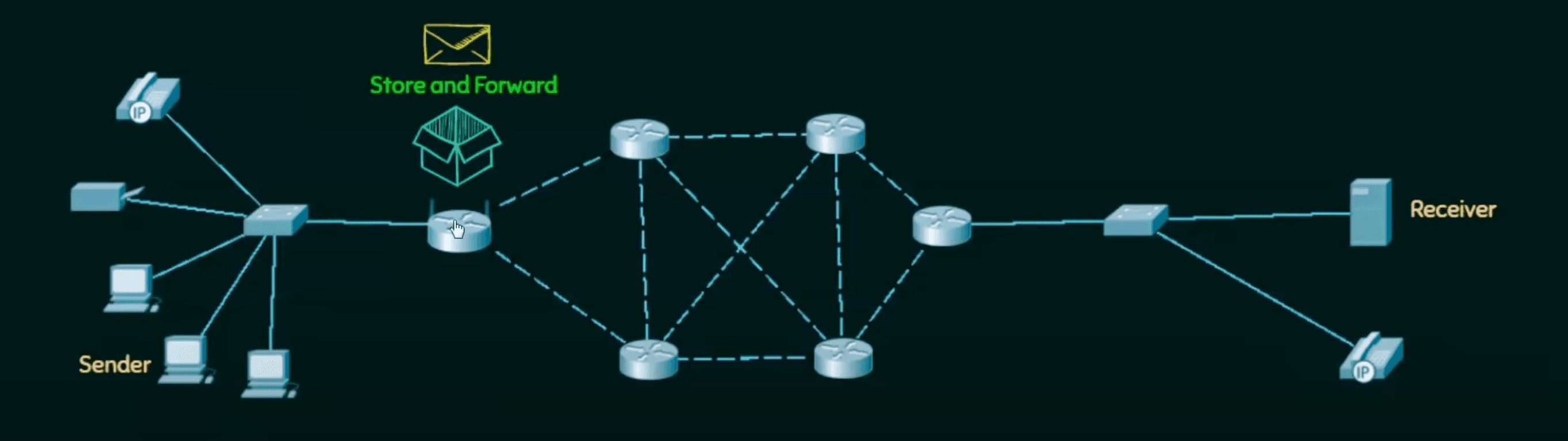
- First message is broken into individual pieces, which are then reassembled at the Intermediary node.
- Then message is transferred as a complete unit and forwarded using Store and Forward mechanism.
- Not suited for streaming media and real time applications.
Packet Switching
- Internet is a packet switching network.
- Message is broken into chunks called packets.
- Each packet is send individually.
- Each packet will have source and destination IP address with sequence number.
- Sequence Number will help the receiver to
- Sort the packets
- Detect missing packets
- Send acknowledgements
1. Datagram Approach - Packet Switching
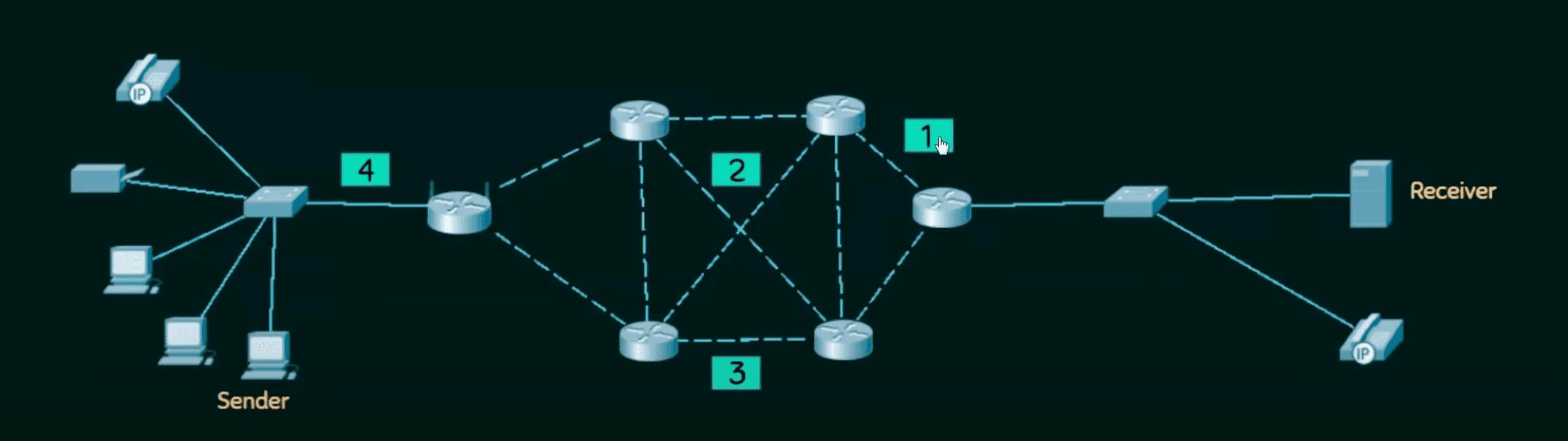
- Connectionless switching
- Each independent entity is called as datagram.
- Path is not fixed
- Intermediary nodes take routing decision to forward the packets using their destination information.
2. Virtual Circuit Approach - Packet Switching
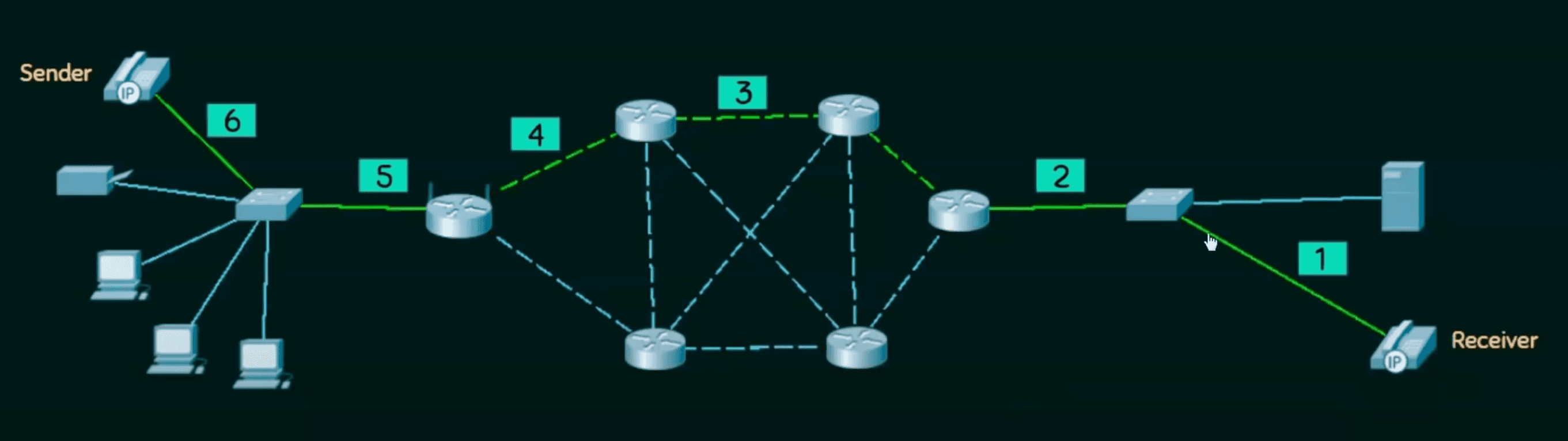
- Connection Oriented Switching
- A preplanned route is established before sending the message
- Call request and call accept packets are used to establish the connection b/w sender and receiver
- Path is fixed for the duration of a logical connection
Packet Switching Technology
Packet switching is the backbone of the Internet, dividing data into small pieces (packets) for efficient transfer:
-
Data Splitting:
- When you send a file or request, it is divided into smaller packets (e.g., a video is split into chunks).
- Each packet contains a header (source and destination info) and payload (the data).
-
Routing:
- Packets travel independently through various routes across the Internet.
- Routers decide the best path for each packet based on availability and speed.
-
Reassembly:
- At the destination, packets are reassembled into the original file, even if they arrive out of order.
-
Error Checking:
- If any packets are lost or corrupted during transmission, the receiving device requests a retransmission.
Advantages of Packet Switching
- Efficiency: Maximizes network bandwidth as packets use available routes.
- Fault Tolerance: If one route fails, packets can take alternative paths.
- Scalability: Handles large amounts of traffic without crashing.
IP Address
IPv4 ->
- Internet Protocol
- Every node in computer network is identified with help of IP address.
- Logical Address, since can change based on Location of device.
- Assigned dynamically, but can be manual.
- Represented in decimal and has 4 octets (x.x.x.x)
- 0.0.0.0 to 255.255.255.255 (32bits)
- Decimal dotted notation and binary notation.
On UNIX based machines, type ifconfig inside terminal. to get your IP address. You'll see something like this
inet 192.168.28.235 netmask 0xffffff00 broadcast 192.168.28.255- That
inetis current IP address. Given to you by your router. In my case, hotspot. - The first three octets will stay the same in your network, called the Network Portion.
- And the last octet will change based on what device it's assigned to, is the Host.
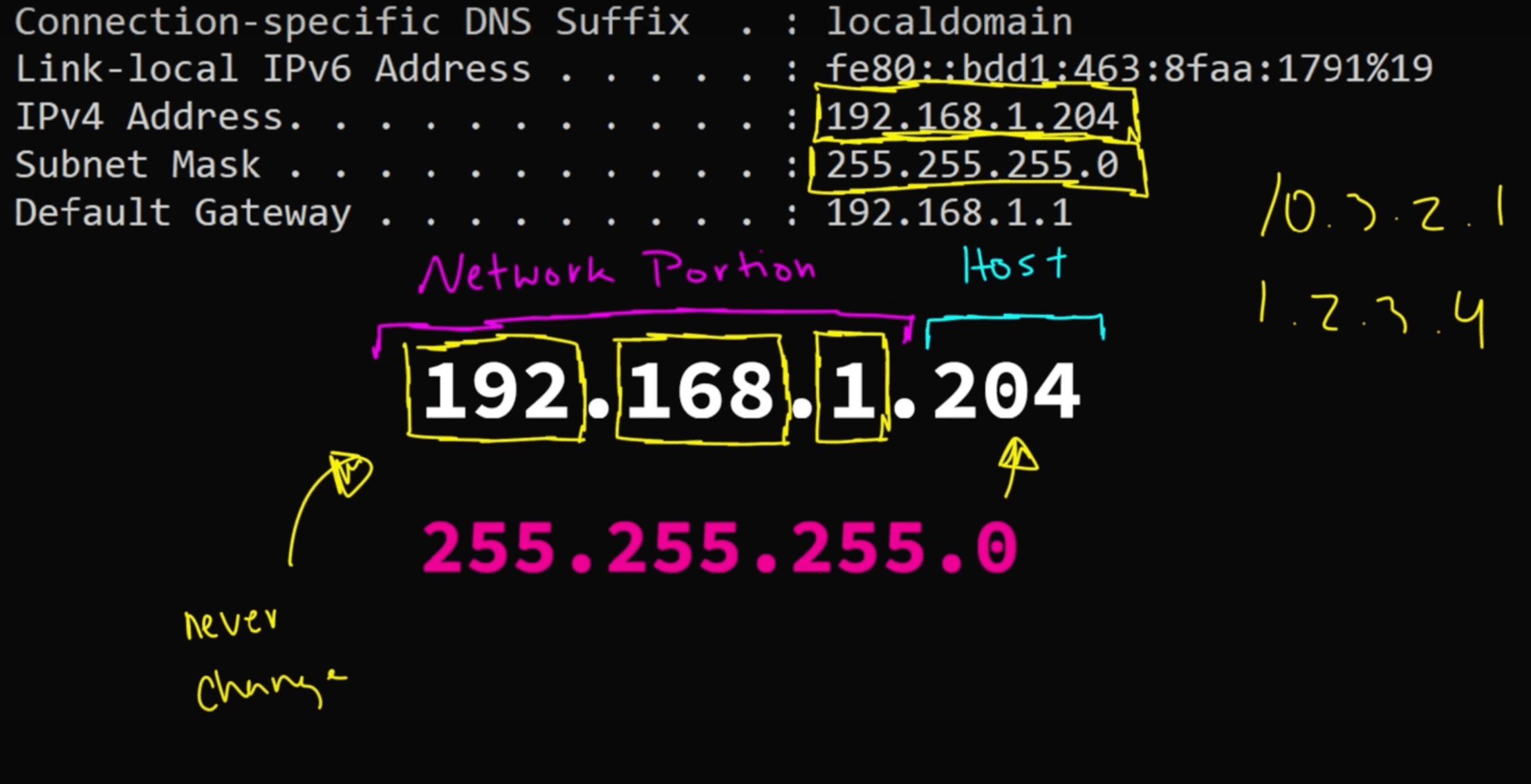
- If you want to exchange on the same network. I.e. IP have same Network Portion. We can directly do that.
- But If the network portion is different, then router will step in to transfer that data.
- Fun fact, Default Gateway is actually your router. (x.x.x.1)
Now how many devices can you host on the same network?
- You might think, since network portions remains the same. And its from 0-255. 256?
- WRONG!
- 192.168.1.0 is reserved for the first born Network Address
- 192.168.1.255 is reserved for the chatty Broadcast Address. He everything to everyone.
- 192.168.1.1 is reserved for your router, ofc.
So that's makes it a total of 253 different hosts!
Layering
Layering means decomposing the problem into more manageable components (layers)
Advantages:
- More modular design
- Easier to troubleshoot
Protocols: Set of rules that govern data communication
Layer Architectures
- OSI Reference Model
- TCP / IP Model
OSI Model
- Open System Interconnection
- It is a model for understanding and designing a network architecture that is flexible, robust, and interoperable (exchange data b/w diff machines of diff types or OS).
- Developed by ISO (International Standards Organization)
- The OSI Model is not a protocol. It is only a guideline.
- The purpose of the OSI model is to show how to facilitate communication between different systems without requiring changes to the logic of the underlying hardware and software.
- The OSI Model was never fully implemented.
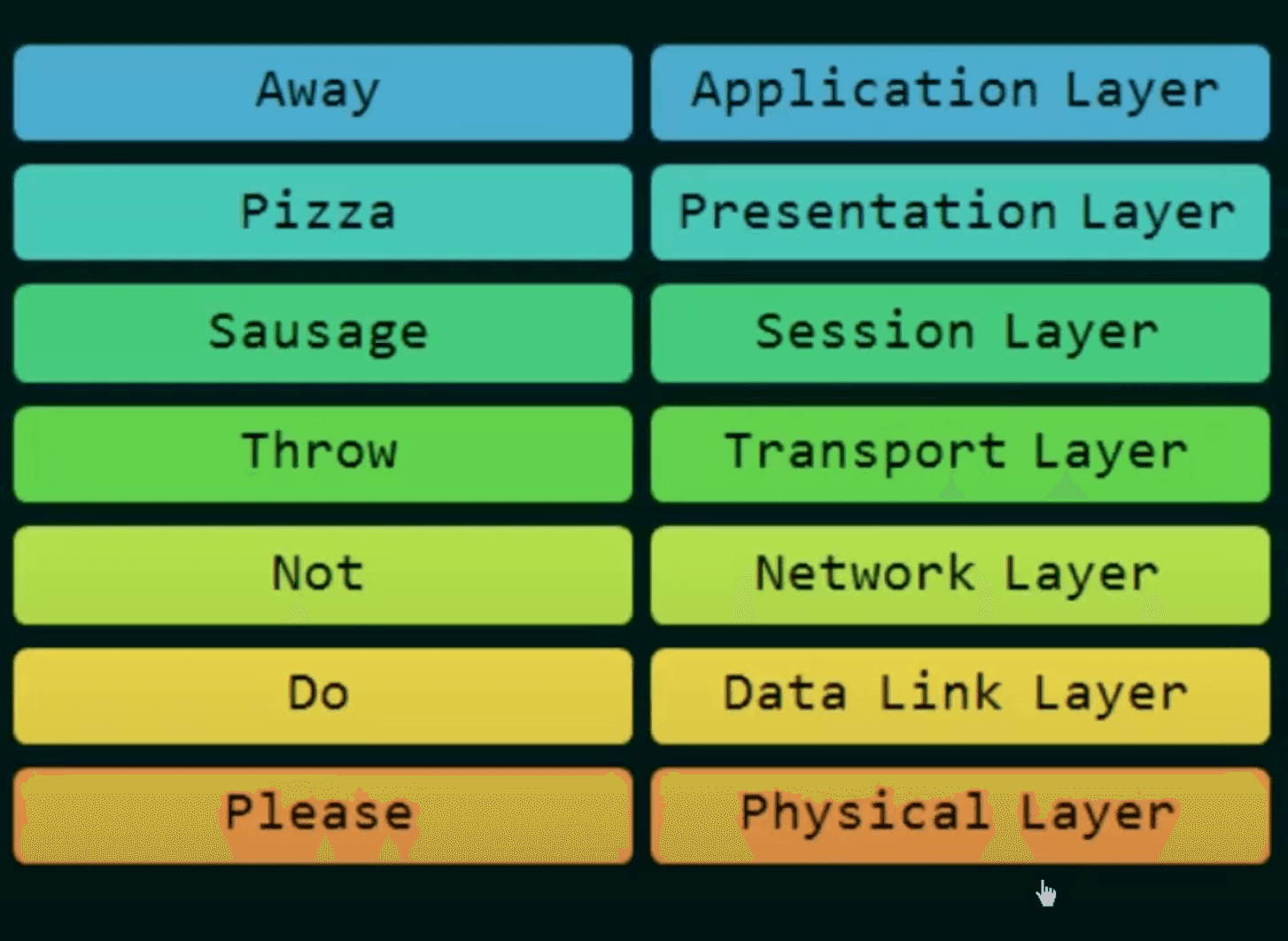
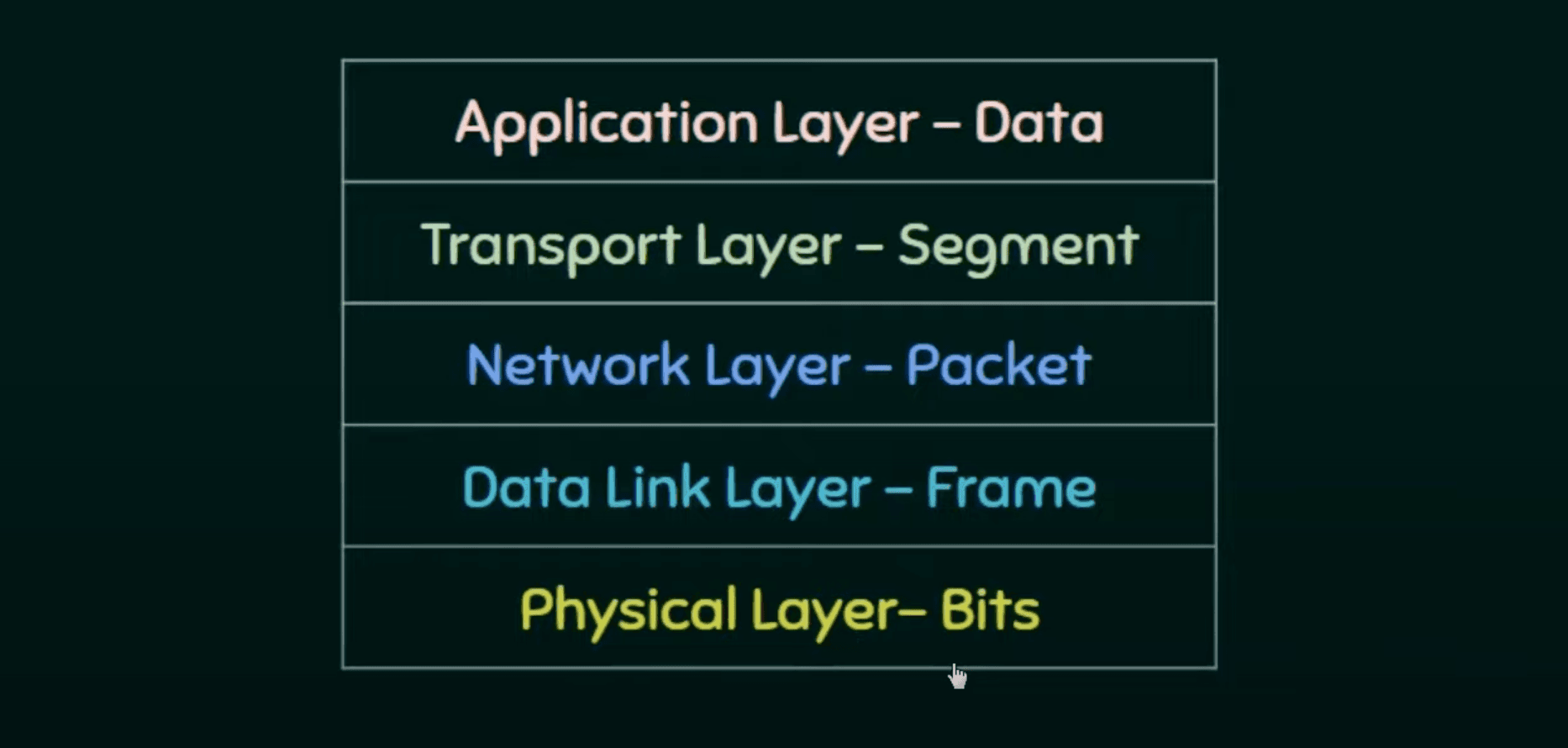
- First data is encapsulated from Application Layer -> Physical Layer
- Then which is then forwarded using intermediary nodes (routers) which modify only the last three layers. Network, Data Link, and Physical
- Finally data is de-encapsulated to extract the data.
7 Layers of OSI Model
Physical Layer:
- Deals with physical connection
- Transmission of raw binary data (0's and 1's) over physical media (fiber optics, etc)
- Eg: Ethernet Cable, USB, Bluetooth
Data Link Layer:
- Ensures error-free data transfer between two devices on same network
- Divides data into frames
- Eg: MAC Addresses, Wi-Fi
Network Layer:
- Handles routing and addressing of data across different networks
- Divides data into packets, assigns IP address, chooses best path
- Eg: IPv4, routers
Transport Layer:
- Ensures reliable data delivery between devices
- Divides data into segments, provides error recovery, flow control and retransmission of lost packets.
- Eg: TCP, UDP
Session Layer:
- Manages and maintains connections (sessions) between devices
- Establishes, maintains and terminates sessions. Synchronous + dialog control
- Eg: APIs, NetBIOS
Presentation Layer:
- Translates data into a format application layer can understand
- Data encryption, compression and formatting. (from ACSII to Unicode)
- Eg: SSL/TLS, JPEG, MP3
Application Layer:
- Provides services directly to the end user
- Facilitates transfer related services like transfer, email and browsing.
- Acts as interface b/w user application and network
- Eg: HTTP, FTP, SMTP, DNS.
TCP/IP Model
- Transmission Control Protocol / Internet Protocol
- Backbone of internet.
- Practical model focusing on simplicity and speed.
- Tightly tied to protocols like TCP, IP, UDP.
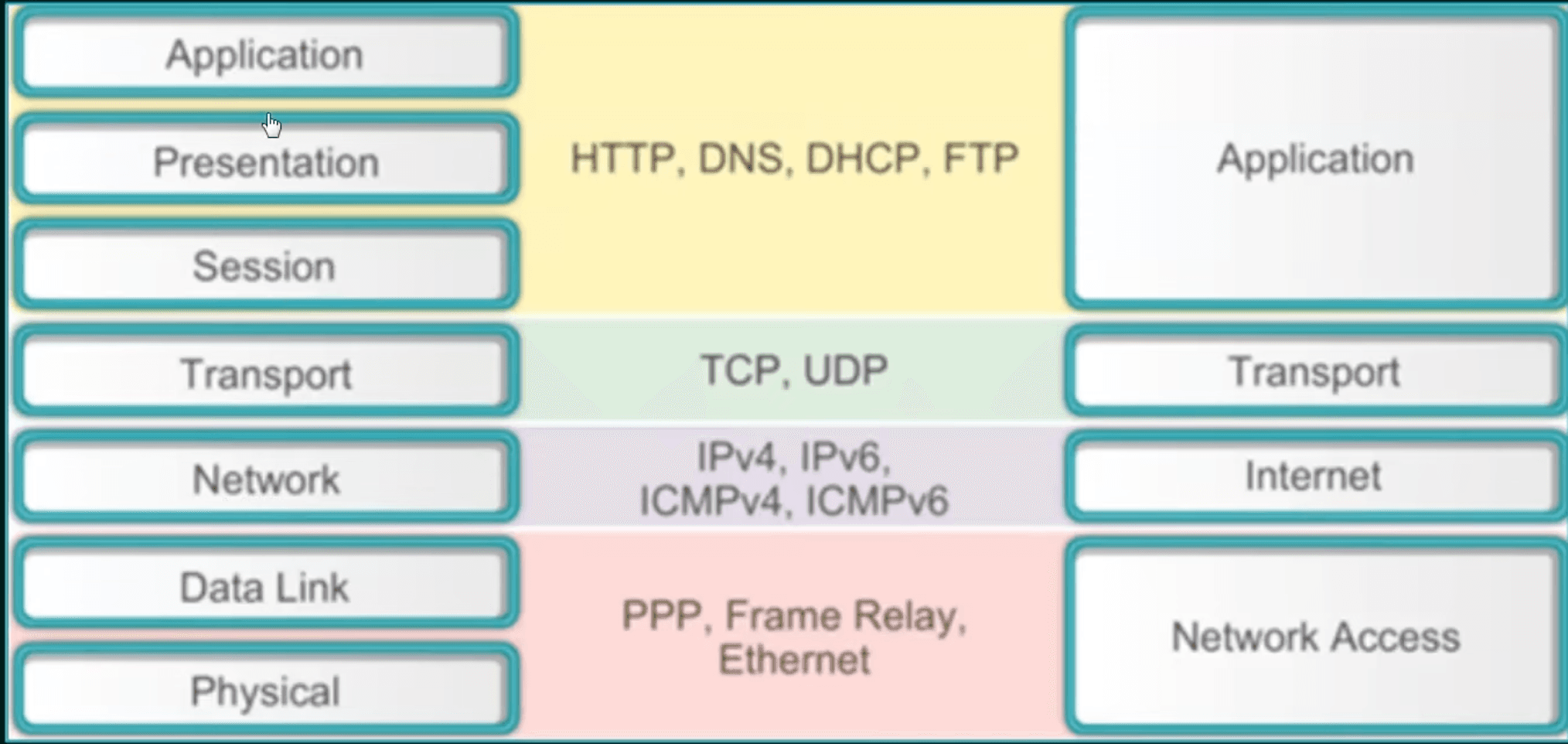
4 Layers of TCP/IP Model
Application: Represents data to user, with encoding and dialog control.
Transport: Supports communication between different devices across different networks.
Internet: Determines the best path thought the network, assigns IP, etc
Network Access: Controls the hardware devices and media that make up the network.
Protocol Data Unit (PDU)
Named according to protocols of TCP / IP suite.
Troubleshooting Internet Connectivity
Understanding network protocols and configurations is critical for diagnosing and resolving internet connectivity issues. Here's why:
1. Protocol Knowledge
- IP (Internet Protocol): Ensures proper IP addressing, subnet masks, and routing are set.
- DNS (Domain Name System): Checks if domain resolution is functional and resolves incorrect DNS configurations.
- TCP/UDP: Verifies communication ports for applications and detects blocked or failing ports.
- DHCP (Dynamic Host Configuration Protocol): Ensures automatic assignment of IP addresses is functioning correctly.
2. Configuration Checks
- IP Configuration: Identifies incorrect static or dynamic IP settings (e.g.,
ipconfig/ifconfig). - Gateway and Subnet: Ensures proper gateway routing and subnet mask alignment for local network communication.
- Firewall/Proxy Settings: Detects rules or proxy misconfigurations blocking access.
- Wi-Fi and LAN Setup: Diagnoses wireless or wired network adapter issues, including driver or signal problems.
3. Troubleshooting Tools
- Ping and Traceroute: Validates reachability and identifies network hops causing delays.
- nslookup/dig: Tests DNS resolution.
- netstat: Identifies open/active connections and their states.
Routers
A router is a networking device that forwards data packets between different networks.
How Routers Handle Packets
- A packet arrives at a router.
- The router examines the destination IP in the packet's header.
- It consults its routing table to determine the next hop.
- The packet is forwarded accordingly, moving closer to its destination.
Router's Role in IP Addressing
- Default Gateway: A router acts as a bridge for devices in your local network to access external networks.
- NAT (Network Address Translation): Routers use NAT to allow multiple devices in a private network to share one public IP address for accessing the Internet.
Why Routers Are Important
- Scalability: Enable millions of devices across the globe to connect without conflict.
- Security: Can implement firewalls and filter malicious traffic.
- Reliability: Provide alternate paths for data in case of network failures.
UDP (User Datagram Protocol)
UDP is a lightweight, connectionless protocol used in the Transport Layer of the Internet protocol suite. Unlike TCP, it focuses on speed rather than reliability.
- Connectionless:
- No need to establish a connection before sending data.
- Data is sent as independent packets (called datagrams).
- Unreliable:
- Does not guarantee delivery, order, or error correction.
- Suitable for applications where speed is critical, and occasional data loss is acceptable.
- Use cases:
- Streaming
- Video Gaming
- VoIP : Internet calls
Subnets
Internet Addressing Schemes
1. Machine Addressing (IP Addressing)
This is how computers and devices are uniquely identified on a network.
-
IP Address:
- Every device on the Internet has a unique IP address.
- Two versions are commonly used:
- IPv4: 32-bit address (e.g.,
192.168.1.1). - IPv6: 128-bit address (e.g.,
2001:0db8:85a3:0000:0000:8a2e:0370:7334).
- IPv4: 32-bit address (e.g.,
-
MAC Address:
- A unique hardware address assigned to a device’s network interface card (NIC).
- It operates at the Data Link layer and is formatted like
00:1A:2B:3C:4D:5E.
-
Private vs. Public Addresses:
- Private IPs: Used within local networks (e.g.,
192.168.0.x). - Public IPs: Used to identify devices on the Internet.
- Private IPs: Used within local networks (e.g.,
-
Dynamic vs. Static IPs:
- Dynamic: Assigned temporarily by a DHCP server.
- Static: Manually assigned and remains fixed.
2. Email Addressing
Email addressing identifies users for sending and receiving messages.
-
Format:
- An email address has three parts:
- Username: The user’s unique ID (e.g.,
john.doe). - @ Symbol: Separates the username and domain.
- Domain: Specifies the mail server (e.g.,
gmail.com).
- Username: The user’s unique ID (e.g.,
Example:
john.doe@gmail.com - An email address has three parts:
-
MX Records:
- Mail Exchange (MX) records help route emails to the correct mail server for a given domain.
-
Protocols Involved:
- SMTP (Simple Mail Transfer Protocol): Sending emails.
- IMAP/POP3: Retrieving emails.
3. Resource Addressing
This refers to identifying and locating web resources, like websites or files.
-
URL (Uniform Resource Locator):
- A URL specifies the location and method to access a resource.
- Format:
protocol://domain/path- Protocol: How to access the resource (e.g., HTTP, HTTPS, FTP).
- Domain: Hostname or IP of the server (e.g.,
www.example.com). - Path: File or resource location (e.g.,
/about.html).
Example:
https://www.example.com/products/item123 -
URN (Uniform Resource Name):
- A persistent name for a resource, independent of its location.
- Example:
urn:isbn:0451450523(a book’s ISBN).
-
DNS (Domain Name System):
- Translates human-readable domain names (
google.com) into machine-readable IP addresses (142.250.190.78).
- Translates human-readable domain names (
Classes of IPv4 Address (Classful)
IP address classes categorize IPv4 addresses based on their default network size and first octet.
Key Features
- Class A: Large networks.
- Binary: First bit is
0. - Range:
0.0.0.0 – 127.255.255.255. - Default Mask:
255.0.0.0.
- Binary: First bit is
- Class B: Medium-sized networks.
- Binary: First two bits are
10. - Range:
128.0.0.0 – 191.255.255.255. - Default Mask:
255.255.0.0.
- Binary: First two bits are
- Class C: Small networks.
- Binary: First three bits are
110. - Range:
192.0.0.0 – 223.255.255.255. - Default Mask:
255.255.255.0.
- Binary: First three bits are
- Class D: Multicasting.
- Binary: First four bits are
1110. - Range:
224.0.0.0 – 239.255.255.255.
- Binary: First four bits are
- Class E: Experimental.
- Binary: First four bits are
1111. - Range:
240.0.0.0 – 255.255.255.255.
- Binary: First four bits are
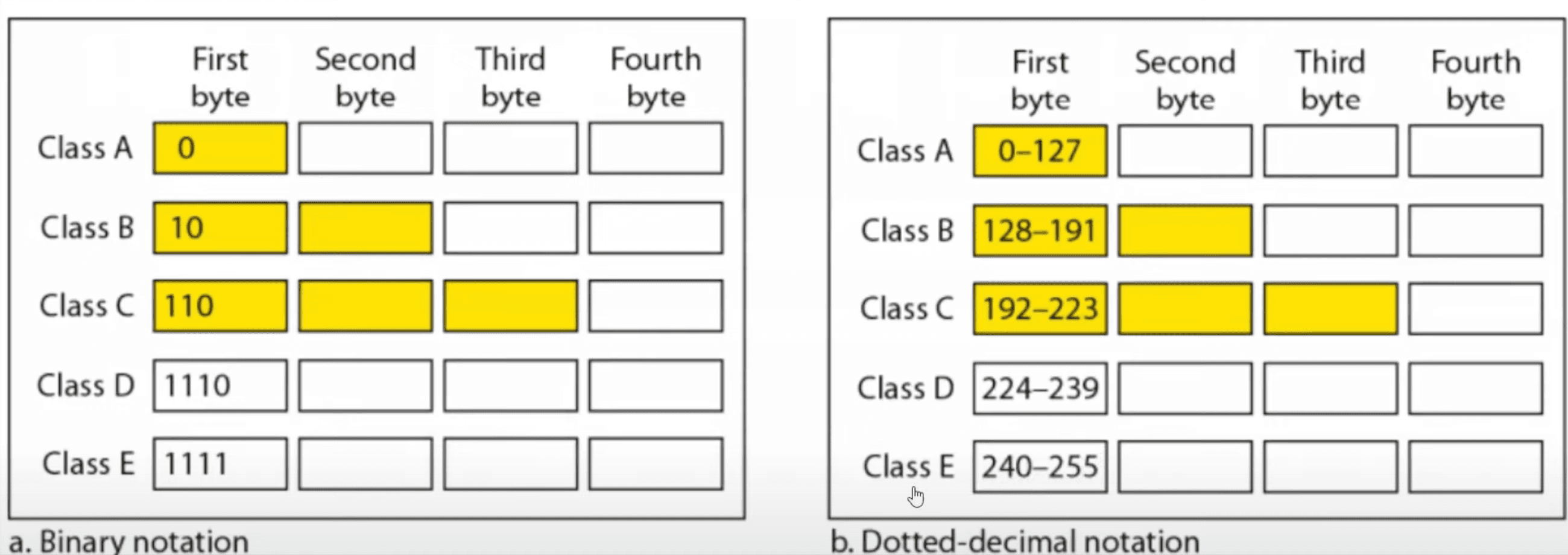
Hence, to find out a class of an IP address. Simply convert first octet of Dotted-decimal notation into binary, and count no. of 1's in the beginning.
Masks in IPv4 Addressing (Subnet Mask)
A mask in IPv4 addressing, also known as a subnet mask, is used to divide an IP address into two parts:
- Network Portion: Identifies the network.
- Host Portion: Identifies individual devices within that network.
The subnet mask determines which part of the IP address belongs to the network and which part belongs to the host.
Default Masks for IPv4 Classes (Subnet classes)
Subnet classes divide an IP address space into smaller subnets using subnet masks.
- Subnet masks define the network and host portions of an IP address.
- Example:
255.255.255.0→ Network (first 24 bits) and Host (last 8 bits).
- Example:
- Custom subnet masks allow more flexibility:
- Example:
255.255.240.0(binary:11111111.11111111.11110000.00000000).
- Example:
Class A
- Binary Notation: 11111111.00000000.00000000.00000000
- Dotted-Decimal Notation: 255.0.0.0
- Network Portion: First 8 bits (1st octet).
- Host Portion: Last 24 bits (remaining 3 octets).
- IP Range: 0.0.0.0 to 127.255.255.255.
Class B
- Binary Notation: 11111111.11111111.00000000.00000000
- Dotted-Decimal Notation: 255.255.0.0
- Network Portion: First 16 bits (1st and 2nd octets).
- Host Portion: Last 16 bits (3rd and 4th octets).
- IP Range: 128.0.0.0 to 191.255.255.255.
Class C
-
Binary Notation: 11111111.11111111.11111111.00000000
-
Dotted-Decimal Notation: 255.255.255.0
-
Network Portion: First 24 bits (1st, 2nd, and 3rd octets).
-
Host Portion: Last 8 bits (4th octet).
-
IP Range: 192.0.0.0 to 223.255.255.255.
-
IP Address Classes define broad categories of IP ranges (A, B, C, etc.).
-
Subnet Classes are subdivisions within those ranges using subnet masks.
-
The subnet mask is essential for routing and defining subnets within larger networks.
-
Modern networking uses CIDR for flexible and efficient IP allocation.
Classless Inter-Domain Routing (CIDR)
Given the address 205.16.37.39/28, let’s calculate the following:
(i) First Address of the Block (Network Address)
-
CIDR Notation: /28 means the subnet mask has 28 bits set to 1, and the remaining 4 bits are 0. The subnet mask in dotted decimal is 255.255.255.240.
-
Network Address: The first address is obtained by setting the host bits (the last 4 bits) to 0.
- Convert 205.16.37.39 to binary:
205:   11001101
16:    00010000
37:    00100101
39: 00100111- Retain only the network bits (first 28 bits) and set the last 4 bits to 0:
11001101.00010000.00100101.00100000 (binary) = 205.16.37.32- First address : 205.16.37.32
(ii) Last Address of the Block (BroadCast Address)
The last address is obtained by setting all the host bits (last 4 bits) to 1:
11001101.00010000.00100101.00101111 (binary) = 205.16.37.47- 205.16.37.47
(iii) Total Number of Addresses
- The number of addresses in a /28 block is calculated as
- Total Addresses: 16
- However, 2 addresses are reserved:
- Network address: 205.16.37.32.
- Broadcast address: 205.16.37.47.
- Usable Addresses for Hosts: 16 - 2 = 14 .
UNIT 2
Electronic Mail is a method of exchanging messages over the internet.
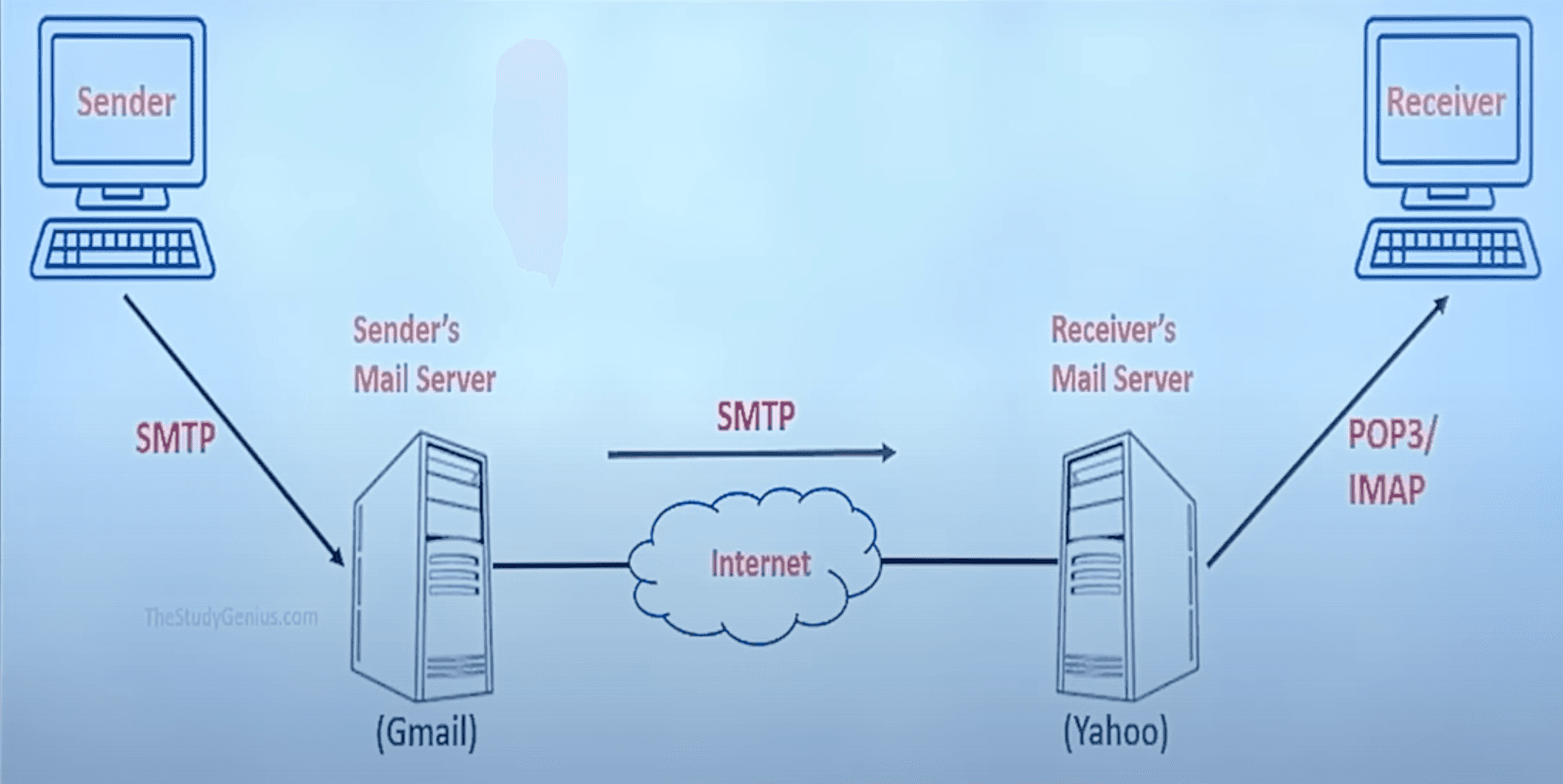
Email is send and received using a couple different protocols.
- SMTP is used for sending email
- IMAP and POP3 is used for receiving email
Email basics
- Email address unique identifier for each user
- Email Client: Software program used to send, receive and message email
- Email Server: Computer system responsible for storing and forwarding email
Components of E-Email System:
- User Agency (UA): Program used to send, receiver, reply and read emails.
- Messaging Transfer Agency (MTA):
- Transfers mail from one system to another.
- To send a mail, a system must have both client and system MTA
- It transfers mail to mailboxes of recipients if they share a machine
- Delivers to main to peer MTA if destination mailbox is in another machine using Simple Mail Transfer Protocol.
- Mailbox: Fall on local hard drive to collect mails.
After email reaches SMTP server
- Server will validate the emails contents in accordance to protocol.
- Now server will lookup IP address of recipients email server on DNS.
- Now server will establish a connection, and send email is packets.
- Which will be re-assembled at recipients server and scan email for virus or spam.
- Finally server will put email to recipients mail box, for him to read.
POP3 vs IMAP
- POP3 is simple. Only downloads contents on Inbox folder. While IMAP (Internet Message Access Protocol) syncs everything throughout all devices
- POP3 offline emails on device. While IMAP keeps everything on server.
- You can only view emails on POP3. While IMAP can also sent items, drafts, delete items, etc.
Internet Chat
Real time text based communication between two or more users over the Internet. Mainly two types of web chat:
- Instant messaging: 1v1 b/w two ppl
- Chat rooms: This is a multi-user chat.
Advantage:
- Simple
- Accessible
- Real-time
- Cost-effective
Disadvantage:
- Security
- Improper use
- Spam
Telnet
- Telecommunication Network
- Telnet is a network protocol that allows you to remotely connect to a computer and establish a two-way text-based communication between two computers.
- Creates remote sessions using TCP / IP protocols, controlled by logged in user to access privileged data and applications on that computer.
- Single operated port, hence only one connection at a time.
- Very old technology, no encryption and low security. Replaced by SSH.
- uses PORT 23
Usenet
- User Network
- Computer network that allows users to share large files and discuss topics in newsgroups.
- Usenet is a decentralized discussion system that began in 1979 as a text-based system. It has evolved into a network with millions of users and thousands of newsgroups, which are similar to forums or subreddits.
FTP
- File Transfer Protocol.
- Client/server protocol that allows you to transmit and receive files from a host computer.
- FTP authentication may be done via usernames and passwords.
- Can also use FTP anonymously using "guest" as ID.
- uses PORT 20 for data and 21 for control connection.
- Use TCP for File transfer.
- But no encryption and no security. Use SFTP for security (add a secure socket layer b/w FTP and TCP)
- data connection is non-persistent. Control is persistent
- Stable
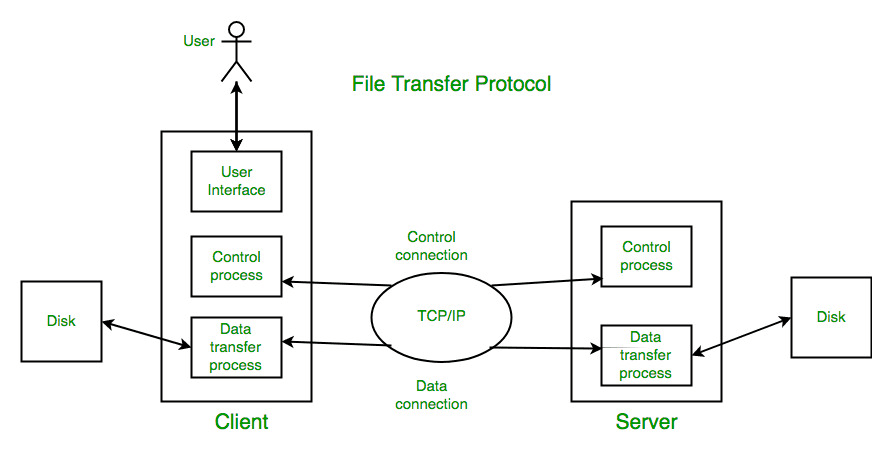
Control Connection For sending control information like user identification, password, commands to change the remote directory, commands to retrieve and store files, etc., FTP makes use of a control connection. The control connection is initiated on port number 21.
Data connection For sending the actual file, FTP makes use of a data connection. A data connection is initiated on port number 20. FTP sends the control information out-of-band as it uses a separate control connection. Some protocols send their request and response header lines and the data in the same TCP connection. For this reason, they are said to send their control information in-band. HTTP and SMTP are such examples.
UNIT 3
HTTP
- HyperText Transfer Protocol: protocols used to exchange data on internet.
- widely used to fetch the webpages on www
- Isn't reliable itself, but uses TCP for reliability.
- Inband Protocol. (since data and commands transfer on the same port, unlike FTP)
- PORT 80
- Stateless
- Client server architecture - uses URL
- Media Independent
- HTTP 1.0 Non-persistent (connection based. sessions)
- HTTP 1.1 Persistent (connectionless. open)
- HTTPS: added Secure Socket Layer (SSL)
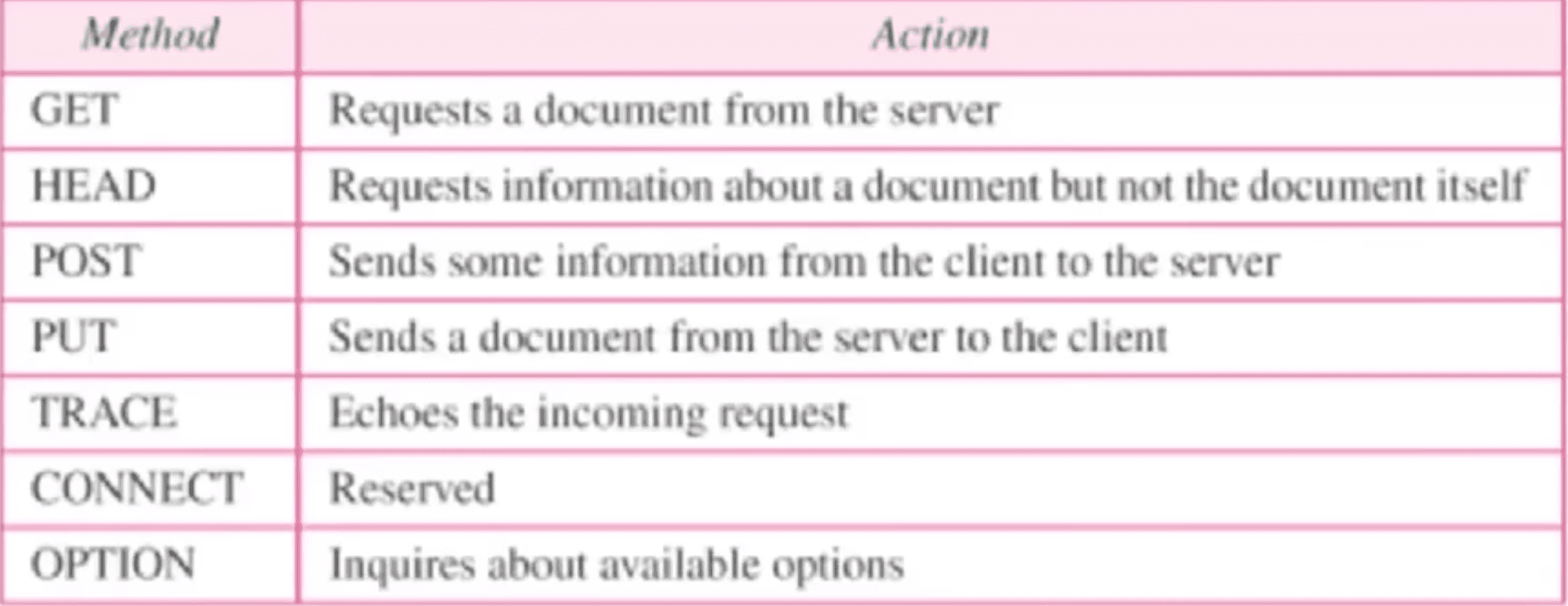
- Commands (head, get, post, put, delete, connect)
Web 1 (Static Web)
The evolution of the web can be categorized into three distinct phases: Web 1.0, Web 2.0, and Web 3.0. Each phase represents advancements in technology, user interaction, and functionality.
Key Features
- Era: 1990s to early 2000s.
- Nature: Static and read-only.
- Content: Information was published, and users could only view it (e.g., text, images).
- Interaction: Minimal to no user interaction.
- Technology:
- HTML for basic pages.
- Inline CSS for styling.
- Early protocols like HTTP, FTP.
- Examples: Personal static websites, early online directories (e.g., Yahoo Directory).
Limitations
- No user-generated content.
- No dynamic updates or real-time interaction.
- Limited to "one-way" communication.
Core Concepts
- Hypertext & Linking Documents: Basic interlinking using static HTML pages.
- HTTP (HyperText Transfer Protocol): Foundation for data communication on the web.
- Client-Server Model: Clients (browsers) request data; servers serve it.
- Peer-to-Peer (P2P): Early experiments in decentralized file sharing (e.g., Napster).
Web Browsers
- Early browsers: Lynx (text-based), Mosaic, Netscape.
- Evolved browsers: Internet Explorer, Firefox, Safari, Mobile Web Browsers (post-2000s).
Impact
- Opportunities: Global information sharing, the birth of e-commerce, and content publishing.
- Challenges: Limited interactivity, static user experience, and manual updates.
Web 2.0 (Dynamic & Social Web)
Key Features
- Era: Early 2000s to present.
- Nature: Dynamic and interactive.
- Content: User-generated content became central (blogs, videos, social media).
- Interaction: Two-way communication, enabling users to create, share, and collaborate.
- Technology:
- Advanced HTML, CSS, and JavaScript for dynamic experiences.
- Backend technologies: PHP, Ruby on Rails, Node.js.
- Databases: MySQL, NoSQL for storing user data.
- Examples: Facebook, YouTube, Wikipedia, and e-commerce platforms like Amazon.
Improvements
- Social networking and community-driven platforms.
- Cloud-based services and apps.
- Rich media experiences (videos, animations).
Limitations
- Centralized data leads to selling of private information. Low security
- More corporations and government control, not public. Low transparency.
- Difficulty in transactions.
Web 3.0 (Semantic & Decentralized Web)
Key Features
- Era: Emerging (2010s onwards).
- Nature: Intelligent, semantic, and decentralized.
- Content: Contextual and personalized content using AI and machine learning.
- Interaction: Peer-to-peer interactions without relying on centralized entities.
- Technology:
- Blockchain for decentralization.
- Smart contracts for secure, automated interactions.
- AI for semantic search and enhanced user experiences.
- Web 3.0 wallets for digital assets (e.g., crypto, NFTs).
- Examples: Decentralized apps (dApps), Ethereum, IPFS, Metaverse platforms.
Improvements
- Ownership of data: Users control their data, not corporations.
- Enhanced security and privacy.
- Automation through smart contracts.
Semantic Web
- What: A web that understands the meaning of data (not just keywords).
- How: Uses technologies like RDF (Resource Description Framework), OWL (Web Ontology Language), and SPARQL (query language for semantic data).
- Why: To enable machines to process, interpret, and act on web data more intelligently.
Technologies
- Blockchain: Ensuring decentralization.
- AI and Machine Learning: Powering smart recommendations and semantic search.
- Web 3.0 Wallets: Managing digital identities and assets (e.g., crypto, NFTs).
Summary
| Feature | Web 1.0 | Web 2.0 | Web 3.0 |
|---|---|---|---|
| Nature | Static, read-only | Dynamic, interactive | Intelligent, decentralized |
| Content | Publisher-created | User-generated | AI-curated, semantic |
| Technology | Basic HTML/CSS | Advanced web frameworks | Blockchain, AI, machine learning |
| Interaction | One-way | Two-way, collaborative | Peer-to-peer, trustless |
| Ownership | Centralized | Centralized | Decentralized |
| Examples | Early websites | Social media, e-commerce | dApps, blockchain platforms |
- Web 1.0 focused on information dissemination.
- Web 2.0 emphasized interaction and social connectivity.
- Web 3.0 aims to empower users with intelligent systems and decentralization for greater privacy and control.
Web 4.0 (Symbiotic Web)
Envisions a fully autonomous, AI-driven web with deep integration between humans and machines (e.g., IoT devices).
UNIT 4
Phases of Web Development
Web development typically involves multiple phases that cover the entire process of creating and maintaining a website or web application. These phases are:
-
Planning
- Define the website’s purpose, goals, and target audience.
- Identify technical and functional requirements.
- Create a site map to outline the structure and navigation.
-
Design
- Create wireframes or mockups for the visual layout.
- Design the user interface (UI) and user experience (UX).
- Focus on responsive and accessible design principles.
-
Development
- Frontend Development: Use HTML, CSS, JavaScript or any framework to create the user-facing part of the website.
- Backend Development: Develop server-side logic using programming languages like PHP, Python, or Node.js and integrate databases (e.g., MySQL, MongoDB).
- APIs: Set up and integrate APIs for additional functionality.
-
Testing and Debugging
- Conduct unit testing, integration testing, and user acceptance testing (UAT).
- Ensure the website is responsive, secure, and free of bugs.
- Validate performance and compatibility across browsers and devices.
-
Deployment
- Host the website on a web server or cloud platform.
- Configure the domain name and ensure the website is live and accessible.
-
Maintenance and Updates
- Monitor website performance and address issues.
- Update content and features as needed.
- Ensure security patches and upgrades are applied.
Web Application
Website:
- Primarily for content presentation (static or dynamic).
- Example: A blog, company website.
- Key Technology: HTML, CSS for layout and styling; minimal scripting.
Web Application:
- Interactive, functional applications where users perform tasks.
- Example: Gmail, e-commerce platforms (e.g., Amazon).
- Key Technology: Combines client-side and server-side scripting, databases, and APIs.
Client Side
- HTML (HTML5): The structural foundation of web pages.
- Key Features in HTML5:
- Semantic elements:
<header>, <footer>, <article>. - Media support:
<audio>, <video>. - Canvas for drawing and animations.
- Form enhancements:
<input type="date">.
- Semantic elements:
- Client-side Scripting: JavaScript: Adds interactivity and logic to web pages.
- Examples:
- Validating user input.
- Creating dynamic content (e.g., live updates).
- Libraries/Frameworks: jQuery, React, Angular.
Server Side
- PHP: A widely-used server-side scripting language for building dynamic web pages.
-
Example: Fetching data from a database and rendering it on a webpage.
-
Strengths:
- Simple integration with HTML.
- Database connectivity using MySQL.
- Server-side JavaScript: Uses Node.js to run JavaScript on servers.
- Strengths:
- Non-blocking I/O operations for high performance.
- Unified language for both client and server.
- High security since code isn't exposed to client.
- Can access databases and call API's for data.
Database Connectivity
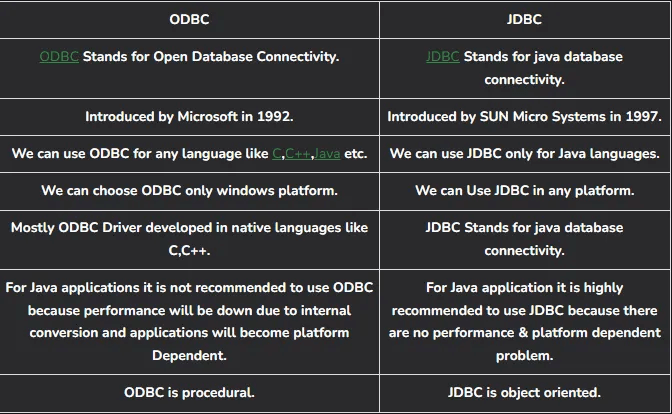
- JDBC (Java Database Connectivity):
- A Java API for connecting and executing queries with databases.
- Example: Accessing MySQL or PostgreSQL databases in a Java application.
- ODBC (Open Database Connectivity):
- A standard API for database connectivity, regardless of the DBMS.
- Example: Allows applications to connect to databases like Oracle, SQL Server.
Database-to-Web Connectivity
- Database integration allows web applications to store and retrieve data dynamically.
How It Works:
- Client requests data via a form or query.
- Server-side scripts (e.g., PHP, Node.js) process the request.
- Queries are sent to the database using JDBC or ODBC.
- Data is retrieved and sent back to the client.
Steps Performed in JDBC
- Load JDBC Driver: Load the database driver using Class.forName("DriverClassName").
- Establish Connection: Use DriverManager.getConnection() to connect to the database with the appropriate URL, username, and password.
- Create Statement: Create a Statement object using the Connection object to execute SQL queries.
- Execute Query: Use methods like executeQuery() for SELECT or executeUpdate() for INSERT, UPDATE, DELETE.
- Process Results: Process the ResultSet object returned by queries (for SELECT statements).
- Close Connections: Close the ResultSet, Statement, and Connection objects to free resources.
Web Development Frameworks
- Django: Python-based framework for rapid web development.
-
Features:
- Built-in ORM (Object-Relational Mapping).
- Security features like CSRF and XSS protection.
-
Use Cases: Content management systems, social networks.
- Ruby on Rails: Framework written in Ruby for building web applications.
-
Features:
- Convention over configuration.
- Integrated testing tools.
-
Use Cases: E-commerce platforms, SaaS applications.
HTML vs HTML5
HTML (HyperText Markup Language):
- The standard language for creating static web pages.
- Limited to basic elements like
<div>, <span>, <h1>, <p>, etc. - Lacks support for multimedia and interactive elements.
- Older versions (HTML 4.01) used external plugins (e.g., Flash) for video, audio, and animations.
HTML5: Latest version of HTML, offering new features for richer, multimedia-enabled websites.
Key Features:
- New semantic tags (e.g.,
<header>, <footer>, <article>, <section>). - Built-in support for audio and video (e.g.,
<audio>, <video>). - Canvas for drawing graphics dynamically.
- Local Storage: Stores data in the browser for offline use.
- Improved form controls (e.g.,
<input type="date">). - No need for third-party plugins for multimedia (video/audio).
- Geolocation: Detects the user’s location for personalized services.
- Error Handling
- Mobile Friendly
- Supports all major web browsers
- Allows Javascript to run in background.
HTML
HTML Features for Layout Creation:
Semantic HTML5 Tags:
- Tags like
<header>, <footer>, <section>, <article>, <nav>, etc., allow developers to structure a page semantically and improve accessibility. - Helps in creating distinct layouts such as blogs, news websites, or e-commerce platforms by organizing the content into sections.
Forms and Controls:
- Use
<form>, <input>, <button>, <select>, and <textarea>to create interactive forms, such as login forms, contact forms, or search forms. - Example: A search box layout in a navigation bar.
HTML Elements
HTML elements are the building blocks of HTML documents, defined by opening and closing tags, and typically consist of:
- Opening Tag: Defines the start of an element, e.g.,
<p>. - Content: Text, nested HTML, or other content enclosed within the tags.
- Closing Tag: Defines the end of the element, e.g.,
</p>.
<p>This is a paragraph element.</p>Types of HTML Elements:
- Structural Elements: Define the layout (e.g.,
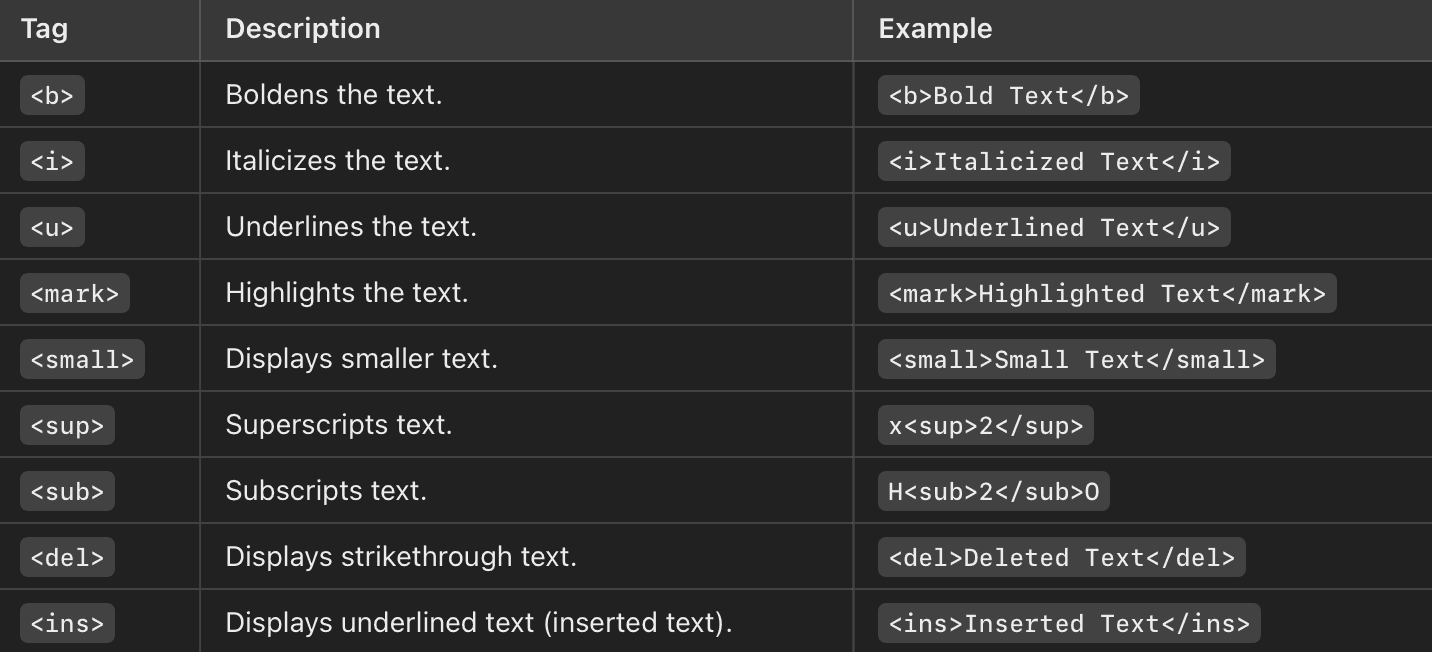
<header>,<nav>,<section>,<footer>). - Text Formatting Elements: Style text (e.g.,
<b>,<i>,<u>). - Multimedia Elements: Embed media (e.g.,
<img>,<video>,<audio>). - Interactive Elements: Handle user input (e.g.,
<form>,<button>).
HTML Linking
Linking connects different parts of a webpage or external resources. The <a> tag is used for hyperlinks.
Syntax:
<a href="URL" target="_target">Link Text</a>Attributes:
href: Specifies the URL of the destination.target:_self: Default, opens in the same tab._blank: Opens in a new tab.
Example:
<a href="https://www.example.com" target="_blank">Visit Example</a>HTML Formatting Tags
HTML provides formatting tags to style and emphasize text.
Defining Image in HTML
The <img> tag embeds an image in an HTML document.
<img src="image_url" alt="description" width="value" height="value">Attributes:
src: Specifies the image source URL.alt: Describes the image for accessibility and when the image cannot be displayed.widthandheight: Define the dimensions of the image.
CSS
CSS Features for Layout Creation:
Flexbox:
- A powerful layout tool for building responsive, flexible layouts.
- Example: A two-column layout that adjusts based on screen size, like in blogs or e-commerce sites.
Grid Layout:
- CSS Grid allows complex, multi-column layouts, ideal for applications that need intricate designs (e.g., dashboards, product pages).
- Example: A grid-based layout for showcasing products or articles.
Media Queries:
- CSS feature that applies styles based on screen size or device type.
- Example: Adjusting a website’s layout from a single-column design on mobile to a multi-column design on desktop.
Different Levels of Style sheets in CSS
CSS (Cascading Style Sheets) allows for different levels of stylesheets to control the presentation of HTML documents. These levels determine the priority of styles applied to elements.
1. Inline Styles
- Written directly within the HTML element's
styleattribute. - Priority: Highest priority (overrides embedded and external styles for the specific element).
- Example:
<p style="color: blue;">This is an inline styled paragraph.</p>2. Internal (Embedded) Styles
- Defined within the
<style>tag inside the<head>section of the HTML document. - Applied to the entire document but cannot be reused across multiple files.
- Priority: Higher than external styles, but lower than inline styles.
- Example:
<head>
    <style>
        p {
            color: green;
        }
    </style>
</head>
3. External Styles
- Defined in a separate
.cssfile and linked to the HTML document using the<link>tag. - Allows consistent styling across multiple HTML files.
- Priority: Lowest priority compared to inline and internal styles but provides global reusability.
- Example:
<link rel="stylesheet" href="styles.css">4. Browser Default Styles
- Built-in styles applied by the web browser when no explicit CSS is defined.
- Priority: Lowest; overridden by all user-defined styles.
Javascript
Comparing two Date Objects
To compare two date objects, even if they are in different formats, JavaScript provides various methods. The common approach is to convert both dates to a comparable format, such as a timestamp (milliseconds since January 1, 1970).
const date1 = new Date("2023-12-01T10:00:00"); // ISO format
const date2 = new Date("December 2, 2023 15:00:00"); // String format

if (date1.getTime() < date2.getTime()) {
    console.log("date1 is earlier than date2");
} else if (date1.getTime() > date2.getTime()) {
    console.log("date1 is later than date2");
} else {
    console.log("Both dates are equal");
}
Steps in the Example:
- Parsing Date Formats:
new Date()handles ISO, string, and numeric formats. - Convert to Timestamps: Use
.getTime()to compare the dates as numeric values. - Comparison: Use standard comparison operators (
<,>,===).
Event Handling
Event handling refers to the process of capturing and responding to user interactions or browser events, such as clicks, keypresses, or mouse movements.
Event Handling Methods:
- Inline Event Handling:
- Add event attributes directly to HTML elements.
- Example:
<button onclick="alert('Button clicked!')">Click Me</button>- Using Event Listeners:
- JavaScript provides
addEventListener()to attach handlers to events dynamically. - Example:
<button id="myButton">Click Me</button>
<script>
    const button = document.getElementById("myButton");
    button.addEventListener("click", function() {
        alert("Button clicked via Event Listener!");
    });
</script>- Directly Assigning Events:
- Attach a function to an element's event property.
- Example:
<button id="anotherButton">Click Here</button>
<script>
    const anotherButton = document.getElementById("anotherButton");
    anotherButton.onclick = function() {
        alert("Button clicked directly!");
    };
</script>
PHP
PHP (Hypertext Preprocessor) is a server-side scripting language widely used for constructing dynamic web pages and managing backend processes.
PHP for Presenting XML data
-
Dynamic Content Generation: PHP can generate dynamic content based on user inputs, such as displaying personalized information after a login.
-
Database Integration: PHP easily integrates with databases (e.g., MySQL) to pull data and display it in real-time on web pages.
-
Data Presentation in XML:
- PHP is highly effective for handling and processing XML data. PHP has built-in functions like
simplexml_load_string()to parse XML files and present them as part of the web page. - It can interact with XML APIs, retrieve or send data in XML format, and integrate with web services using XML (e.g., RSS feeds).
- Example: PHP can retrieve data from a database, format it in XML, and present it to a client’s browser or API consumer.
- PHP is highly effective for handling and processing XML data. PHP has built-in functions like
PHP for reading file
- File Existence Check:
- Ensures the input file exists using
file_exists().
- Ensures the input file exists using
- Reading the Input File:
- Opens the file in read mode (
r) usingfopen(). - Reads the entire content using
fread().
- Opens the file in read mode (
- Writing to the Output File:
- Opens the file in write mode (
w) usingfopen(). - Writes the content to the output file using
fwrite().
- Opens the file in write mode (
- Closing Files:
- Ensures all file handles are properly closed with
fclose().
- Ensures all file handles are properly closed with
UNIT 5
Search Engine Optimization (SEO) and Key Aspects.
Search Engine Optimization (SEO) refers to the process of optimizing a website or online content to improve its visibility and ranking on search engine results pages (SERPs). The primary goal of SEO is to attract more organic (non-paid) traffic to a website by making it more appealing to search engines like Google, Bing, or Yahoo.
SEO involves understanding how search engines work, what people search for, and which keywords or phrases are being used by potential audiences. It focuses on improving both the technical aspects of a website and the quality of its content.
Key Aspects of SEO
-
On-Page SEO
- Content Optimization: Ensuring the content is relevant, informative, and aligned with the target audience’s search intent.
- Keywords: Integrating relevant keywords strategically in titles, headings, meta descriptions, and throughout the content.
- Meta Tags: Crafting compelling meta titles and descriptions that accurately describe the page content.
- URL Structure: Using clean, descriptive, and keyword-rich URLs.
- Internal Linking: Linking to other relevant pages within the same website to enhance navigation and spread link equity.
-
Off-Page SEO
- Backlinks: Building high-quality, authoritative links from other reputable websites.
- Social Signals: Activity on social media platforms that drives traffic and indirectly impacts rankings.
- Brand Mentions: Mentions of the brand or website across the web, even without direct links.
-
Technical SEO
- Website Speed: Optimizing page loading times to ensure fast performance.
- Mobile-Friendliness: Ensuring the website is responsive and performs well on mobile devices.
- Structured Data: Implementing schema markup to help search engines better understand the content.
- Site Architecture: Creating a logical and user-friendly site structure with easy navigation.
- Secure Website (HTTPS): Using SSL certificates to ensure a secure connection.
-
Local SEO
- Google My Business: Optimizing the business profile on Google for local searches.
- Local Citations: Listing the business in local directories and ensuring consistency in name, address, and phone number (NAP).
- Reviews and Ratings: Encouraging positive reviews on platforms like Google and Yelp to boost trust and visibility.
-
Content Marketing
- Blogging: Producing regular, high-quality blog posts around relevant topics.
- Video and Multimedia: Creating engaging videos and other forms of media to attract diverse audiences.
- Evergreen Content: Publishing content that remains relevant over time.
Also good analysis. Good UI/UX. Trust worthy websites also are more SEO'd
Web Mining and frameworks.
Web mining refers to the process of discovering and extracting useful and actionable knowledge from web data. This includes data from web pages, web links, web server logs, and other online content. The aim is to uncover patterns, trends, and relationships that can provide insights for decision-making, personalization, and other applications.
Web mining combines techniques from data mining, machine learning, natural language processing (NLP), and information retrieval to analyze and extract information from the vast amount of unstructured and semi-structured data available on the web.
Data for web mining is collected via web crawlers, web logs, and other means.
The analysis of web usage provides feedback on the web content and also the consumer's browsing habits. This data can be of immense use for commercial advertising, and even for social engineering.
The Web could be analyzed for its structure as well as content.
Web Mining Framework
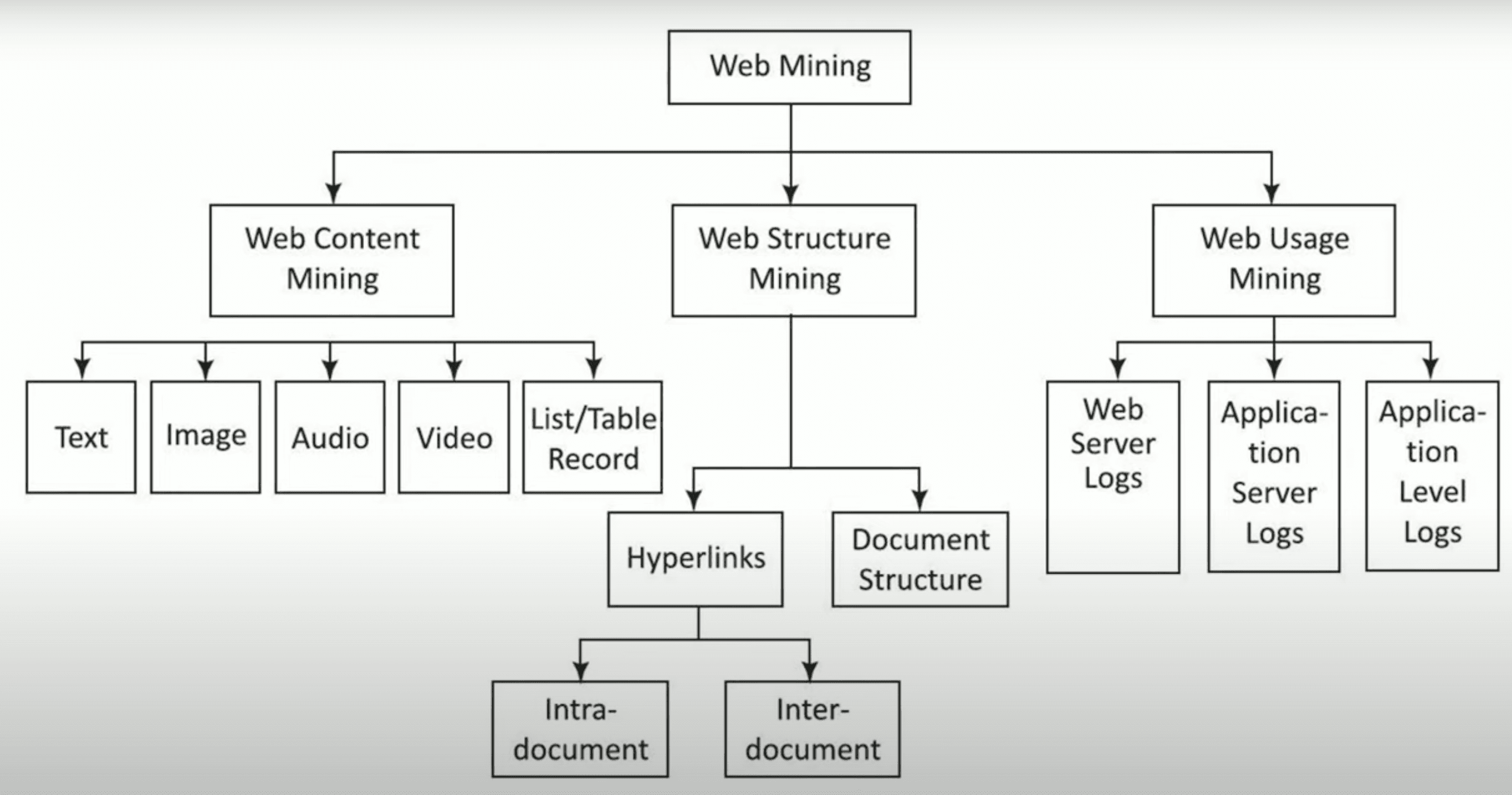
The framework for web mining typically consists of three major components, categorized based on the type of data being analyzed:
1. Web Content Mining
Focuses on extracting useful information from the content of web pages.
Content Types:
- Text, images, audio, video, and structured data like tables and metadata.
Techniques:
- Text Mining: Uses NLP to analyze and extract patterns from text.
- Multimedia Mining: Analyzes multimedia data like images or videos.
Applications:
- Personalization (e.g., product recommendations).
- Opinion mining and sentiment analysis.
2. Web Structure Mining
Analyzes the structure of the web, focusing on hyperlinks and interconnections between pages.
Structure Types:
- Intra-page structure: HTML/XML tags within a page.
- Inter-page structure: Links between web pages.
Techniques:
- Graph Theory: Represents web pages as nodes and hyperlinks as edges in a graph.
- Algorithms: PageRank and HITS (Hyperlink-Induced Topic Search).
Applications:
- Search engine ranking algorithms.
- Community detection in web networks.
3. Web Usage Mining
Involves analyzing user interaction data captured in server logs, clickstreams, and user sessions.
Data Sources:
- Web server logs (IPs, reference, etc), application logs (troubleshooting), application level logs (activity), cookies, and user profiles.
Techniques:
- Clustering and Classification: Groups users based on browsing behavior.
- Sequence Mining: Identifies frequent navigation patterns.
Applications:
- Behavioral targeting (e.g., ads).
- Website optimization and user experience enhancement.
Steps in the Web Mining Process
-
Data Collection
- Gather web data from different sources like websites, server logs, or APIs.
- Tools: Web crawlers, scrapers, and data integration platforms.
-
Data Preprocessing
- Clean and organize raw data to make it suitable for analysis.
- Steps:
- Noise removal (e.g., removing irrelevant tags or ads).
- Handling missing or inconsistent data.
- Data transformation (e.g., tokenization in text).
-
Pattern Discovery
- Use algorithms and models to uncover patterns and trends.
- Examples:
- Clustering: Grouping similar content or users.
- Association Rule Mining: Identifying relationships (e.g., users who visit a product page often proceed to checkout).
-
Analysis and Interpretation
- Interpret the discovered patterns to derive actionable insights.
- Tools: Visualization tools (e.g., Tableau) or statistical analysis software.
-
Deployment
- Use the extracted knowledge in applications like search engines, recommendation systems, or market analysis.
Benefits of Web Mining
- Improved Decision-Making: Offers data-driven insights for businesses.
- Enhanced Personalization: Helps tailor content and recommendations to user preferences.
- Market Understanding: Identifies trends, competitors, and consumer behavior.
- Operational Efficiency: Optimizes web resources and improves user experiences.
By using a systematic framework, web mining enables businesses and researchers to harness the vast amount of web data effectively.
Web Crawling
Web crawling is the process of systematically browsing and downloading content from web pages using automated programs called web crawlers or spiders. Web crawlers navigate through hyperlinks across the internet to collect data for search engines or other applications.
- Purpose: To index web pages for search engines (e.g., Google) or to gather data for analytics.
- Process: Starts with a list of seed URLs → fetches their content → extracts links → follows the links recursively.
- Challenges:
- Handling dynamic pages and frequently updated content.
- Avoiding overloading websites (politeness and rate limits).
- Example: Search engines like Google and Bing use web crawlers to discover new and updated web pages.
Web Information Retrieval (Web IR) System
A Web Information Retrieval (Web IR) System is algorithm designed to search, retrieve, and rank relevant information from the web in response to user queries.
Key Components:
- Indexing: Organizes web content into searchable indexes.
- Query Processing: Interprets the user’s query to fetch relevant results.
- Ranking: Orders results based on relevance using algorithms (e.g., PageRank).
- Feedback Mechanism: Improves future searches using user behavior or relevance feedback.
Applications:
- Search engines (e.g., Google, Bing).
- Specialized systems (e.g., PubMed for medical articles).
Recommendation System
Recommendation systems are algorithms that provide personalized suggestions to users based on their preferences, behaviors, or interactions.
Types:
-
Content-Based Filtering:
- Recommends items similar to those a user has interacted with in the past.
- Example: Netflix recommending a movie based on a user’s viewing history.
-
Collaborative Filtering:
- Recommends items based on preferences of similar users.
- Example: Amazon’s “Users who bought this also bought” feature.
-
Hybrid Systems:
- Combines both content-based and collaborative filtering for better accuracy.
Applications:
- E-commerce (e.g., product recommendations).
- Streaming platforms (e.g., Netflix, Spotify).
- Social media (e.g., friend suggestions).
Search Engine
Platforms that index and retrieve web content (hyperlinks), ranking results based on relevance and algorithms in response to user queries using Web IRs.
Together, Web IR provides the framework, while search engines operationalize it.
Key Functions:
- Web Crawling: Collects data from web pages.
- Indexing: Organizes data into a searchable format.
- Query Processing: Matches user queries with the indexed data.
- Ranking: Sorts results by relevance using ranking algorithms.
Examples: Google, Bing, Yahoo, DuckDuckGo.
Core Technologies:
- Algorithms (e.g., PageRank).
- Natural Language Processing (NLP) for interpreting user queries.
Topic Detection and Tracking
Topic Detection and Tracking is the process of identifying emerging topics from a stream of textual data and monitoring their evolution over time.
Components:
- Topic Detection: Uses clustering or machine learning techniques to group related documents or news into specific topics.
- Topic Tracking: Monitors changes or updates to identified topics over time.
Applications:
- News aggregation and monitoring (e.g., Google News).
- Social media analytics to track trending topics.
- Sentiment analysis and opinion mining.
Techniques:
- Natural Language Processing (NLP).
- Text clustering and classification algorithms.
- Statistical methods for trend analysis.
Web Analysis
Tools and methods to analyze website user behavior, traffic patterns, and performance metrics.
- Purpose: Track metrics like user sessions, bounce rates, and conversion rates.
- Applications: Optimizing user experience, marketing campaigns, and website content.
Social Web Mining
Social Web Mining extracts patterns and insights from social media data to analyze user behavior, relationships, and trends.
Applications:
- Sentiment Analysis: Understanding public opinion on topics or brands.
- Community Detection: Identifying groups or influencers.
- Trend Analysis: Discovering emerging topics.
Opinion Mining (Sentiment Analysis)
Opinion Mining focuses on analyzing textual data to determine the sentiment (positive, negative, neutral).
Purpose: Understand public opinions on products, services, or events.
Applications:
- Analyzing reviews, social media posts, and surveys.
- Supporting marketing and decision-making strategies.
Text Mining
Text Mining is the process of deriving valuable information from unstructured text using techniques like natural language processing (NLP).
Applications:
- Opinion Mining
- Recommendation System
- Topic Detection and Tracking.
- Document classification and clustering.
- Keyword extraction and summarization.
