Operating System
Operating System (OS)
An operating system is system software that acts as an intermediary between users/applications and computer hardware.
Core Functions:
- Hardware Access: Manages and controls use of CPU, memory, storage, and I/O devices.
- User Interface: CLI, GUI, or APIs for interaction.
- Resource Management: Allocation, scheduling, and arbitration of CPU, memory, devices, files, and processes.
- Abstraction: Hides hardware complexity from users/programs.
- Program Execution Support: Provides isolation, protection, and services for running applications.
- Security & Access Control: Protects system integrity and user data.
Goals of an OS
- Maximize CPU Utilization – Minimize idle time.
- Fair Resource Allocation – Reduce starvation.
- Priority Handling – Execute higher-priority jobs promptly.
- Responsiveness – Especially in interactive systems.
- Reliability & Stability – Ensure error handling and fault tolerance.
Types of Operating Systems
- Single-Process OS
- Runs one process at a time.
- Example: MS-DOS (1981).
- Batch Processing OS
- Groups similar jobs and executes them sequentially without interaction.
- No prioritization; I/O-bound jobs can cause CPU idling.
- Example: IBM’s early mainframes (1950s–60s).
- Multi-Programming OS
- Multiple processes in memory; CPU switches on I/O wait (context switching).
- Single CPU; better utilization but no guaranteed fairness.
- Example: THE Multiprogramming System (1960s).
- Multi-Tasking OS (Time-Sharing)
- Extension of multi-programming with time quantum per process.
- Improves responsiveness; reduces starvation; allows priority-based preemption.
- Example: UNIX (MIT, 1960s).
- Multi-Processing OS
- Uses multiple CPUs (or CPU cores) for parallel execution.
- Improves throughput, reliability, and load balancing.
- Example: Modern Windows, Linux servers.
- Distributed OS
- Manages multiple networked computers as a single system.
- Provides transparency in access, communication, and resource sharing.
- Example: LOCUS, Amoeba.
- Real-Time OS (RTOS)
- Guarantees task completion within strict timing constraints.
- Hard RTOS – Missing deadlines can cause system failure (e.g., flight control).
- Soft RTOS – Occasional missed deadlines tolerated (e.g., streaming).
- Examples: VxWorks, QNX.
Multi-Tasking vs Multi-Threading
Program
- Executable file with compiled instructions for a specific job.
- Stored on disk; not running yet.
Process
- Program in execution; loaded into RAM.
- Has its own memory space and resources.
Thread
- Smallest unit of execution within a process (lightweight process).
- Shares process resources (memory, files, open sockets).
- Used to achieve parallelism within a process.
- Example: Web browser tabs, text editor doing typing + spell-check + auto-save concurrently.
Thread Scheduling
- Managed by OS scheduler or runtime environment.
- Time slices assigned based on priority.
- Threads in the same process share the process’s allocated memory.
| Multi-Tasking | Multi-Threading |
|---|---|
| Multiple processes run concurrently (context switching between processes). | Multiple threads within the same process run concurrently (context switching between threads). |
| Requires 1 CPU (can be single-core with time-slicing). | Requires ≥ 1 CPU (benefits from multi-core). |
| Each process has its own memory space and resources. | All threads in a process share the same memory and resources. |
| Strong isolation between processes; more secure but heavier. | No isolation between threads; less secure but lighter. |
| Higher memory and CPU overhead. | Lower memory and CPU overhead. |
Context Switching
| Process Context Switch | Thread Context Switch |
|---|---|
| Switches between different processes. | Switches between threads in the same process. |
| Memory address space changes. | No change in memory address space. |
| Saves/restores program counter, registers, stack, and memory mappings. | Saves/restores program counter, registers, and stack. |
| Slower; CPU cache may be flushed. | Faster; CPU cache state usually preserved. |
Components of an Operating System
- Kernel
- Core component of OS; interacts directly with hardware.
- First part of OS to load during startup.
- Runs in privileged mode (kernel mode).
- Responsible for critical system functions.
- User Space
- Where application software runs (unprivileged mode).
- Interacts with kernel via system calls.
- Examples:
- GUI (Graphical User Interface)
- CLI (Command Line Interface)
- Shell: Command interpreter that receives user commands and passes them to the OS.
Functions of the Kernel
- Process Management
- Create & delete processes (user/system).
- Schedule processes/threads on CPUs.
- Suspend & resume processes.
- Provide synchronization & inter-process communication (IPC).
- Memory Management
- Allocate & deallocate memory as needed.
- Track memory usage and ownership.
- File Management
- Create & delete files/directories.
- Map files to storage devices.
- Provide backup support.
- I/O Management
- Manage and control I/O devices and operations.
- Buffering – Temporarily store data between devices of different speeds (e.g., video buffering).
- Spooling – Queue jobs for devices (e.g., print spooling).
- Caching – Store frequently accessed data (e.g., memory cache, web cache).
Types of Kernels
| Type | Description | Pros | Cons | Examples |
|---|---|---|---|---|
| Monolithic | All core functions in kernel space. | High performance (fast communication). | Bulky; less reliable (single crash can bring down system). | Linux, Unix, MS-DOS |
| Microkernel | Only essential services (memory & process) in kernel space; others (file, I/O) in user space. | More reliable, stable, smaller size. | Slower (more mode switching). | MINIX, L4, Symbian OS |
| Hybrid | File mgmt. in user space, rest in kernel. | Balance of speed & stability. | More complex design. | Windows NT/7/10, macOS |
| Nano/Exokernel | Minimal kernel; delegates most services to applications. | Highly customizable, efficient for specific tasks. | Complex app development. | Some embedded systems |
Communication Between User Mode & Kernel Mode
- Done via Inter-Process Communication (IPC).
- Processes have separate memory spaces (memory protection).
- Communication methods:
- Shared Memory – Common memory region accessible to both processes.
- Message Passing – Sending structured messages between processes.
System Calls
Definition:
- Mechanism for user programs to request services from the kernel they don’t have direct permission to perform.
- Only way to switch from user mode → kernel mode.
- Implemented in C; triggered by software interrupts.
- Provides controlled access to hardware and system resources.
- Ensures security and stability by restricting direct hardware access.
Examples:
mkdir dir_name→ CLI wrapper → kernel’s file management module → create directory.creating process: executes process (US) → gets system call (US) → exec system call to create process (KS) → Return to US.
Types of System Calls (UNIX)
- Process Control
fork()– Create new processexit()– Terminate processwait()– Wait for child process to finish
- File Management
open()– Open fileread()– Read from filewrite()– Write to fileclose()– Close filechmod()– Change file permissionsumask()– Set default permissionschown()– Change file owner
- Device Management
ioctl()– Control device parametersread()– Read from devicewrite()– Write to device
- Information Maintenance
getpid()– Get process IDalarm()– Set timersleep()– Pause execution
- Communication Management
pipe()– Create pipe for IPCshmget()– Get shared memory segmentmmap()– Map file/device into memory
OS Startup Process
- Power On
- PC receives power, CPU resets and initializes.
- Firmware Execution (BIOS/UEFI)
- BIOS (Basic Input/Output System) or UEFI (Unified Extensible Firmware Interface) runs from a ROM/flash chip on the motherboard.
- Initializes and tests hardware (RAM, CPU, storage, peripherals).
- Loads firmware configuration settings.
- If hardware failure detected → error displayed → boot stops.
- This process is called POST (Power-On Self-Test).
- Boot Device Selection
- Firmware determines the boot device from boot order settings (e.g., SSD, HDD, USB, network).
- Bootloader Handoff
- BIOS → reads MBR (Master Boot Record) from boot device.
- UEFI → loads bootloader from EFI System Partition.
- Bootloader examples:
- Windows →
Bootmgr.exe - Linux →
GRUB - macOS →
boot.efi
- Windows →
- Kernel Loading
- Bootloader loads OS kernel into memory.
- Kernel initializes core subsystems, device drivers, and mounts root filesystem.
- User Space Initialization
- System services start.
- Login screen or desktop environment appears.
32-bit vs 64-bit OS
| Feature | 32-bit OS/CPU | 64-bit OS/CPU |
|---|---|---|
| Registers | 32-bit wide | 64-bit wide |
| Addressable Memory | 2³² = 4 GB | 2⁶⁴ (theoretical ~16 EB, OS-limited) |
| Instruction Size | Processes 4 bytes per cycle | Processes 8 bytes per cycle |
| Performance | Limited for large calculations | Faster with large data/graphics ops |
| RAM Usage | Cannot use >4 GB effectively | Can use much more RAM |
| Compatibility | Runs only 32-bit OS & apps | Runs 32-bit and 64-bit OS & apps (if OS supports) |
| Graphics/Computation | Slower for heavy workloads | Better performance in graphics, video editing, simulations |
Key Points:
- 64-bit CPUs handle larger registers, addresses, and instructions → better performance and scalability.
- Upgrading to a 64-bit OS is beneficial only if hardware supports it and sufficient RAM is installed (≥4 GB recommended).
Storage in a Computer System
Types of Memory
- Registers – Smallest, fastest storage inside CPU; holds instructions, addresses, or immediate data.
- Cache – High-speed memory between CPU and RAM; stores frequently used instructions/data.
- Main Memory (RAM) – Primary storage for currently running programs/data.
- Secondary Storage – Non-volatile storage (HDD, SSD, optical media) for long-term data.
Comparison
- Cost: Registers > Cache > RAM > Secondary storage.
- Speed: Registers > Cache > RAM > Secondary storage.
- Capacity: Secondary (GB-TB) >> RAM (GB) >> Cache (KB-MB) >> Registers (few bytes).
- Volatility: Only secondary storage retains data when power is off.
Introduction to Process
How the OS Creates a Process
- Load program & static data into memory
- Text segment: compiled code.
- Data segment: global/static variables.
- Allocate runtime stack
- For local variables, function arguments, return addresses.
- Allocate heap
- For dynamic memory allocation at runtime.
- Initialize I/O handlers
- Setup standard input, output, and error streams.
- Handoff control to
main()- CPU begins executing from the program’s entry point.
Architecture of a Process in Memory

Process Attributes & Tracking
- Process Table – OS keeps a table of all processes.
- PCB (Process Control Block) – Each row in the process table; stores all attributes of a single process.
Structure of PCB
- Process ID (PID) – Unique identifier.
- Program Counter – Address of the next instruction to execute.
- Process State – NEW, READY, RUNNING, WAITING, TERMINATED.
- Priority – Used by scheduler to decide execution order.
- CPU Registers – Saved/restored during context switches (SP, BP, general registers, control registers).
- Open File List – File descriptors for files in use.
- Open Devices List – Device descriptors for connected devices in use.
Note: When a process is swapped out (context switch), the CPU register values are saved into the PCB. When it’s scheduled again, values are restored from the PCB to the CPU registers.
This structure now fully explains:
- What a program and process are.
- How a process is created.
- What’s inside a process in memory.
- How OS keeps track of processes through PCB.
Process States
As a process executes, it transitions between the following states:
- New – The process is being created; OS loads the program from secondary storage and sets up the PCB (Process Control Block).
- Ready – The process is in main memory, waiting to be assigned to the CPU.
- Running – The process is currently executing instructions on the CPU.
- Waiting (Blocked) – The process is waiting for an I/O operation or some event to complete.
- Terminated (Finished) – The process has completed execution; PCB entry is removed from the process table.
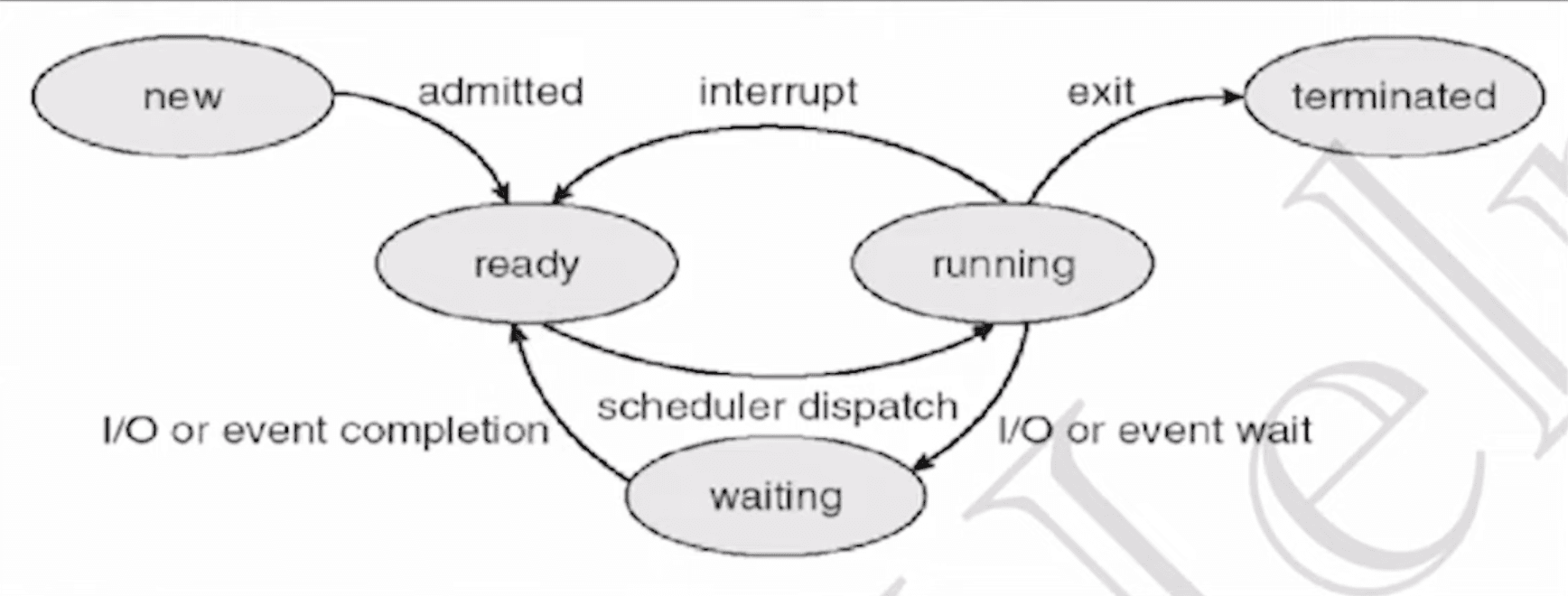
Process Queues
- Job Queue
- Contains all processes in the New state.
- Located in secondary storage (disk).
- Managed by the Long-Term Scheduler (LTS) to move processes into the Ready Queue.
- Ready Queue
- Contains processes in the Ready state.
- Located in main memory.
- Managed by the Short-Term Scheduler (STS) to select the next process for CPU execution.
- Waiting (Blocked) Queue
- Contains processes in the Waiting state.
- Waiting for I/O completion or another event before returning to Ready Queue.
Schedulers and Dispatcher
- Long-Term Scheduler (Job Scheduler / LTS)
- Selects jobs from the Job Queue and loads them into memory (Ready Queue)
- Controls degree of multiprogramming.
- Runs less frequently.
- Short-Term Scheduler (CPU Scheduler / STS)
- Selects a process from the Ready Queue and allocates CPU to it.
- Runs very frequently because time quantum is small.
- Selects a process and hands it over to dispatcher.
- Dispatcher
- Responsible for actual context switching.
- Hands CPU control to the process chosen by the STS.
- Performs context switching, switching to user mode, and jumping to the proper instruction.
Degree of Multiprogramming
- Maximum number of processes that can reside in memory at a time (capacity of ready queue).
- Controlled by the Long-Term Scheduler.
- Too low → underutilization of CPU; too high → thrashing (excessive swapping).
Context Switching in OS
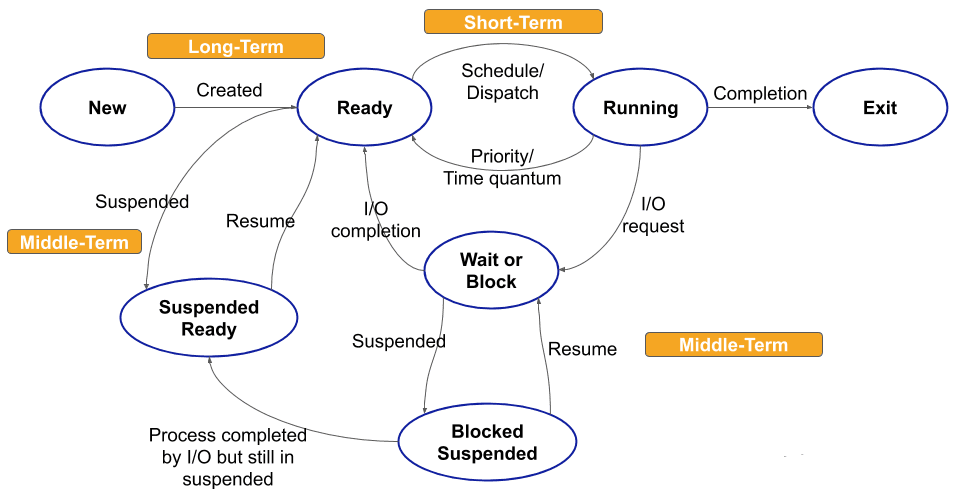
Medium Term Scheduler
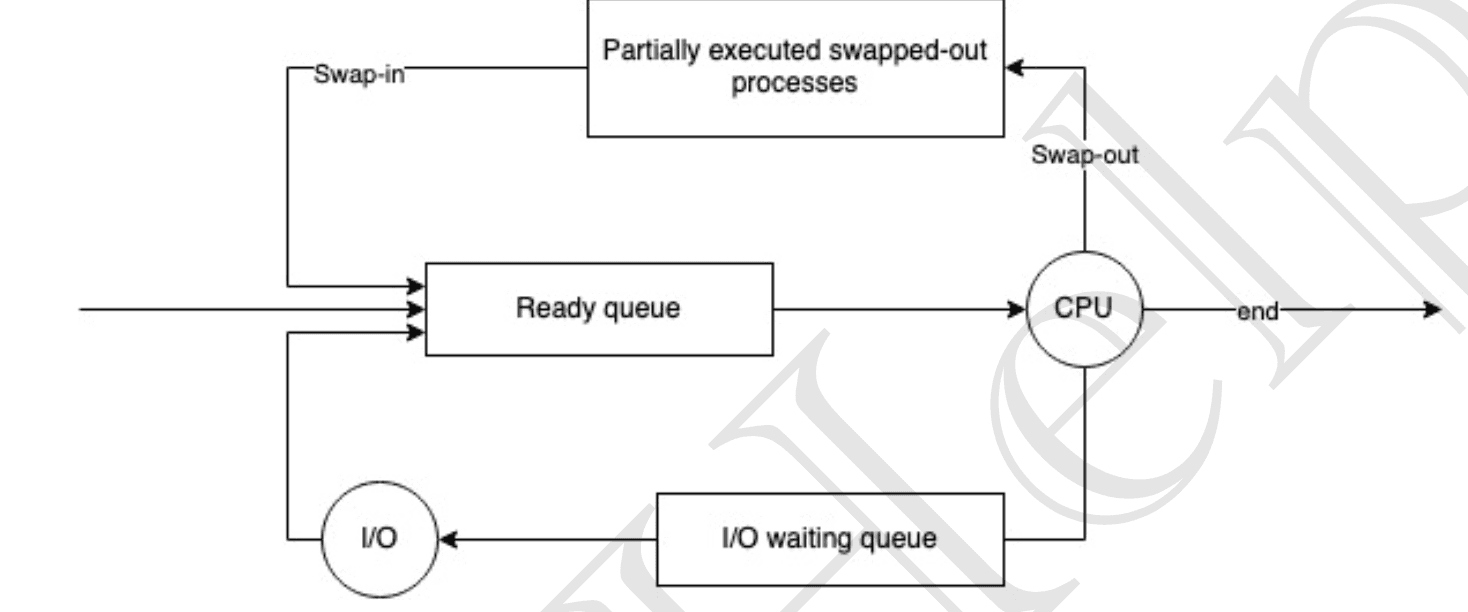
- In a time-sharing system, the Medium-Term Scheduler (MTS) manages the degree of multiprogramming.
- When memory is overcommitted or too many processes are active, MTS may swap-out some processes to swap space on disk.
- This frees memory for other processes and improves the overall process mix.
- Once a few processes are terminated and memory is releases, we swap-in those processes again into ready queue.
Context Switching
- Happens when the CPU changes from one process to another.
- Steps involved:
- The kernel saves the current process state (registers, program counter, etc.) into its PCB.
- It then restores the saved state of the next process to be scheduled.
- Context switching is handled entirely by the OS kernel.
- It is considered pure overhead since no real work is done during the switch itself.
- The speed of context switching depends on:
- CPU hardware support.
- Number of registers to save/restore.
- Memory access speed.
Orphan Process
- Processes are often created with the
fork()system call, where a parent creates a child process. - Normally, the parent waits for the child to finish.
- If the parent terminates early, the child becomes an orphan process.
- Orphans are automatically adopted by
init(PID 1), which becomes their new parent.
orphan.sh
#!/bin/bash
sleep 200 &
zsh
ps -al # list active process
echo  $$# show current PID
bash orphan.sh
ps -al
Zombie Process
- Is a Child process that has finished execution but still has an entry in the process table.
- This happens because the parent has not yet read the child’s exit status using
wait()orwaitpid(). - Key points:
- A zombie is “dead” but remains until its parent reaps it.
- It does not use CPU or memory resources — only a small slot in the process table.
- Zombies commonly appear if a parent delays or forgets to call
wait().
- If the parent dies without reaping,
init(PID 1) adopts the child and automatically cleans up zombies.
Process Scheduling
- Process scheduling is the basis of multiprogramming OS.
- By switching the CPU among processes, the OS keeps the system productive.
- When a process waits (e.g., for I/O) or its time quantum expires, the OS takes away the CPU and assigns it to another process.
CPU Scheduler
- Whenever CPU becomes idle, the OS must choose one process from ready queue to execute.
- This selection is done by the Short-Term Scheduler (STS).
Non-Preemptive Scheduling
- Once a process is given the CPU, it keeps running until it terminates or enters a wait state.
- Drawbacks:
- Can cause starvation: long processes delay short ones.
- May lead to low CPU utilization (CPU sits idle if the running process waits for I/O).
- Simpler, with very little overhead.
Preemptive Scheduling
- The CPU can be taken away from a process when:
- Its time quantum expires, or
- It voluntarily waits/terminates.
- Benefits:
- Better CPU utilization.
- Less starvation (shorter tasks get a chance).
- Has some overhead due to frequent context switching.
Important Terms
- Arrival Time (AT): Time when a process enters the ready queue.
- Burst Time (BT): CPU time required for execution.
- Completion Time (CT): Time when process finishes.
- Turnaround Time (TAT):
CT – AT - Waiting Time (WT):
TAT – BT - Response Time (RT): Time from ready queue arrival to first CPU run.
Goals of CPU Scheduling
- Max CPU Utilization – keep CPU as busy as possible.
- Minimum Turnaround Time – total time from arrival to completion.
TAT = CT – AT
- Minimum Waiting Time – time spent waiting in ready queue.
WT = TAT – BT
- Minimum Response Time – time from entering ready queue to first CPU allocation.
- Max Throughput – number of processes completed per unit time.
First Come, First Serve (FCFS)
- The CPU is allocated to processes in the order they arrive in the ready queue (like a regular queue).
- Problem – Convoy Effect:
- If a long process arrives first, shorter processes must wait behind it.
- This increases average waiting time and causes poor resource utilization, since short processes are blocked by a long one.
Shortest Job First (SJF) — non-preemptive
- Dispatch the ready process with the smallest burst time (BT); it runs until completion.
- Criteria: consider
AT + BTwhen choosing which ready job to run. - Requires an estimate of BT for each process — accurate estimation is difficult in practice (drawback).
- Pros: minimizes average waiting time for a given set of processes (optimal for average WT).
- Cons: can suffer from convoy effect if a long job arrives first; long processes can be starved.
Shortest Remaining Time First (SRTF) — preemptive SJF
- Also called preemptive SJF. At any arrival or decision point, pick the job with the smallest remaining CPU time.
- Solves many convoy problems because a newly arrived short job can preempt a long one.
- Pros: usually gives lower average waiting time than non-preemptive SJF.
- Cons: higher overhead (more context switches); still depends on BT estimates and may cause starvation for long jobs.
Priority Scheduling
- Each process has a priority; the scheduler runs the highest-priority ready process.
- Priorities can be static (set once) or dynamic (change over time).
- Non-preemptive: once CPU is given, process runs to completion or I/O.
- Preemptive: a running process is preempted if a higher-priority process arrives.
- Drawbacks: possible indefinite waiting (starvation) for low-priority jobs.
- Fixes:
- Aging — gradually increase the priority of waiting processes so they eventually run.
- Be aware of priority inversion (low-priority task holding resource needed by high-priority task); solved by techniques like priority inheritance.
- Note: SJF is a special case of priority scheduling when priority = inverse(BT).
Round-Robin (RR)
- Each ready process receives the CPU for a fixed time quantum (TQ) in round-robin order; then it’s preempted and placed at the queue’s tail.
- Criteria:
AT + TQ. Designed for time-sharing systems. - Pros: fair and simple; excellent response time for interactive tasks; very low starvation.
- Cons:
- Context switch overhead increases as TQ gets smaller.
- If TQ is too large, RR behaves like FCFS (loses responsiveness).
- Tuning: choose TQ so it’s large enough to amortize switching cost but small enough to keep response time good.
- Easy to implement and commonly used.

Multi level Queue Scheduling (MLQ)
- Ready queue is divided into 3 logical divisions.
- Each queue can have it's own scheduling algorithm.
- A process that goes into one of the queue, stays in that queue.
Types of processes
- System processes (SP): Created by OS, highest priority (e.g.,
init). - Interactive processes (IP): Foreground, require user input (e.g., MS Word).
- Batch processes (BP): Background, no user I/O (e.g., detached processes).
Priority goes from highest (SP) to lowest (BP).

- Scheduling among queues: Fixed-priority preemptive scheduling.
- Higher-priority queue always preempts lower-priority queues.
- Example: If an interactive process arrives while a batch process is running, the batch process is preempted.
- Problems:
- Starvation: Lower-priority queues may never get CPU if higher queues are always busy.
- Convoy effect: A long process at higher level delays execution of all lower-priority processes.
- Inflexibility: Once assigned, a process stays in the same queue forever (no aging).
Multi-level feedback queue (MLFQ)
- Multi sub-queues
- Inter-queue movement is allowed.
- Queues are arranged by priority (higher queues = smaller time quantum, favor I/O bound jobs).
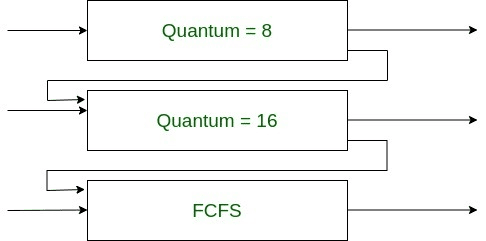
- Process movement rules:
- If a process uses too much CPU time → demoted to lower-priority queue.
- Interactive / I/O-bound jobs naturally stay in higher-priority queues.
- If a process waits too long in a lower queue → promoted (aging).
We couldn't use aging in MLQ because inter-level movement wasn't possible there
- Advantages over MLQ:
- Less starvation (aging prevents indefinite waiting).
- More flexible and configurable (number of queues, time quantum, rules for promotion/demotion can be tuned).
- MLFQ Design requires:
- Number of queues.
- Scheduling algorithm for each queue.
- Rule for upgrading a process.
- Rule for demoting a process.
- Which queue a new process enters initially.
Comparison
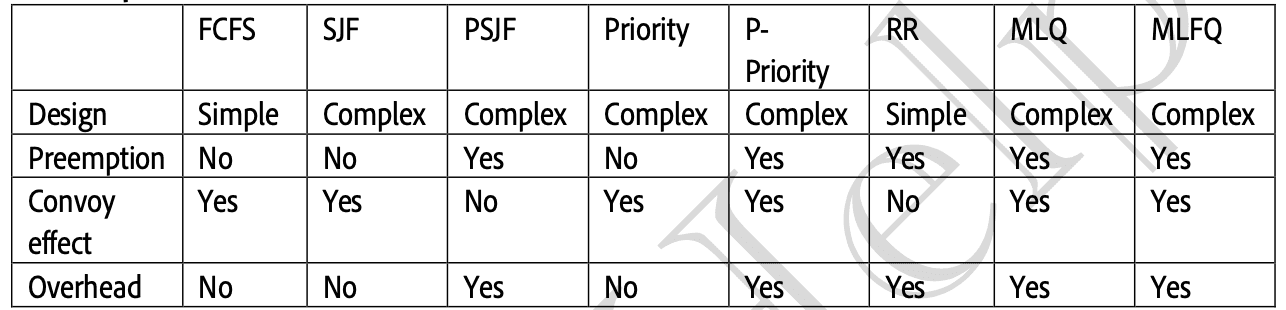
Concurrency
- Ability of OS to execute multiple instruction sequences at the same time.
- Achieved by dividing a process into threads that run in parallel.
Threads
- Single sequence stream within a process.
- An independent path of execution inside a process.
- A light-weight process.
- Used to achieve parallelism by dividing work into independent tasks.
- Examples: Multiple tabs in a browser; in a text editor → typing, spell-checking, formatting, saving happen concurrently.
Process vs Thread memory
- Processes: Each process has its own isolated memory (separate address space).
- Threads: All threads of the same process share memory & resources (heap, data, code), but each thread has its own stack and program counter.
Thread Scheduling
- Threads are scheduled based on priority.
- OS assigns time slices (CPU bursts) to each thread.
- Each thread has a Thread Control Block (TCB) similar to a PCB.
Thread context switching
- OS saves the state of a thread (program counter, registers, stack pointer) and switches to another thread of the same process.
- Does not switch memory address space (faster than process switching).
- Preserves CPU cache state, improving performance.
- Switching can happen due to I/O wait or time quantum (TQ) expiry.
Memory layout
- Process memory:
Stack -> <- Heap | Data | Text- Thread memory:
Stack1 | Stack2 | ... | <- Heap | Data | Text- All threads share heap, data, and text, but each thread has a separate stack.
Heap area remains the same, but no. of stacks is equal to the no. of threads
Benefits
- Improves responsiveness (e.g., UI remains active while background tasks run).
- Resource sharing: Efficient use of shared memory/resources.
- Economy: Creating/switching threads is cheaper than processes.
- Better CPU utilization: Takes full advantage of multi-core processors.
- Scalability: More efficient parallel execution of tasks.
On a single CPU, multi-threading doesn’t improve speed (threads just context switch), but still improves responsiveness.
Example: Multi-threading in C++ (std::thread)
<span style={{ color: 'rgb(116,62,228)' }}>#include</span> <iostream>
<span style={{ color: 'rgb(116,62,228)' }}>#include</span> <thread>   // for std::thread
<span style={{ color: 'rgb(116,62,228)' }}>#include</span> <unistd.h> // for sleep()

using namespace std;

// Task A: prints numbers 0–9 with delay
void taskA() {
    for (int i = 0; i < 10; ++i) {
        sleep(1); // pause 1 second
        printf("TaskA: %d\n", i);
        fflush(stdout); // flush output buffer immediately
    }
}

// Task B: prints numbers 0–9 with delay
void taskB() {
    for (int i = 0; i < 10; ++i) {
        sleep(1); // pause 1 second
        printf("TaskB: %d\n", i);
        fflush(stdout);
    }
}

int main() {
    // Create two threads running taskA and taskB
    thread t1(taskA);
    thread t2(taskB);

    // Wait for both threads to finish
    t1.join();
    t2.join();

    return 0;
}
This will run TaskA and TaskB concurrently, so their outputs may interleave differently each run.
Critical Section Problem
A critical section (C.S.) is the portion of code where threads/processes access shared resources (variables, files) and perform write operations.
Because threads can be interrupted at any time, simultaneous access may corrupt shared data — this is the critical section problem.
Race condition (major scheduling issue)
- A race condition occurs when two or more threads access shared data and at least one thread modifies it.
- The final result depends on the order/timing of thread execution (they are “racing” to change data).
Example (race):
Not Atomic : counter++; => temp = counter + 1; counter = temp;
<span style={{ color: 'rgb(116,62,228)' }}>#include</span> <iostream>
<span style={{ color: 'rgb(116,62,228)' }}>#include</span> <thread>

using namespace std;

int counter = 0;

void task() {
    for (int i = 0; i < 10000; ++i)
        counter++;   // NOT atomic -> race condition
}

int main()
{
    thread t1(task);
    thread t2(task);
    t1.join();
    t2.join();
    cout << counter << endl; // often < 20000 due to races
    return 0;
}
Solutions to Race Conditions
1) Atomic operations
- Make the shared update atomic so it cannot be interrupted mid-operation.
counter++takes two cpu cycles to execute, which makes it a race condition. We can fix this by running these operations in a single cpu cycle.
<span style={{ color: 'rgb(116,62,228)' }}>#include</span> <atomic>

std::atomic<int> counter{0};

void task() {
    for (int i = 0; i < 10000; ++i)
        ++counter;   // atomic increment; safe from races
}- When to use: Simple counters or small operations where atomic primitives exist.
- Limitations: Not every compound operation can be made atomic; might not exist in all languages/hardware.
2) Mutual exclusion (locks / mutex)
- Only one thread may execute the critical section at a time.
- Use
std::mutexor higher-level locking helpers.
Bad (manual lock/unlock):
mutex mtx;
void task() {
    mtx.lock();
    for(int i=0;i<10000;i++) counter++;
    mtx.unlock();
}- Problem: if an exception occurs inside the critical section,
unlock()may never run → deadlock.
Good (RAII with lock_guard):
std::lock_guardensures the mutex is released automatically when the guard goes out of scope.
<span style={{ color: 'rgb(116,62,228)' }}>#include</span> <iostream>
<span style={{ color: 'rgb(116,62,228)' }}>#include</span> <thread>
<span style={{ color: 'rgb(116,62,228)' }}>#include</span> <mutex>

std::mutex m;
int counter = 0;

void worker() {
    for (int i = 0; i < 1000; ++i) {
        std::lock_guard<std::mutex> lg(m); // locked here
		++counter;    // only one thread at a time
        // automatically unlocked when lg goes out of scope
    }
}

int main() {
    std::thread t1(worker);
    std::thread t2(worker);
    t1.join();
    t2.join();
    std::cout << "counter = " << counter << '\n'; // expected 2000
}
Why use lock_guard? It's tiny, zero fuss, and safe — you can't accidentally leave the mutex locked if you return/throw.
3) Semaphores
- A semaphore is a generalized lock with a counter.
- Binary semaphore behaves like a mutex.
- Counting semaphore allows up to N concurrent holders.
- Useful for resource pools (e.g., N identical resources).
Can a single flag solve it? — NO
- A naive flag (e.g.,
flag = truemeans t1 can enter, else t2) can provide mutual exclusion but fails progress and fairness:- It imposes a fixed order; if the designated thread is not ready, the other must wait (no progress).
- Also vulnerable to timing/race in checking/updating the flag itself.
Peterson’s solution (two threads)
- A classic software solution for two threads that satisfies mutual exclusion and progress (and bounded waiting).
- Only valid for two threads and assumes sequentially consistent memory (no reordering).
flag[0] = flag[1] = false
turn = 0

// thread i (0 or 1)
flag[i] = true
turn = 1 - i
while (flag[1-i] && turn == 1-i) { /* busy wait */ }
// critical section
flag[i] = false- Works without hardware atomics but not practical for general multi-threaded programs on modern architectures (memory ordering, scalability).
What a correct C.S. solution must guarantee
- Mutual Exclusion — At most one thread in C.S. at a time.
- Progress — If no thread is in C.S. and some threads wish to enter, the selection of the next thread should not be postponed arbitrarily.
- Bounded Waiting (Fairness) — A thread trying to enter C.S. should have a bounded number of other entries before it gets to enter.
- No assumption about relative speeds of processes/threads (solution must work even if one thread is much faster or slower).
Locks: advantages & disadvantages
Locks can be used to implement mutual exclusion and avoid race condition by allowing only one thread/process to access critical section.
std::lock_guard— simplest RAII lock. Locks immediately, unlocks automatically at scope exit. Use when you just need a basic scoped lock.std::unique_lock— flexible RAII lock. Can lock/unlock manually, be moved, deferred/timed, and is required bystd::condition_variable::wait.std::lock(function) — locks multiple mutexes at once without deadlock. Use when you need to lock more than one mutex.
Advantages
- Simple to reason about for mutual exclusion.
- Widely available in standard libraries (
std::mutex,std::shared_mutex, etc.). - Efficient when C.S. is short.
Disadvantages
- Contention / Busy waiting — Threads may spin or block while waiting for lock; wastes CPU.
- Deadlock — cycles of locks can cause permanent waiting (A waits for B, B waits for A).
- Debugging complexity — Multithreaded bugs are nondeterministic and hard to reproduce.
- Starvation / Priority inversion — Some threads may never acquire lock (or a low-priority holder blocks high-priority threads).
- Coarse locking reduces concurrency — Locking large regions serializes work that could be done in parallel.
Synchronize Threads
Busy waiting
- Occurs when a thread keeps checking for a condition (e.g., spinning on a lock) while waiting.
- Wastes CPU cycles, since the thread isn’t doing useful work.
- Goal: avoid busy waiting → use conditional variables or semaphores.
Conditional variables
- A synchronization primitive that allows threads to wait until a specific condition occurs.
- Works with a lock (mutex).
- Steps:
- Thread acquires a lock.
- Thread calls
wait(). → It releases the lock and blocks. - Another thread modifies state and calls
notify_one()/notify_all(). - Waiting thread wakes up, calls
signal(), reacquires the lock, and continues execution.
- Why use it? → To avoid busy waiting.
- No contention while waiting → the waiting thread is blocked, not spinning.
Example: std::condition_variable
<span style={{ color: 'rgb(116,62,228)' }}>#include</span> <iostream>
<span style={{ color: 'rgb(116,62,228)' }}>#include</span> <thread>
<span style={{ color: 'rgb(116,62,228)' }}>#include</span> <mutex>
<span style={{ color: 'rgb(116,62,228)' }}>#include</span> <condition_variable>
<span style={{ color: 'rgb(116,62,228)' }}>#include</span> <chrono>

using namespace std;

mutex m;
condition_variable cv;
bool ready = false;

void waiter() {
    unique_lock<mutex> lk(m);                   // lock acquired
    cout << "waiter: waiting...\n";
    cv.wait(lk, []{ return ready; });           // releases lock, waits
    cout << "waiter: signaled, proceeding\n";   // lock reacquired after signal
}

void signaler() {
    this_thread::sleep_for(chrono::seconds(1));
    {
        lock_guard<mutex> lg(m);
        ready = true;
        cout << "signaler: ready = true\n";
    } // unlocks here
    cv.notify_one();                             // notify waiting thread
}

int main() {
    thread t1(waiter);
    thread t2(signaler);
    t1.join();
    t2.join();
}unique_lockis required forwait()because:- It can be unlocked/relocked multiple times.
- Needed so
condition_variablecan safely release and reacquire the lock.
- Prevents busy waiting → thread sleeps until signaled.
Semaphores
- A synchronization tool represented by an integer variable.
- Controls access to resources by multiple threads.
- Unlike a mutex (1 thread only), a semaphore can allow multiple concurrent accesses.
Types:
- Binary semaphore (0 or 1)
- Behaves like a mutex.
- Only one thread can enter the critical section.
- Counting semaphore (n > 1)
- Represents N instances of a resource.
- Up to
nthreads can access the critical section simultaneously.
How semaphores work:
- wait() (a.k.a.
Pordownoperation):- Decrements the semaphore.
- If the value becomes negative, the process is blocked and placed in a waiting queue.
- signal() (a.k.a.
Vorupoperation):- Increments the semaphore.
- If threads are waiting, one is moved from waiting → ready (via
wakeup()), so it can acquire the resource.
This avoids busy waiting because blocked processes are not spinning — they’re suspended until signaled.
Comparison
- Mutex → Only one thread at a time (binary lock).
- Semaphore → Can allow multiple concurrent threads (counting).
- Condition variable → Used for waiting on specific conditions/events instead of just resource availability.
Producer–Consumer Problem
(also called Bounded Buffer Problem)
- Producer thread: generates data and inserts it into a shared buffer.
- Consumer thread: removes data from the buffer and consumes it.
- The buffer has n slots → acts as the critical section (shared resource).
Constraints / Problem
- Producer must not insert when the buffer is full.
- Consumer must not remove when the buffer is empty.
- Both threads must not access the buffer simultaneously → requires synchronization.
Solution (using semaphores & mutex)
We use three synchronization primitives:
- Mutex (m) → binary semaphore for mutual exclusion (critical section lock).
- Empty → counting semaphore, initial value =
n(tracks empty slots). - Full → counting semaphore, initial value =
0(tracks filled slots).
Pseudocode
// Producer thread
void producer() {
    do {
        wait(empty);    // ensure empty slots available
        wait(mutex);    // enter critical section

        // Critical Section: add data to buffer

        signal(mutex);  // leave critical section
        signal(full);   // increase filled slot count
    } while (true);
}

// Consumer thread
void consumer() {
    do {
        wait(full);     // ensure data available
        wait(mutex);    // enter critical section

        // Critical Section: remove data from buffer

        signal(mutex);  // leave critical section
        signal(empty);  // increase empty slot count
    } while (true);
}
Explanation
-
Producer flow:
- Waits until at least one empty slot (
wait(empty)). - Locks buffer with
mutex. - Inserts data into buffer.
- Unlocks buffer and signals
full.
- Waits until at least one empty slot (
-
Consumer flow:
- Waits until at least one full slot (
wait(full)). - Locks buffer with
mutex. - Removes data from buffer.
- Unlocks buffer and signals
empty.
- Waits until at least one full slot (
Reader–Writer Problem
- Readers → perform read operations (don’t modify data).
- Writers → perform write operations (modify shared data).
Constraints
- Multiple readers can read simultaneously → no conflict.
- Writers require exclusive access →
- Multiple writers cannot write together.
- A writer cannot write while readers are reading (avoids race & inconsistency).
Synchronization Primitives
- Mutex (binary semaphore)
- Protects the read count (RC) variable.
- Ensures no two threads modify RC at the same time.
- WRT (binary semaphore)
- Ensures mutual exclusion between readers and writers.
- Common lock used by both readers & writers.
- RC (integer)
- Tracks number of readers currently inside critical section.
- Initially
RC = 0.
Writer Solution
do {
    wait(wrt);        // request exclusive access

    // Critical Section: perform write operation

    signal(wrt);      // release access
} while (true);
Reader Solution
do {
    wait(mutex);      // protect RC
    RC++;

    if (RC == 1)      // first reader enters
        wait(wrt);    // block writers

    signal(mutex);

    // Critical Section: perform read operation

    wait(mutex);
    RC--;

    if (RC == 0)      // last reader leaves
        signal(wrt);  // allow writers
    signal(mutex);
} while (true);
Explanation
- Writer flow:
- Acquires
wrtbefore writing. - Ensures exclusive access.
- Releases
wrtafter writing.
- Acquires
- Reader flow:
- Uses
mutexto safely updateRC. - If first reader enters → blocks writers (
wait(wrt)). - Multiple readers can now enter concurrently.
- If last reader leaves → releases writers (
signal(wrt)).
- Uses
Properties
- Mutual Exclusion → Only writers OR multiple readers can access C.S. at a time.
- Progress → If buffer is free, either readers or a writer can proceed.
- Fairness / Bounded Waiting → Avoids indefinite writer starvation by proper scheduling (but some versions of this solution can cause starvation if readers continuously arrive).
Dining Philosopher Problem
Problem: 5 philosophers around a table, 5 forks (one between each). To eat a philosopher needs both adjacent forks.
Goal: avoid deadlock & minimize starvation while allowing concurrency.
Model
ph[i]needsfork[i](left) andfork[(i+1)%5](right).- Each
fork[]is a binary semaphore / mutex.
Naive (deadlock-prone)
wait(fork[i]);                // pick left
wait(fork[(i+1)%5]);          // pick right
// eat
signal(fork[i]);
signal(fork[(i+1)%5]);
// think- Deadlock: if all pick left simultaneously, everyone waits for right → circular wait.
Simple deadlock-free strategies (short)
- Room (N−1)
- Use counting semaphore
room = 4. Only 4 philosophers may try to pick forks → prevents circular wait.
- Use counting semaphore
- Atomic pickup
- Acquire both forks inside a single critical section (check-and-take atomically) so a philosopher only takes forks if both are available.
- Odd–Even (asymmetric)
- Odd philosophers pick left → right, even pick right → left. Breaks symmetry and prevents global cycle.
Deadlock
Deadlock: A state where two or more processes wait indefinitely for resources held by each other (cyclic dependency).
Processes never finish execution, and resources remain blocked → harms system throughput.

Examples of resources: CPU cycles, memory, files, I/O devices, sockets, semaphores, locks, etc. (Some resources can have multiple instances: e.g., 2 CPUs).
Resource Utilization Cycle
- Request → If available → lock it, else wait.
- Use → Perform operation.
- Release → Free the resource.
Necessary Conditions (All 4 must hold for deadlock)
- Mutual Exclusion → Only one process can use a resource instance at a time.
- Non-sharable resources (e.g., printers) must be locked.
- Sharable resources (e.g., read-only files) don’t need locking.
- Hold and Wait → A process holds one resource and waits for additional ones.
- No Preemption → Resources cannot be forcefully taken; must be released voluntarily.
- Circular Wait →
{P0, P1, …, Pn}exists where eachPiwaits for a resource held byPi+1, andPnwaits forP0.
Resource Allocation Graph (RAG)
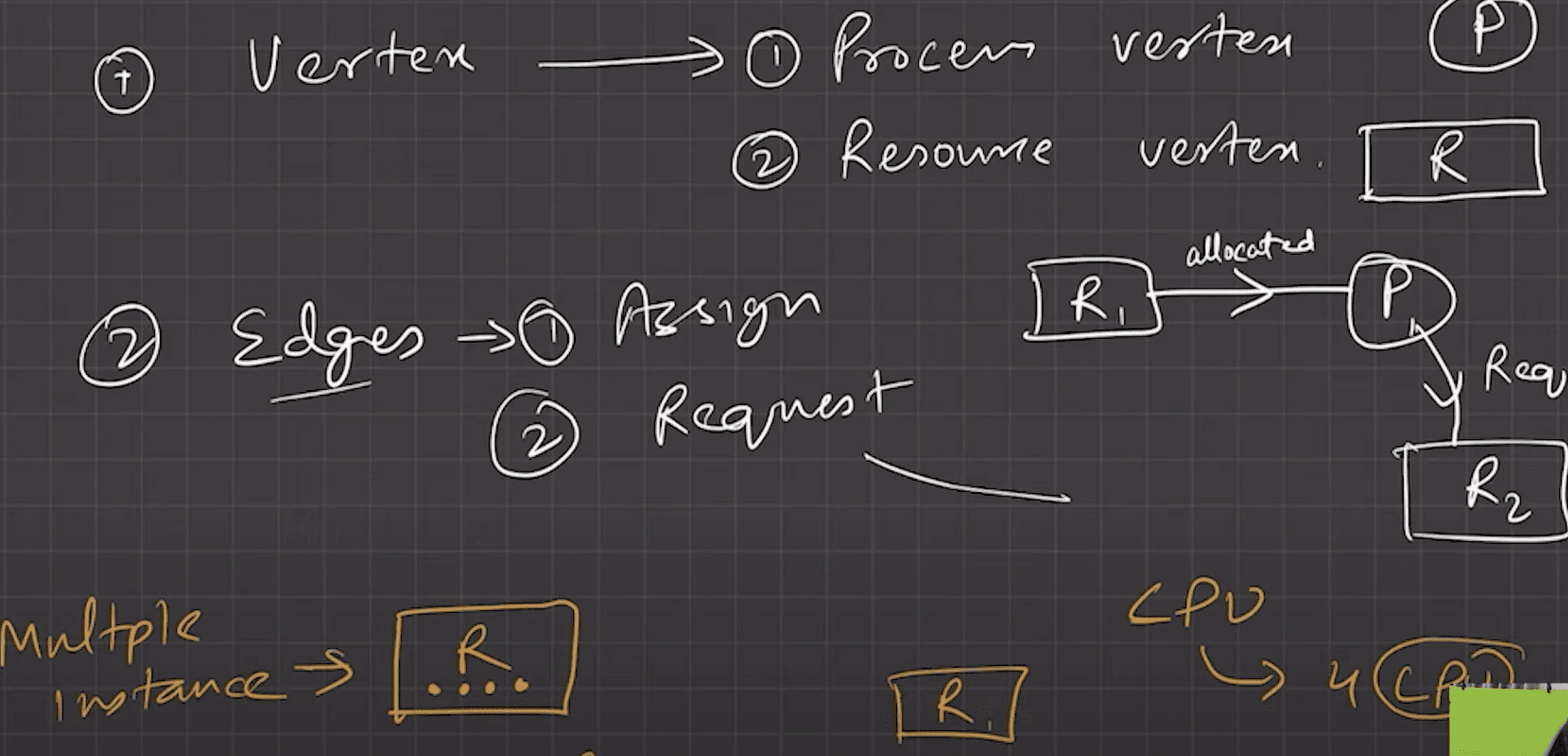
- Process nodes (circles), Resource nodes (squares).
- No cycle → No deadlock.
- Cycle present →
- Single instance per resource → Deadlock.
- Multiple instances → Deadlock possible.
Handling Deadlocks
- Prevention → Ensure at least one condition never holds.
- Avoidance → Allocate resources only if system remains in a safe state.
- Safe state: At least one process can finish execution.
- Example → Banker’s Algorithm (checks if granting request keeps system safe).
- Detection & Recovery
- Allow deadlock → detect → recover.
- Detection: Wait-for graph (for single instance), or resource-allocation matrix (multi-instance).
- Recovery:
- Terminate one/more processes (victims).
- Preempt resources (may cause rollback or starvation).
- Ostrich Algorithm (Ignorance)
- Ignore the problem (assume DL probability is negligible).
- Used in practical OS like UNIX/Linux.
Deadlock prevention
Idea → Ensure that at least one of the four necessary conditions for deadlock never holds.
- Pros → Simple concept, guarantees no deadlock.
- Cons → Can lead to poor utilization and reduced concurrency.
- Mutual Exclusion
- Allow sharing wherever possible (e.g., read-only files don’t need locks).
- But → some resources (printers, semaphores) are inherently non-sharable, so we cannot completely prevent deadlock by breaking this.
- Hold and Wait
- Protocol A: Process requests all resources upfront before execution begins.
- Protocol B: Process requests resources only when holding none. Must release current resources before requesting new ones.
- Downside:
- May cause low resource utilization (resources remain idle).
- May lead to starvation (if resource demand is large).
- No Preemption
- If a process requests a resource and it’s not available:
- Force the process to release all currently held resources.
- Restart later when all needed resources are available.
- Downside:
- Live-lock may occur (process keeps releasing and reacquiring without making progress).
- Not suitable for all resources (e.g., can’t preempt CPU mid-execution).
- If a process requests a resource and it’s not available:
- Circular Wait
- Impose a global ordering of resources.
- Assign each resource a unique number (priority).
- Processes can request resources only in increasing order.
- Breaks the cycle → no circular wait possible.
- Impose a global ordering of resources.
Deadlock Avoidance
- Unlike prevention (removing conditions), avoidance ensures the system never enters an unsafe state.
- OS must know in advance:
- Number of processes
- Max resource need of each process
- Current allocation of resources to each process
- Total available instances of each resource
Safe & Unsafe States
- Safe State → There exists some safe sequence of process execution, where every process can finish with currently available + future released resources.
- Unsafe State → No such sequence exists. May lead to deadlock (not always immediate).
- Rule → A request is granted only if system remains in safe state.
Banker’s Algorithm
- Works like a banker giving loans: only grants if it can ensure repayment.
- Steps:
- For each process, compute Need = Max – Allocation.
- Check if there exists a process with Need ≤ Available.
- If yes → assume it completes, release its resources, and add to
Available. - Repeat until all processes finish (Safe State) or no such process exists (Unsafe).
- If all processes finish → safe state. Else → unsafe (risk of deadlock).
Deadlock Detection
- Used when avoidance/prevention isn’t applied.
- System allows deadlock, but periodically checks and recovers.
- Single Instance per Resource
- Use a Wait-For Graph (WFG).
- Nodes = processes, edge
P → QmeansPis waiting for a resource held byQ. - Cycle in WFG = Deadlock.
- Multiple Instances per Resource
- Use a variant of Banker’s Algorithm to check if safe sequence exists.
- If none exists → deadlock detected.
Deadlock Recovery
Once detected, system must break the cycle.
- Process Termination
- Abort all deadlocked processes (brutal but simple).
- Or abort one at a time (usually the lowest-priority or least costly to restart) until deadlock breaks.
- Resource Preemption
- Take resources away from some processes and give to others until deadlock cycle breaks.
- Issues:
- Which resource to preempt?
- Which process to roll back?
- Possible starvation if the same process is always chosen.
Memory Management in OS
In multiprogramming, there are many processes. and those processes run in RAM. But how are those processes stored on RAM? Might be continuous, or non-continuous. Might leave some space empty in between. But we know that physical addressing of processes will be different.
For example, both processandof 16kb has a logical address fromtobits. But they will have different physical addresses.will have range$$ [R_i + 0, R_i + 12800]$.