Python
Installation
First download a stable version from [python.org].
But PyLance might slow errors and some dependencies won't work.
In that case simply Homebrew.
Introduction
Hello World
def main():
    print("Hello World")

if __name__ == '__main__':
main()-
No curly braces or closing semicolons
-
Indentation necessary
-
Automatic datatype
-
Similar to javascript, formatted string literals and concatenation
Input()
- By default, input function takes strings
a = input('Enter a: ')
print('a = ', a)
print(f'a = {a}')-
Function
str()takes a value and converts it into a string. There are other functions such asint(),float()andbool() -
** - exponential.
-
// - Floor Division
-
Logical Operator :
andornotinstead of &&, ||, !
elif:
def main():
	a = 5
	b = 3
	a /= b # 1.66667
	if bool('True') == True and not(a == 1):
		print("Ya" + ("ta" * 3) + "!")
	else:
		print("nu uh")
# Yatatata!- Optional bracket
Pass: Do nothing Continue: move on to next iteration Break: move out of the loop
- The clause Try attempts to execute a block of code and except executes another block of code if try fails. And finally runs regardless.
Built- In Data Structures
String
- Immutable
def main():
    s = "My name is Himanshu!"
    print(s[0])
    print(s[3:7]) # slice - start index : end index + 1
    print(s[11:]) # from 11th index to end

# negative index to print letters from back
    print(s[-1]) # first from back
    print(s[-9:]) # 9th from back to end
    print(s[-9:-1]) # 9th from back to 2nd from back

    print(len(s)); # length

    print(s.upper()) # coverts all letters capital
    print(s.lower())
    print(s.title()) # Capitalize first letter of all words

    # split() : splits string into list of strings at argument
    print(s.split('name'))
List - [ ]
- Mutable
- Faster insertion and deletion
def listy():
    l = ['abc', 123, "v", 4.27, ['x', 4]] # flexible

    print(l[4][0])
    print(l[0:2]) # slicing works
    print(len(l)) # lengh

    l.append('hello') # appends argument to end
    print(l)

    l.remove(4.27) # removes 4.27
    print(l)

    l.pop(1) # pops 1st index
    print(l)
Tuples - ( )
- Immutable
- More memory and time efficient than list
- Faster index accessing
def tuply():
    t = ('abc', 34, 'd', -4, 5.5, (3,7,4))
    print(t)
    print(t[0]) # indexing works
    print(t[1:3]) # slicing works
    print(len(t)) # length
    print(max(t[5])) # returns max when tuple of same data type

    tp = ('abc', 'a', 'b', 'acb', 'a')
    print(min(tp))
    print(sorted(tp))

    print(tp.index('a')) # returns index of first occ. of arg.
    print(tp.count('a')) # returns freq. of arg.
Dictionaries - { }
- Key-value pairs
- keys must be immutable. Eg: strings, tuples, numbers, etc
- values can be mutable. Eg: lists, nests dictionaries.
- No indices or slicing here
- Can access, update and add new element using keys
def dict():
    d = {
        'h' : 'himanshu',
        2 : [3,2,'a'],
        ('x', 'y') : {6 : 9}
    }
    print(d['h']) # access
    d['h'] = 'aggarwal' # update
    d[2].append(0) # modify value
    d[3] = 5 # add new
print(len(d))- update(): adds arg. dictionary. updating existing keys and adding new
    dp = {'a' : 3, 2 : 5}
d.update(dp)- .keys() and .values() can be used to return the list of keys and values of a dictionary.
    print(d.keys())
print(d.values())- use del keyword to delete any key-value pair
del d['h']Sets - { }
A set is an immutable, unordered collection of unique elements that can consist of integers, floats, strings and tuples.
def sets():
    s1 = {'himanshu', 2, 234.2, 'b', 2}
    print(s1)

    # set() create set from list removing duplicates
    lst = ['a', 'b', 3, 3]
    s2 = set(lst)
    print(s2)

    # use in to check if value exists
    print('himanshu' in s1)
    print('himanshu' in s2)

    # immutable but can add unique elements
    s2.add('c')
    # removes existing element from set
    s1.remove('himanshu')
    print(s1)
# union() joins iterable object with existing object
print(s1.union(s2))
print(s1) # Note: s1 doesn't update
# update() take any iterable object
# (tuple, lists, dictionaries, sets)
# and adds object to existing set
# s1.update(lst)
s1.update(s2)
print(s1) # set is iteratable hence for loop
for x in s2:
print(x)Misc
- use
end=''inside print() to customise output's other than default'\n'
def main():
    print("h", end='')
    print("ello", end=' ')
    print("bro", end='!\n')
    print("himanshu")

# output:
	# hello bro!
	# himanshu
range()
range() takes three arguments: (start, stop, step) if enter only one argument -> (stop) ; start = 0; step = 1 if enter two arguments -> (start, stop) ; step = 1
- again, don't count stop. Example:
def main():
    for i in range(5, 0, -1):
        print(i, end=' ')
    print()
# 5, 4, 3, 2, 1
Enumerate
Syntax: enumerate(iterable, start=0)
Parameters:
- Iterable: any object that supports iteration
- Start: the index value from which the counter is to be started, by default it is 0
Return: Returns an iterator with index and element pairs from the original iterable
Example:
def main():
    num = [5,3,1,2,4]
    for i, element in enumerate(num):
        print(i, element)
*args and **kwargs
To spread arguments when printing or as inputs. basically spread operator for list and dictionaries respectively.
Slice Operator
again [start:stop:step] similar to for loops
- [:2:] -> from start, and before 2nd index
- [4:2:-1] -> 4th index, 3rd index
- [::-1] -> reverses the object
Let Us Python
UNIT 1 : Introduction
- High level programming language
- Free, quality, productivity, portability, libraries, integration, joy
- Powerful, Automatic, Ready-made stuff, Easy
- Dynamic Typing (check errors at runtime)
Uses
- System Programming
- Building GUI
- Internet Scripting
- Game programming
- Scientific programming
- Robotics
- Database programming
- Component Integration (can invoke c++, frameworks, etc )
- Machine Learning
- Google (Web Search System), Youtube (Video Sharing), Movie animation
Paradigms
Style of structuring and coding One program may use many paradigms
Procedural
- Implements one statement at a time
- Uses functions but treats them like statements (instruction for computer)
- sequential - step by step
- Imperative : how're u finna do it?
amma go there, and punch him 3 times
Functional
- Decompose problem into set of functions (taking input, returning output)
- mathematical equations like expression (code that produces a value)
- Declarative : what're u finna do?
amma beat his ass
Object-Oriented
- like real world, creating mini-world of objects
- in college, objects are professors, students, staff, papers, courses, etc
- Each Object has a state (values) and behaviour (interface / methods), from the class that created it.
- Objects call each other's interface
Event-driven
- used for programming GUI applications containing elements (window, buttons, etc)
- interact with elements, and emit messages via listener methods
- Asynchronous
UNIT 2: Getting Started
Compiler vs Interpreter
Compiler is a software that converts your entire code into machine code for the computer to process.
Interpreter, on the other hand, is already binary.
Eg: $ python hello.py
Here python is the interpreter that will be stored in the memory and has two components
- Compiler
- Python Virtual Machine
Compiler will convert hello.py into Byte Code
These Byte code, can't be understood by the processor. But instead will be processed by the Python Virtual Machine.
So that's how everything works on the hardware
CPython is written in C. (official, popular) - python3 There's also Jython, in java PyPy - in RPython IronPython - in C#
IDE
- NetBeans, PyCharm, VSCode
PyPI : Python Package Index. For installing pre-built third party packages.
Some packages that are popular for Data Science:
- NumPy: Advanced Mathematical Operations - multi-dimen. arrays
- SciPy: Scientific Computing Library - image processing, optimizing
- Panda: Library for manipulating numeric tables and time series
- MatPlotLib: 2D and 3D Data visualization
- OpenCV: Open Source Computer Vision
pip: tool for installing packages from PyPI
More tools for python
- Jupyter Notebook: flexible browser based interactive tool
- Google Colab: Jupyter env to run code on google cloud
- Spyder: Scientific Python Development Environment
Python Programming Modes
- Interactive mode: explore syntax, help and debug small: shell
- Script mode: proper programming: *.py
UNIT 3 : Python Basics
- Case sensitive language
- identifier used to name a variable, function, class, module, or other objects
- Python has 33 keywords. All lowercase except True and False
Python Types
- Basic Types: int, float, complex, bool, string, bytes : (no char datatype)
- Container Types: list, tuple, set, dict
- User-Defined Types: class
Basic Types
- int - binary 0b, decimal 12, hexadecimal 0x, etc
- float - fractional or exponential
- complex - 3 + 2j
- bool - True and False
- string - immutable characters between ' ', " " or "" ""
- byte - binary data
Use type() function to check data type of a value
- int's have arbitrary precision value. Hence, no overflow
- same with float. In approximate binary representation
No need to define type of variable. Python understands from context during execution. Hence, dynamically typed.
Multiple Variable Assignment
a = 10; b = 20; c = "Himanshu" # use ; as statement separator
d, e = 8, 9
x = y = z = 5
Arithmetic Operators
/- performs true division and returns float//- performs floor on division and returns integer%- remainder**- exponential
Operation Nuances
print(10 // 3)  # 3
print(-10 // 3) # -4. Since division is -3.33 and floor is -4
a % bis evaluated asa - (b * (a // b))
print(4 % 3)   #  1
print(-4 % 3)  #  2
print(4 % -3)  # -2
print(-4 % -3) # -1print(True + True) # 2
print(True * False) # 3Precedence and Associativity
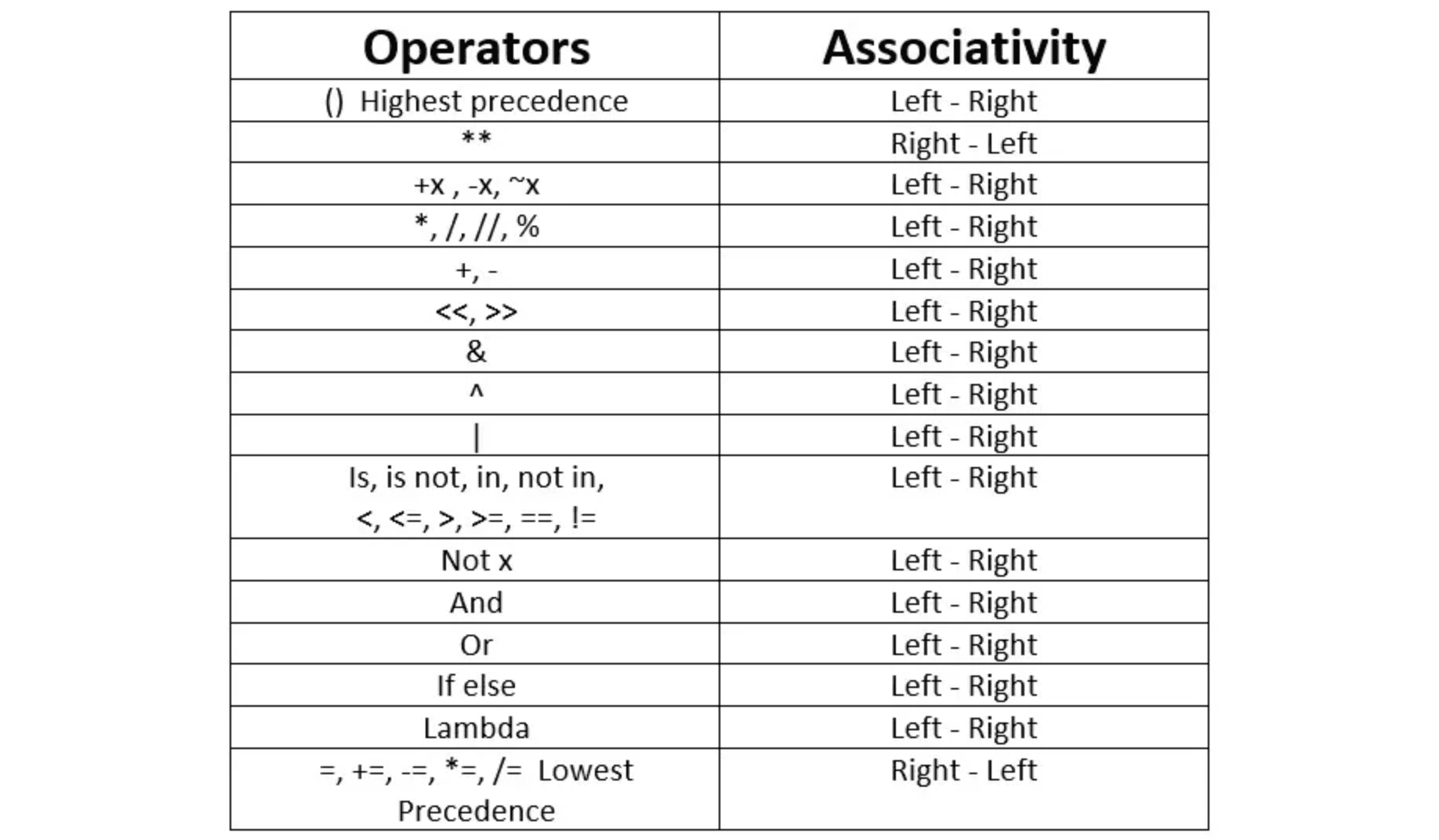
When tie between operators of same precedence. Settled using associativity
Eg: multiplication and division same precedence. Hence solve left to right
x = 3 * 4 / 5  # (3 * 4) / 5 = 2.4
y = 3 / 5 * 4  # (3 / 5) * 4 = 2.4
Type Conversion
- operation between int and float will yield float
- int and complex -> complex
- float and complex -> complex
int("23") # 23
int(3.33) # 3
int(-3.33) # -3
chr(86) # V
ord("E") # 69
use
ord()function return ascii value of one character string
Build-in Functions
abs(x)
pow(x, y)
min(a, b, c, ...)
max(a, b, c, ...)
round(x, [,n]) # returns x rounded on n digits after .
bin(10) # returns binary equivalent of 10. i.e. 0b1010
Build-in Modules
- math: useful mathematics functions
import math

def main():
    print(math.sqrt(10)) # 3.16...

# maths
pi, e  # values of constants pie and e
sqrt(x)
factorial(x)
log(x) # base e
log10(x)
exp(x) # e raised to x
ceil(x)
floor(x)

# trigonometry
degrees(x)
sin(x)
cos(x)
tan(x)-
cmath: performing operations of complex numbers functions
-
random: random number generation functions
import random

def main():
    print(random.random()) # random number between 0 and 1
print(random.randint(10, 15)) # random between range (included)-
decimal: precise arithmetic operations functions
Python Type Jargon
-
Collection: a generic term for container types
-
Iterable: collection that can be iterated over using loop
-
Ordered collection: elements are stored in same order as insertion. Hence, indexing.
-
Unordered collection: order not preserved. can't predict. Hence, no indexing
-
Sequence: ordered collection
-
Immutable: unchangeable collection
-
Mutable: changeable collection
String - "" - ordered collection, immutable, iterable
List - [] - ordered collection, mutable, iterable
Tuple - () - ordered collection, immutable, iterable
Set - {} unordered collection, mutable, iterable
Dict - {} - unordered collection, keys immutable, value immutable, iterable
start with # for one line comments type between
'''...'''or"""..."""for multi-line comments Indentation matters in python
Multi-lining
- long statements can be written in multiple lines by ending each line expect last with
\ - multi-line statements within
[], {}, or ()don't need\
total = maths + toc + \
		english + sst + \
		civics + pe

days = ["1asdf", "as",
		"adf"]
Classes and Objects
-
In Python, every type is a class. So
int, float, complex, bool, str, list, tuple, set, dictare all ready made classes. -
Class is a blueprint for creating objects.
-
It defines attributes (variables) and methods (functions) that it's object will have.
class MyClass:
    def __init__(self, name):  # Constructor
        self.name = name      # Instance attribute

    def greet(self):          # Instance method
return f"Hello, {self.name}!"- Object is an instances of a class.
- It has its own copy of attributes and can call methods defined in the class.
obj = Myclass("Himanshu")

print(obj.name) # attribute
print(obj.greet()) # call methods
__init__ Method:
- The class constructor.
- Automatically called when an object is created.
- Used to initialize object attributes.
self:
- Refers to the current instance of the class.
- Must be the first parameter of instance methods.
Class vs Instance:
- Class Attributes: Shared by all instances.
- Instance Attributes: Unique to each object.
Mind fuck
- A class has a name, whereas objects are nameless. Since objects not have names, they are referred using their addresses in memory via pointers.
class Solution:
    def fucksumn(self, a, b):
        return a + b

def main():
    a = 5
    print(isinstance(a, int)) # true

    sol = Solution()
    print(type(sol)) # <class '__main__.Solution'>
    print(sol.fucksumn(3, 5))

if __name__ == '__main__':
main() - Here
Solution()is the object with attributes and methods. solis simply a pointer referencing that object, since it doesn't have a name.
That means
ais not actually a variable, but a pointer to an object!
Multiple Objects
a = 3
b = 3
print(id(a), id(b)) # same ids
print(a is b) # true
a = 30 # now a
print(id(a)) # different id- Here since a and b are referring to the same int object. Hence, they are the same.
UNIT 4 : String
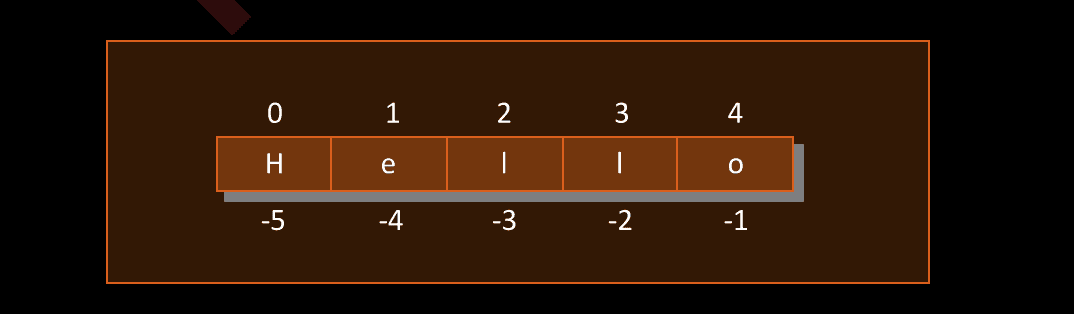
Negative Indexing
String Properties
- Slicing and negative index works.
[start, end]. end not included. - Python strings are immutable-they cannot be changed.
- strings can be concatenated using +.
- string can be replicated during printing.
print('-' * 10) - check if substring exists in the string.
print('her' in 'dishwasher') # true
Build in functions
s = "himanshuAggarwal"
print(len(s))
print(min(s)) # prints min ascii value ; A
print(max(s))
String Methods
content test function
1. s.isalpha() - checks if all characters in string are alphabets.
2. s.isdigit() - checks if all characters in string are digits.
3. s.isalnum() - checks if all characters in string are alphabets or digit.
4. s.islower() - checks if all characters in string are lower case
5. s.isupper()
6. s.startswith(ss) - checks prefix
7. s.endswith(ss) - checks suffix
search and replace
1. s.find(ss) - searches for a substring, return its starting index. else -1
2. s.replace(a, b) - replace a substring with b.
trim whitespace
1. s.lstrip() - removes starting white spaces.
2. s.rstrip() - removes ending white spaces.
3. s.strip() - removes whitespaces from both sides.
Split and Partition
1. s.split(ss) - splits the string at given substring
2. s.partition(ss) - partitions the string into 3 parts, left, subtring, right
Join Joins substring to each element of iterable except last.
a = "asdf"
print("-".join(a)) # a-s-d-f

x = "himanshu"
y = "Aggarwal"
z = "angel"
print(" ".join([x, y, z])) # himanshu Aggarwal angel
String Conversions
Case conversion
1. s.upper() - converts entire string to uppercase
2. s.lower() - converts entire string to lowercase
3. s.capitalize() - converts first character of string to uppercase
4. s.title() - converts first letter of each word to uppercase
5. s.swapcase() - inverts cases of entire string
Numeric Conversion
1. str(x) - converts int, float, complex to string
2. int("23") - converts numeric string to intchr()prints Unicode character.ord()prints ascii value- String comparisons and sorting is done Lexicographically
UNIT 5 : Decision Control Instruction
All logical operations remain the same as c++
if a > b > c:
	print(a)
elif a == b == c:
	print(c)
else:
print(b)- don't need bracket if indented properly
- and, or, not
Conditional Expressions Like ternary operators
Read left to right
# if 10 > 20 print dumb else cool
print("dumb" if 10 > 20 else "cool") # cool

wt = 60
s = 'fat' if wt > 80 else 'heavy' if wt > 55 else 'light' # heavy
# if wt > 80 'fat', else if wt > 55 'heavy', else 'light'- all() same as AND over a iterable
- any() same as OR
- input() to take input from user
UNIT 6 : Repetition Control Instruction
While
while condition:
	statement1
else:
	statement2
For
for var in itr:
	statement1
else:
statement2- else is optional
- if loop is terminated using break, else will not be executed.
- continue to skip the remaining iteration
- use enumerate instead of range() which want index + value
UNIT 7 : Console Input / Output
Input
input('prompt')

a,b,c = input("Enter 3 values: ").split()
print(int(a) + int(b) + int(c))

l = [x for x in input("Enter values: ").split()]
Output
print("himanshu") # outputs value to console

print("Name:", name, "Age:", age)  # , separates output by spaces

print(f"Name: {name}, Age: {age}")  # Formatted Strings

# multiple lines with spacing
print('''
hello
	asd
''')
# could also use \n for enter and \t for spaces

# by default print() moves to new line, but can change that
print("Hello", end=", ")
print("world!)
# outputs: Hello, world!

# by default separated by spaces, but can change that
print("Apple", "Banana", "Cherry", sep=", ")
# Output: Apple, Banana, Cherry

# escape characters
print("it\'s not what he said - \"what the fuck\" he said\t nigga")

# raw string
print(r"that wasn't me ma'am")

# for formatting large one line strings for cleaner code
print("it said \
bro tf is you sayin")

print("one love baby"
"second love sidechick")- Python takes input as strings. Make sure to properly typecast values before performing operations.
UNIT 8 : List []
Entity which contains multiple data items. Also known as collection or compound data type.
- Can grow and shrink during execution. Hence, dynamic array.
- May contain duplicates
- Can directly
print(arr) - Can * to repeat element multiple times. Useful for initializing arrays.
arr = [0] * 5 # [0, 0, 0, 0, 0]- Ordered collection. Indexing possible. Sequence type. 0-indexed
- Slicing possible
- Mutable. Can change values.
arr = [0, 1, 2, 3, 4, 5]
arr[2:4] = [6,7,8] # replace [2,3]: [0,1,6,7,8,4,5]
arr[5:] = [] # delete from 5th index onwards: [0,1,6,7,8]- Can concatenate and merge two lists using +
- Convert any set/tuple/string into list using list() conversion function
l = list("abcd") # ['a', 'b', 'c', 'd']- Aliasing: Shallow copy. Pass by reference. Don't copy contents only address
l1 = [1, 2, 3]
l2 = l1
l2[0] = 100
print(l1) # [100, 2, 3]- Cloning: Deep copy. Copy inside contents. Pass by value.
l1 = [1, 2, [3,4]]
l2 = []
l2 = l1 + l2- Searching :
if val in num: - Identity:
l1 = [1,2,3]
l2 = [1,2,3]
l3 = l1
print(l1 is l3) # true
print(l1 is l2) # false- Comparison: matches two strings until a mismatch and compares
l1 = [1,2,3,4]
l2 = [1,2,4]
print(l1 < l2) # true- Empty list is valid. Can check
l = []
if not l:
	print("empty")

print(bool(l)) # false
Functions
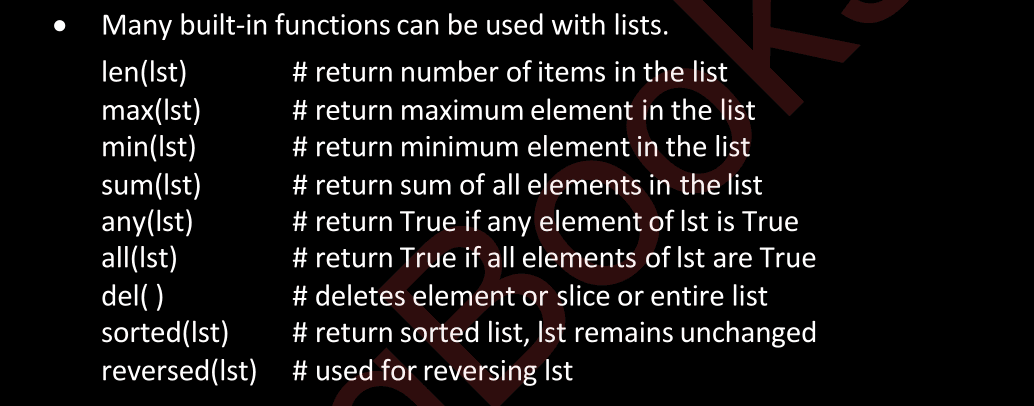
l = del(l[0]) # deletes first element
l = del(l[1:3]) # deletes 1st to 2nd index
l = del(l[:]) # deleted entire list
Methods
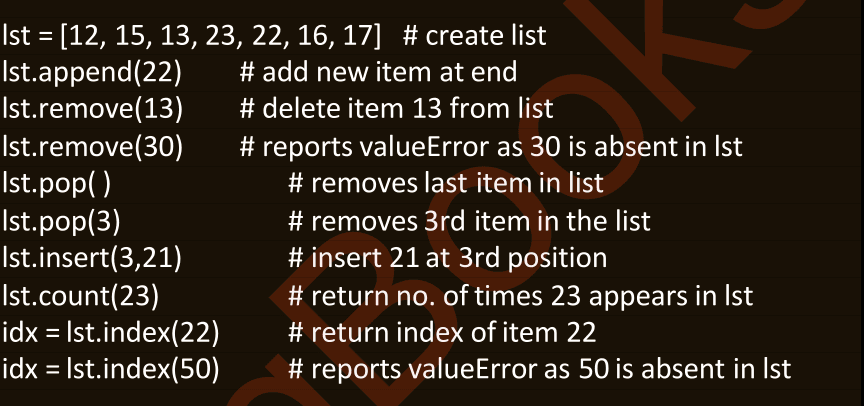
Changes are made in place
lst.sort()
lst.reverse()
lst.sort(reverse=True)
List Varieties
- Nested Loops by embedding
a = [3,4,5]
b = [1,a,2] # [1, [3, 4, 5], 5]- unpack a list using
*operator
a = [3,4,5]
b = "abc"
b = [1, *a, *b] # [1, 3, 4, 5, 'a', 'b', 'c']
UNIT 9 : Tuple ()
- Immutable, ordered collection, iterable list.
- Can contain duplicates
t = () # empty
t = (10,) # single. comma is necessary for tuple, else int
t = (1,2,3,1.0, 2, 'hi') # dissimilar elements
t = 3,31,5 # don't even need ()
t = (5,) * 3 # (5, 5, 5)- Can access using indexes
- Use slice to print
t[1] = 2will give error for immutability. Can't append, remove, insert- Can contain mutable lists through.
- Other operations of tuples remain the same as list. Eg: concatenation, conversion tuple(), copy, searching, identity, empty...
- Same build-in functions
- Methods -
tpl.count(1)andtpl.index(3) - Nested tuples, unpack, and list of tuples, ...
UNIT 10 : Sets {}
- Do not contain duplicates
- Mutation. Unordered collection.
s = set() # empty set
s = {20}
s = {1,1,1.1,1,2,3,2} # {1, 2, 3, 1.1}- It is only possible to create set of immutable datatypes. Like, strings and tuples. But not lists.
- Can't access using indexes or perform slice operations.
- Access using their values as hash.
- Can for loop on sets.
- Enumerate gives access order, not insertion order.
set.add(4)frozenset()for immutable set- Concatenation and merging doesn't work
- Converse removes duplicates.
- Can create alias and clone.
- Searching, Identity, Comparison and emptiness works too.
ls = [1,2,3,1]
s1 = set(ls)
s2 = s1 # alias
s3 = set(s1) # clone
Methods
# adds element
s.add('asdf')
s.update(3)

# remove element
s.remove(12)
s.discard('asdf')

# removes all elements
s.clear()
s = {1,2,3,4,5,6}
t = {2,4,6}
print(s.issuperset(t)) # is s superset of t : YES
print(s.issubset(t)) # is s subset of t : NO
print(s.isdisjoint(t)) # is s disjoint set of t : NOMathematical Operations
s = {1, 2, 3, 4}
t = {3, 4, 5}
print(s | t) # Union {1, 2, 3, 4, 5}
print(s & t) # Intersection {3, 4}
print(s - t) # difference {1, 2}
print(t - s) # {5}
print(s ^ t) # symmetric difference {1, 2, 5}
print(s >= t) # is s superset of t : False- No such thing as nested sets
- unpack possible
UNIT 11 : Dictionaries {}
- Collection of key-value pairs separated by comma. Known as maps or associative arrays.
- keys -> no duplicates, immutable
- values -> duplicates allowed, mutable, nested
d = {} # empty
d = {1 : 'A', 2 : 'A', 1 : 'B'} # stores {1 : 'B', 2 : 'A'}- Unlike sets, insertion order preserved. But still access using keys, not positions.
Iteration
for k, v in d.items():
	print(k, v)

for k in d: # shorter for d.keys()
	print(k)

for v in d.values():
	print(v)

# for indexing
for i, (k, v) in enumerate(d.items()):
	print(i, k, v)
Operations
s[5] = 'C' # add or modify using key
del(s[2])  # delete key-value pair using key
del(s) # delete entire hashmap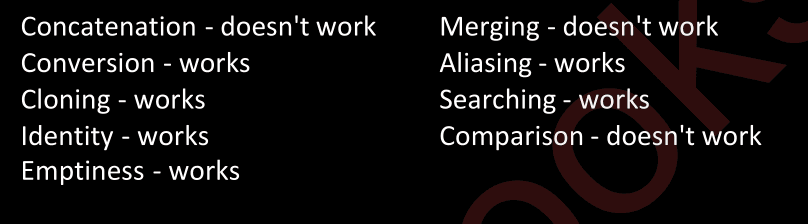
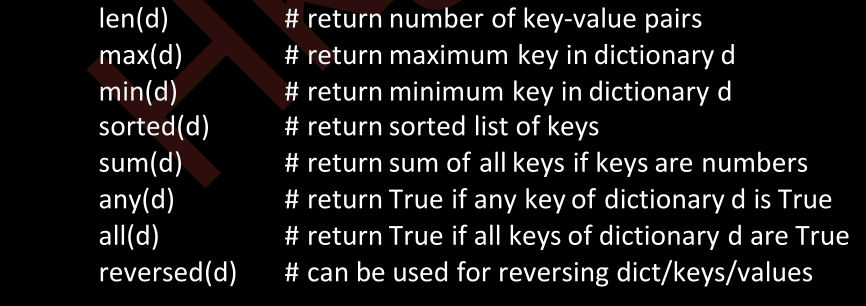
Built-in Functions
Methods
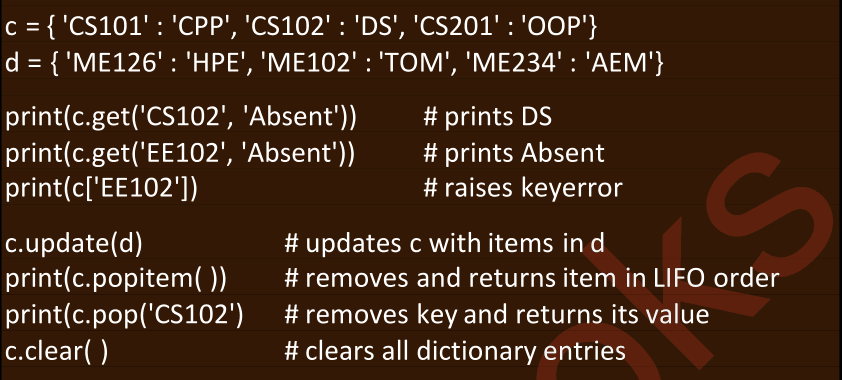
- Can nest values as dictionaries
- unpack using
**
UNIT 12 : Comprehensions
Read in reverse. Declarative, not imperative
Syntax:
[expression for variable in iterable if condition]Parameters
expression: What you want in your new list (e.g.,x,x+3,x%3).for variable in iterable: Loops over the sequence (range(5)is like a for loop iterating from 0 to 4).if condition(optional): Filters elements based on the condition (e.g.,x % 2 == 0).
def main():
    x = [x for x in range(5)] # [0,1,2,3,4]
    x = [x + 3 for x in range(5)] # [3,4,5,6,7]
    x = [x % 3 for x in range(5)] # [0,1,2,0,1]

	# if statement comes after
    x = [x for x in range(5) if x % 2 == 0] # [0,2,4]

	# nested comprehensions
    x = [x for x in range(2) for x in range(5)] # [0,1,2,3,4,0,1,2,3,4]
    x = [y for y in range(2) for x in range(5)] # [0,0,0,0,0,1,1,1,1,1]
Example 5 in c++:
for x in range(5) means 0, 1, 2, 3, 4
for x in range(2) for ... means nested for loops, i.e. twice range(5)
[x for x in ...] means return actual list twice. i.e. actual value
[y for y in ...] implies returning list of iterations i.e. i in case of nested loops in c++
vector<int> x;
for (int i = 0; i < 2; ++i)
    for (int j = 0; j < 5; ++j)
x.push_back(j);- For generating random 15 numbers between 5 to 55
st = set(random.randint(5, 55) for _ in range(15))- If else comes before in list comprehensions
a = ['!' if c in 'aeiou' else c for c in 'himanshu']- Nested comprehensions
# flatten a list of lists. [[1,2], [3,4,5]]
b = [n for ele in arr for n in ele]

# think of first for as outer loop and second as inner loop
lst = [a + b for a in [1,2] for b in [4,5,6]]
# [5,6,7,6,7,8]

lst = <Link href="a--b-for-a-in-12">a + b for a in [1,2</Link> for b in [3,4,5]]
# [[4,5,6], [5,6,7]]- Similarly solve set and dictionary comprehensions
UNIT 13 : Functions
-
Python function is a block of code that performs a specific task
- Help us divide program into multiple tasks. Making code modular.
- Provide a reuse mechanism.
-
Two types:
- Build in. eg:
len(), sorted(), min(), etc - User-defined functions
- Build in. eg:
-
You know about scope and flow of program
-
Communicate with functions using parameters / arguments passed to it, and values returned.
Types of Arguments
- Positional: 'required'. Must be passed in correct positional order.
def fun(i, j, s):
	print(i + j)
	print(s.upper())

fun(10, 3, 'hi') # okay
fun('hi', 10, 3) # not okay- Keyword: can be passed out of order. 'required'
def fun(i, j, s)
	print(i + j)
	print(s.upper())

fun(s = 'hi', i = 10, j = 3)- we can use positional as well keyword arguments. Positional must come first.
Variable length positional arguments
def fun(*args):
	for var in args:
		print(var)

print(10)
print(10, 'as')
Variable-length keyword
def fun(**kwargs):
	for name, value in kwargs.items():
		print(name, value)

print(a = 10)
print(a = 10, s = 'as')- We can use any other names in place of
argsandkwargs - But can't use more than one while defining a function
- optional arguments in order:
1. positional arguments
2. variable length positional
3. keyword
4. variable length keyword

def fun(i, j, *args, x, **kwargs)
	fn

fun(10, 20, x = 15) # i = 10, j = 20, x = 15
fun(1,2,3,4, x = 5) # i=1, j=2, args has 3, 4. x = 5
fun(1,2,x = 5, y = 5) # now kwargs has y = 5
fun(1,2,3,4) # error. nothing for x. args has 3,4- default arguments must come at end
Unpack arguments
Kinda like spread operator
* for iterable except ** for dictionary
def print_it(name = 'Sanjay', marks = 75):
    print(name, marks)

d = {'name': 'Anil', 'marks': 50}
print_it(*d) # name marks
print_it(**d) # Anil 50
UNIT 14 : Recursion
- Function inside functions
- Base case. Head recursion, tail recursion. Stack space. Same shit
UNIT 15 : Functional Programming
- problem is treated by evaluating one of more functions
Functions are First Class Values
- functions can be assigned to variables and be called
- Can be passed as arguments
- Can be built at execution time
Lambda Function
- Small, inline, anonymous function. Only one expression
- Build at execution time
- can be any number of arguments, but only return one value
# Syntax
lambda [arguments]: [expression]
# Example
sum = lambda a, b: a + b
greet = lambda name : f'hello, {name}'
def main():
print(sum(3,5))
print(greet("himanshu"))
print((lambda i : i % 2 == 0)(4)) # True- Higher-order functions are functions that can accept other functions, such as lambda functions, as arguments or return them.
- Example:
map(),filter(), andsorted().
# map()
# returns a new list after applying lambda function to each item in list
# syntax: map(function, iterable)
squared = list(map(lambda a : a ** 2, nums))

# filter()
# creates new list of elements for which given lambda function returns True
odd = list(filter(lambda a : a % 2 == 0, nums))

# reduce()
# performs rolling computation of sequence. Return value
from functools import reduce
x = reduce(lambda a, b: a * b, [1,2,3,4,5])
# sorted()
# uses lambda fns as keys for custom sorting
rev = sorted(nums, key=lambda x : -x) # reverses nums
print(rev)
students = [('A', 18), ('B', 15), ('A', 12)]
roll = sorted(students, key=lambda x : x[1]) # sorts based on i = 1
print(roll)- all these can be used together.
UNIT 16 : Modules and Packages
- A module is a
.pyfile containing definitions and statements. - When we execute a program, it's module name is
__main__
print(__name__) # __main__- Multiple modules for modular code. Reusing existing code. Easy development and maintenance.
Import
import math # standard module
import random, sys # multiple imports

x = random.random()
import random * # imports all functions from random
from math import sqrt # import specific functions
x = randint(1,3)
y = sqrt(2)import random as rn # aliasUser defined modules
# temp.py

def fucksumn(a, b):
    print(__name__)
    return a + b

def main():
    print("same code, different output")

if __name__ == '__main__':
    main()
# okay.py
import temp
def main():
print(temp.fucksumn(3, 4))
print(__name__)
if __name__ == '__main__':
main()Output:
temp
7
__main__- temp's main() will not run when imported.
Packages
- Packages help us organize sub-packages and modules
- A directory is treated as a package if it contains
__init__.py
To import a module mod.py from a package pkg
import pkg.mod
pkg.mod.f1()- PyPI: Python Package Index maintains list of third-part python packages.
- pip is a package manager for installing packages downloaded from PyPI