Dbms
What is DBMS?
Data: Collection of raw bytes. Process Meaning Information.
This information helps understand context and decision making.
Database: Electronic place/system where data is stored. Interrelated data.
DBMS: Software to perform CRUD operations on database. Generally referred together with DB.
File Systems Disadvantages over DBMS
- Data Redundancy and inconsistency.
- Difficulty in accessing data and querying.
- Data isolation.
- Integrity problems.
- Atomicity problems.
- Concurrent-access anomalies.
- Security problems.
Key Components:
- Hardware, software, data, procedures, and users.
DBMS Models:
- Relational: Data stored in tables; uses SQL (Structured Query Language).
- Non-relational: using other data structures. JSON, XML, Graphs. NoSQL.
- Hierarchical: Tree-like structure.
- Network: Flexible many-to-many relationships.
- Object-Oriented: Stores objects with attributes and methods.
Advantages:
- Data abstraction and independence (hiding complex details and giving simple concise output).
- Reduced redundancy (repetition of same data in multiple tables).
- Improved data integrity (information remains accurate, complete and consistent).
- Enhanced security (authorization).
- Backup and recovery mechanisms.
ACID Properties: Atomicity, Consistency, Isolation, Durability.
- Atomicity:
- Ensures all operations in a transaction complete successfully or none do.
- Eg: During a 100 AB $$'s balance should increment at the same time. During failure, both balances should return to normal.
- Consistency:
- Guarantees transactions transition the database between valid states.
- Eg: Ones balance shouldn't be negative. Hence a 100failed due to consistency violation.
- Isolation:
- Keeps concurrent transactions independent to avoid interference.
- Dirty read - when a transaction reads data that has been modified by another transaction but that transaction has not yet committed its changes.
- Non-repeatable read - when a transaction reads the same row twice, but the second read retrieves different values than the first.
- Phantom read - when a transaction re-executes a query and finds that the results have changed due to the insertion or deletion of rows by another transaction, even though the initial transaction hadn't modified anything itself.
- Durability:
- Once committed, transaction changes persist even after failures.
- By using Write-Ahead Logging and replication, making changes permanent.
Normalization: 1NF, 2NF, 3NF to reduce redundancy.
- First Normal Form (1NF):
- Each column contains atomic values.
- No repeating groups or arrays.
- Second Normal Form (2NF):
- Meets all criteria of 1NF.
- Eliminates partial dependency; every non-key attribute is fully dependent on the entire primary key.
- Third Normal Form (3NF):
- Meets all criteria of 2NF.
- Removes transitive dependency; non-key attributes depend only on the primary key.
- Boyce-Codd Normal Form (BCNF):
- A stricter version of 3NF.
- Every determinant must be a candidate key.
Core Concepts:
- Transactions: Ensure reliable and consistent operations.
- Concurrency Control: Manages simultaneous transactions.
- Indexing: Improves data retrieval speed.
Architectures:
- Single-Tier: Direct access on a single system.
- Two-Tier: Client-server model.
- Three-Tier: Separates user interface, business logic, and data storage.
Keys:
- Primary Key: Unique identifier for table records.
- Foreign Key: Links records between tables, ensuring referential integrity.
- Candidate Key: Minimal attribute set that can uniquely identify records.
- Composite Key: Combination of two or more attributes forming a unique identifier.
- Alternate Key: Candidate key not chosen as the primary key.
Data Types:
- Numeric:
INT, FLOAT, DOUBLE, DECIMAL. - Character/String:
CHAR, VARCHAR, TEXT. - Date/Time:
DATE, TIME, TIMESTAMP. - Binary:
BLOB, VARBINARY. - Boolean:
BIT, BOOL.
DBMS Architecture
View of Data
- DBMS provide users with an abstract view of data. No details about how data is stored, maintained or accessed.
- Three-level architecture enables personalized view of data.
1. Physical level / Internal level
- Lowest level abstraction.
- Low level data structures are used.
- Physical Schema describes physical storage structure of DB.
- Data compression, encryption, hashing, etc.
- Algorithms to access data efficiently.
2. Logical level / Conceptual level
- Conceptual schema to describe data and it's relationships.
- Doesn't care about physical-level structures. Leading to Physical data independence. Change in physical schema doesn't affect logical schema.
- Database Administration decides what information to keep in DB uses logical level of abstraction.
3. View level / External level
- Highest level of abstraction to provide personalized data view.
- Several schema called subschema for different views.
- Also provides security mechanism to prevent users from unauthorized access.

Instance and Schema
- Instance: Collection of information stored in DB at any given instance.
- Schema: structural description of data.
- Logical schema is most important subschema.
Data models
- Provides way to design DB at logical level by defining data relationships, constraints, semantics, etc.
- Eg: ER model, Relational model, Object-oriented model, object-relational model, etc.
Database Languages
- Data Definition Language (DLL): to define/specify DB schema.
- Data manipulation language (DML): to perform DB queries and updates (CRUD).
- SQL provides features of both languages.
Database access from Application
- An interface is created for two non-compatible languages to communicate with each other.
- API is used to send queries to DB and fetch results.
- Open Database Connectivity (ODBC): C/C++.
- Java Database Connectivity (JDBC): Java.
Database Architecture (DBA)
- Person who has central control of both data and program that access that data.
- Is responsible for:
- Schema Definition.
- Storage structure and access methods.
- Schema and physical organization modifications.
- Authorization control.
- Routine maintenance (periodic backups, security patches, upgrades, etc)
Database Application Architecture
Tier-1 Architecture
- Client, server and database on the same machine.
Tier-2 Architecture
- Client communication with DB server. No third party.
- API standards like ODBC and JDBC are used interact.

Tier-3 Architecture

- Different client, server, and database.
- For business applications. Scalable, Data Integrity, Security.
ER Model
High level data model based on a perception of a real world that consists of a collection of basic objects, called entities and of relationships among these objects.
- ER Diagram is graphical representation of ER Model.
- Entity: Thing or object in real world that is distinguishable from other objects.
- Strong Entity: can be uniquely identified using primary key.
- Weak Entity: can't be uniquely identified, depends on some other strong entity.
- Entity Set: set of similar type of entities that share the same attributes. Eg: Students.
Attribute An entities property(s). Has a set permitted values called domain or value set.
Types of Attributes:
- Simple: can't be divided further. Eg: Phone number.
- Composite: can be divided into further attributes. Eg: Address.
- Single-valued: one value attribute. Eg: Student ID.
- Multi-valued: more than one value. Eg: Phone number.
- Derived: can be derived from other related attributes. Eg: Age from DOB.
Attributes takes null value when no value for it. Eg: Middle name (not applicable). Can also indicate value is unknown (data inconsistency).
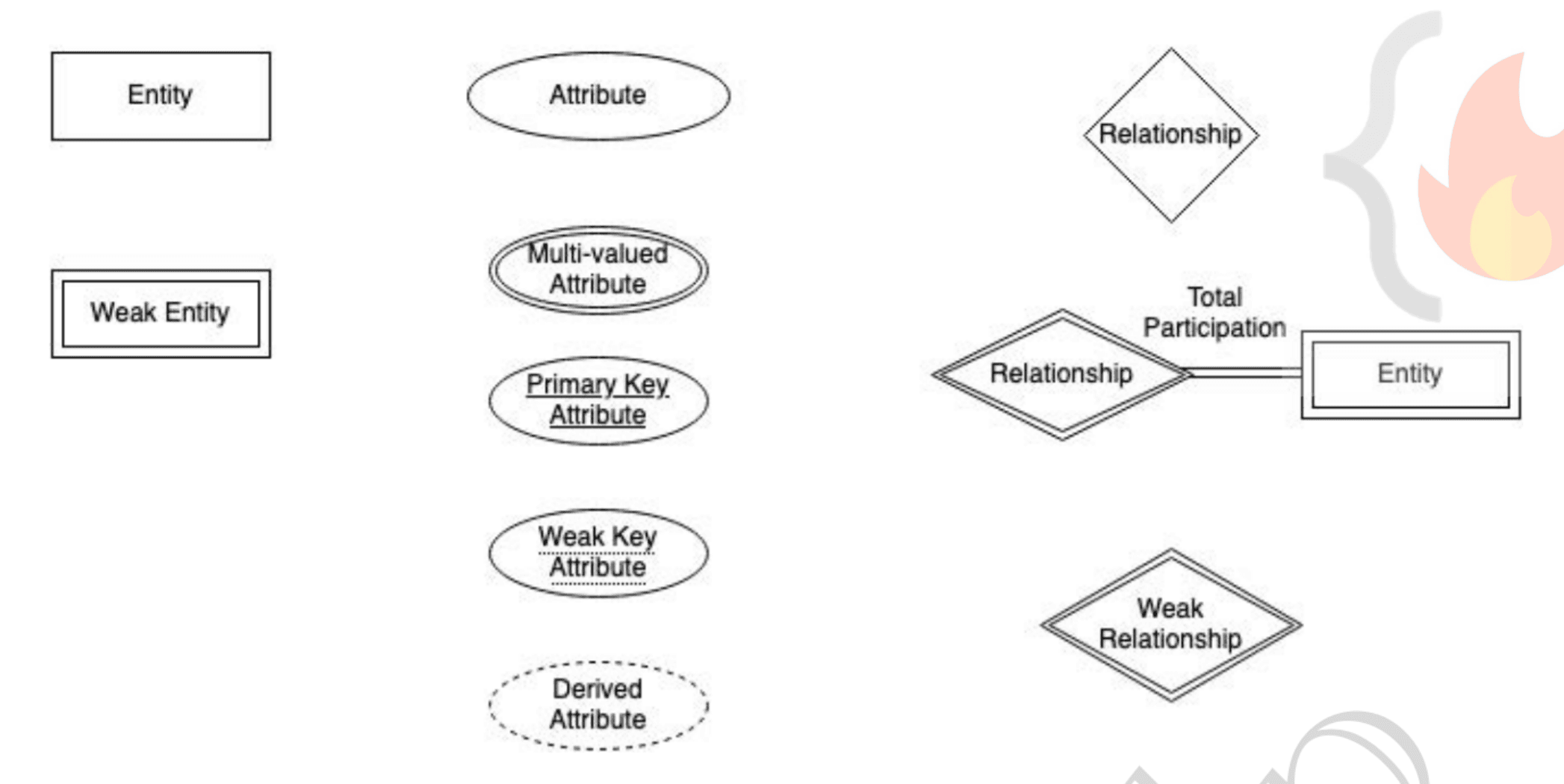
Relationships: association among two or more entities. Eg: customer places order.
- Strong relationship: between two independent entities. Eg: Loan
- Weak relationship: between weak entity and it's owner/strong entity. Eg: payment.
- Degree of relationship: number of entities participating in a relationship.
- Unary: only one entity participates. Eg: employee manages employee.
- Binary: two entity participates. Eg: student takes course.
- Ternary: three entity. Eg: Teacher teaches student, teacher teaches subject.
- Relationship constraints
- Mapping cardinality / cardinality ratio:
- One to one: Entity A associates with at most one entity B and vice-versa. Eg: Citizen has Aadhar-card.
- One to many: Entity A associates with N entity B. While entity B associates with at most one entity A. Eg: Citizen has vehicle.
- Many to one: opposite of one-many. Eg: employee and department.
- Many to many: Entity A associates with N entity B. and vice-versa. Eg: Students and course.
- Participation Constraints: Minimum cardinality constraints. Types:
- Partial participation: not all entities are involved in the relationship instance.
- Total participation: each entity must be involved in at least one relationship instance.
- Weak entity has total participation constraints, but strong may not.
- Mapping cardinality / cardinality ratio:
Advanced ER Features
1. Specialization
- Specialization is splitting up the entity set into further sub entity sets on the basis of their functionalities, specialities and features.
- It is a Top-Down approach.
- E.g., Person entity set can be divided into customer, student, employee. Person is superclass and other specialized entity sets are subclasses.
- We have "is-a" relationship between superclass and subclass. Depicted by triangle component.
- It refines the DB blueprint by grouping entities and applying certain attributes to few applicable entities of parent entity set. Removing redundancy.
2. Generalization
- It is just a reverse of Specialization.
- It is a Bottom-Up Approach.
- DB Designer, may encounter certain properties of two entities are overlapping. Designer may consider to make a new generalized entity set. That generalized entity set will be a superclass.
- Eg: Car, Bus, and Jeep can all be generalized as vehicles.
- Makes DB more refined and simple.
Attribute Inheritance
- Both specialization and generalization has attributes inheritance.
- Attributes of higher level entity sets are inherited by lower level entity sets.
- Eg: Customer and Employee inherit attributes of Person.
Participation Inheritance
If a parent entity set participates in a relationship then its child entity sets will also participate in that relationship.
Aggregation
- Abstraction is applied to treat relationships as higher-level entities. Called Abstract entity.
- Avoid redundancy.
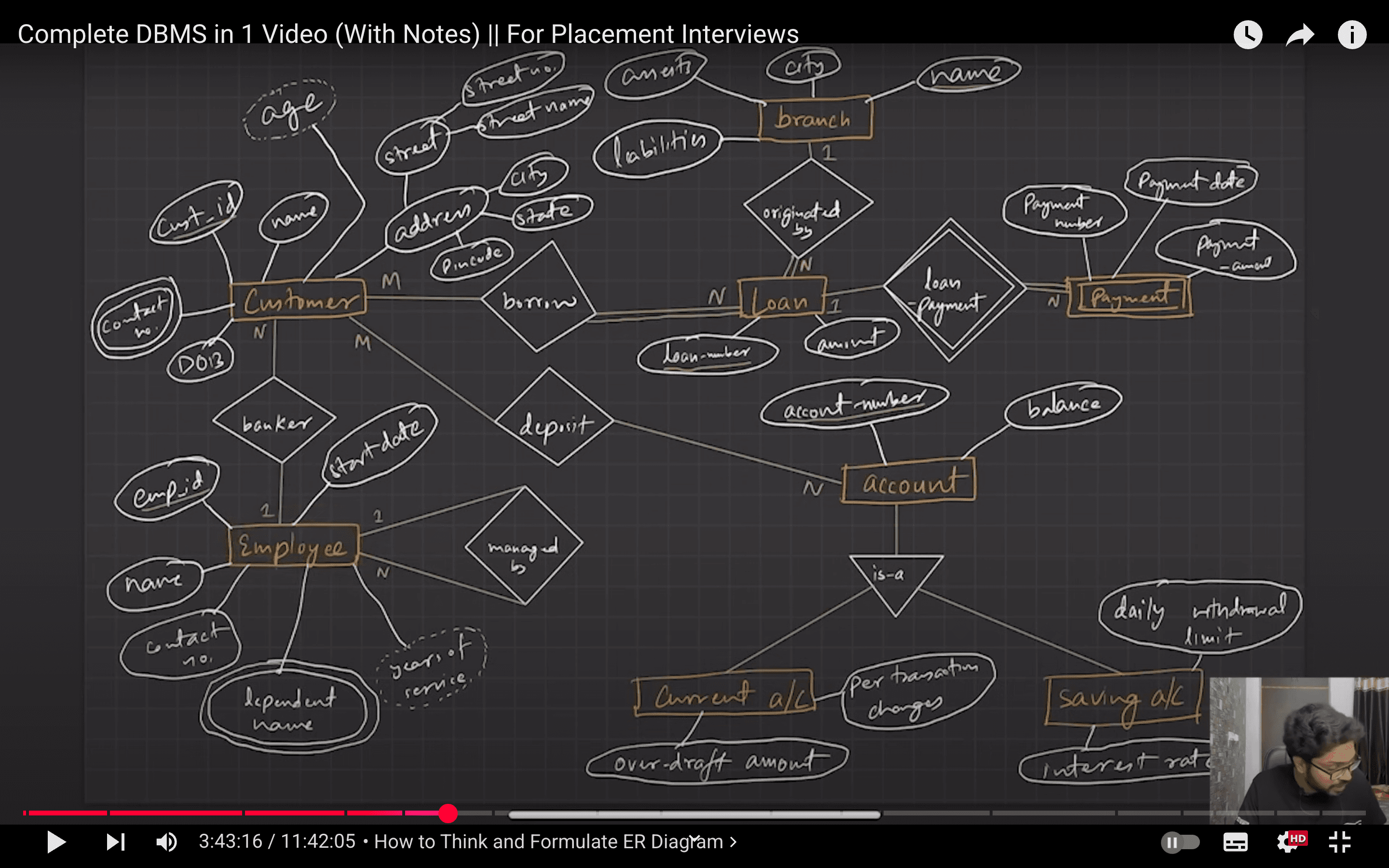
Think and Formulate ER Diagrams
- Identify Entity sets
- Identify Attributes and their types
- Identify relationships and their constraints (mapping cardinality, participation)
Relational Model
- Relational Model (RM) organizes the data in the form of relations (tables).
- A relational DB consists of collection of tables, each of which is assigned a unique name.
- A row in a table represents a relationship among a set of values, and table is collection of such relationships.
- Tuple: A single row of the table representing a single data point / a unique record.
- Columns: represents the attributes of the relation. Each attribute, there is a permitted value, called domain of the attribute.
- Degree of table: number of attributes/columns in a given table/relation.
- Cardinality: Total no. of tuples in a given relation.
- Relation Schema: defines the design and structure of the relation, contains the name of the relation and all the columns/attributes.
- Relational Key: Set of attributes which can uniquely identify an each tuple.
- Common RM based DBMS systems, aka RDBMS: Oracle, IBM, MySQL, MS Access.
Properties
- Name of relation/table must be unique.
- Values must be atomic i.e. can't be broken down further.
- Each column/attribute must be unique.
- Each tuple in a table must be unique.
- Sequence of row and column don't matter
- Tables must follow integrity constraints.
RM Keys
- Super Key (SK): Set of one of more attributes that uniquely identifies each tuple.
- Candidate Key (CK):
- Minimum subset of super key, that can uniquely identify each tuple.
- Contains no redundant attributes.
- Shouldn't be NULL.
- Primary Key (PK): Candidate key with least number of attributes. Must be unique as well as non-null.
- Alternate Key: all CK except PK.
- Foreign Key:
- Creates relation between two tables.
- By referencing primary key of another tableinside current table. -Referenced (Parent) relation. -Referencing (Child) relation.
- Composite Key: PK formed using at least two attributes.
- Compound Key: PK which is formed using two foreign keys.
- Surrogate Key: Synthetic PK generated automatically by DB. (usually integer)
- Natural Key: set of attributes that exists in real world and uniquely identify tuple.
Integrity Constraints
-
CRUD operations must be done with some integrity policy so that DB remains consistent.
-
Domain Constraints
- Restrict data type of every attribute.
- Restrict value of attributes i.e define domain.
-
Entity Constraints
- Every relation must have a non-NULL Primary key.
-
Referencial Constraints
- Insert Constraint - Value can't be inserted in the child table, if it isn't present in the parent table.
- Delete Constraint - Value can't be deleted from the parent table, if it is lying in the child table.
> To avoid delete conflict: > ON Delete Cascade - Delete corresponding values in child table when deleting value from parent table. > ON Delete NULL - Set corresponding foreign key value to NULL, when deleting value from parent table.
-
Key constraints
- NOT NULL: Ensures a column in a table must always contain a value. By default attribute can be
NULL. - UNIQUE: Ensure that all values consisting in a column are different from each other.
- DEFAULT: Set default value to the column.
- CHECK: It is one of the integrity constraints in DBMS. It keeps the check that integrity of data is maintained before and after the completion of the CRUD.
- PRIMARY KEY: Defines primary key.
- FOREIGN KEY: Defines foreign key.
- NOT NULL: Ensures a column in a table must always contain a value. By default attribute can be
Transformation from ER to Relational Model
Strong Entity
- Becomes an individual table with entity name, attributes (single-valued) becomes columns of the relation.
- Entity’s Primary Key (PK) is used as Relation’s PK.
- FK are added to establish relationships with other relations.
Weak Entity
- A table is formed with all the attributes of the entity.
- PK of its corresponding Strong Entity will be added as FK.
- PK of the relation will be a composite PK, {FK + Partial discriminator Key}
Composite Attributes
- Handled by creating a separate attribute itself in the original relation for each composite attribute.
- e.g., Address:
{street-name, house-no}, is a composite attribute in customer relation, we addaddress-street-name&address-house-nameas new columns in the attribute and ignore “address” as an attribute.
Multivalued Attributes
- New tables (named as original attribute name) are created for each multivalued attribute.
- PK of the new table would be {FK (PK of entity) + multivalued name}.
- e.g., For Strong entity Employee, dependent-name is a multivalued attribute.
- New table named dependent-name will be formed with columns emp-id, and dname.
- PK:
{emp-id, d-name} - FK:
{emp-id}
Generalization
- Create a table for the higher level entity set. For each lower-level entity set, create a table that includes a column for each of the attributes of that entity set plus a column for each attribute of the primary key.
- For e.g., Banking System generalization of Account - saving & current.
- Table 1: account (
account-number, balance) - Table 2: savings-account (
account-number, interest-rate, daily-withdrawal-limit) - Table 3: current-account (
account-number, overdraft-amount, per-transaction-charges)
- Table 1: account (
Normalization
Normalization is a step towards DB optimization. i.e. minimize redundancy. Divides composite attributes into individual OR large tables into small and links them using relationships.
Functional Dependency (FD)
- Defines relationship b/w attributes where one attribute (usually primary key) determines the value of other attributes.
X -> Y; determinant -> dependent.- Types
- Trivial FD:where is B is a subset of A. Eg:
A -> A. - Non-Trivial FD:where B isn't a subset of A. i.e..
- Trivial FD:where is B is a subset of A. Eg:
- Rules (Armstrong's axioms)
- Reflexive
- Ifthen2. Augmentation
- Ifholds, thenholds too. Wherebeing a set of attributes.
- Transitivity
- Ifandthen.
- Reflexive
Anomalies
Insertion Anomaly When certain data (attribute) can not be inserted without the presence of other data.
Deletion Anomaly When deletion of data results in unintentional loss of other important data.
Updation Anomaly When update of a single data value requires multiple rows of data to be updated.
Types of Normalization
1NF
- Do not use row order to convey information.
- Do not mix data types within the same column.
- Do not design a table without a primary key.
- Do not store repeating group of data items on a single row. i.e. no multi-valued attributes. Only atomic values.
2NF
Each non-key attribute must depend on the entire primary key.
1NF with No partial dependency.
- All non-prime attributes must be fully dependent on PK.
- Not depend on part of PK.

{player_id, item_type} -> item_quantity  ✅
{player_id} -> player_rating             ❌
Add a player table to fix this 2NF violation.
3NF
Every non-key attribute in a table should depend on the key, the whole key and nothing but the key.
2NF with No transitive dependencies allowed.

To fix 3NF violation, we can remove player_rating from player table and create a new player_skill_levels defining skills to rating.
Boyce-Codd NF
Every attribute in a table should depend on the key, the whole key and nothing but the key.
4NF
Multivalued dependencies in a table must be multivalued dependencies on the key.
Notice insert anomalies on adding new color of prairie bird. We also need to add separate style, but allowed still 3NF.

Again split tables to model | color and model | style.
5NF
It must be possible to describe the table as being the logical result of joining some other tables together.
Transactions
Transactions - Logical unit of work that contains one or more SQL statements. Sequence is important. Either the transaction is completely successful (all changes made are permanent) or failure at point results in rollback (all changes done are undone).
ACID Properties: Atomicity, Consistency, Isolation, Durability.
- Atomicity:
- Ensures all operations in a transaction complete successfully or none do.
- Eg: If money is deducted from your account but failed to transfer. Money should rollback.
- Consistency:
- Guarantees transactions transition the database between valid states.
- Eg: Total balance after transaction should remain the same. No loss of money.
- Isolation:
- Keeps concurrent transactions independent to avoid interference.
- Eg: DB should know how to handle transactions from/to same account at the same time.
- Durability:
- Once committed, transaction changes persist even after failures.
Transaction States
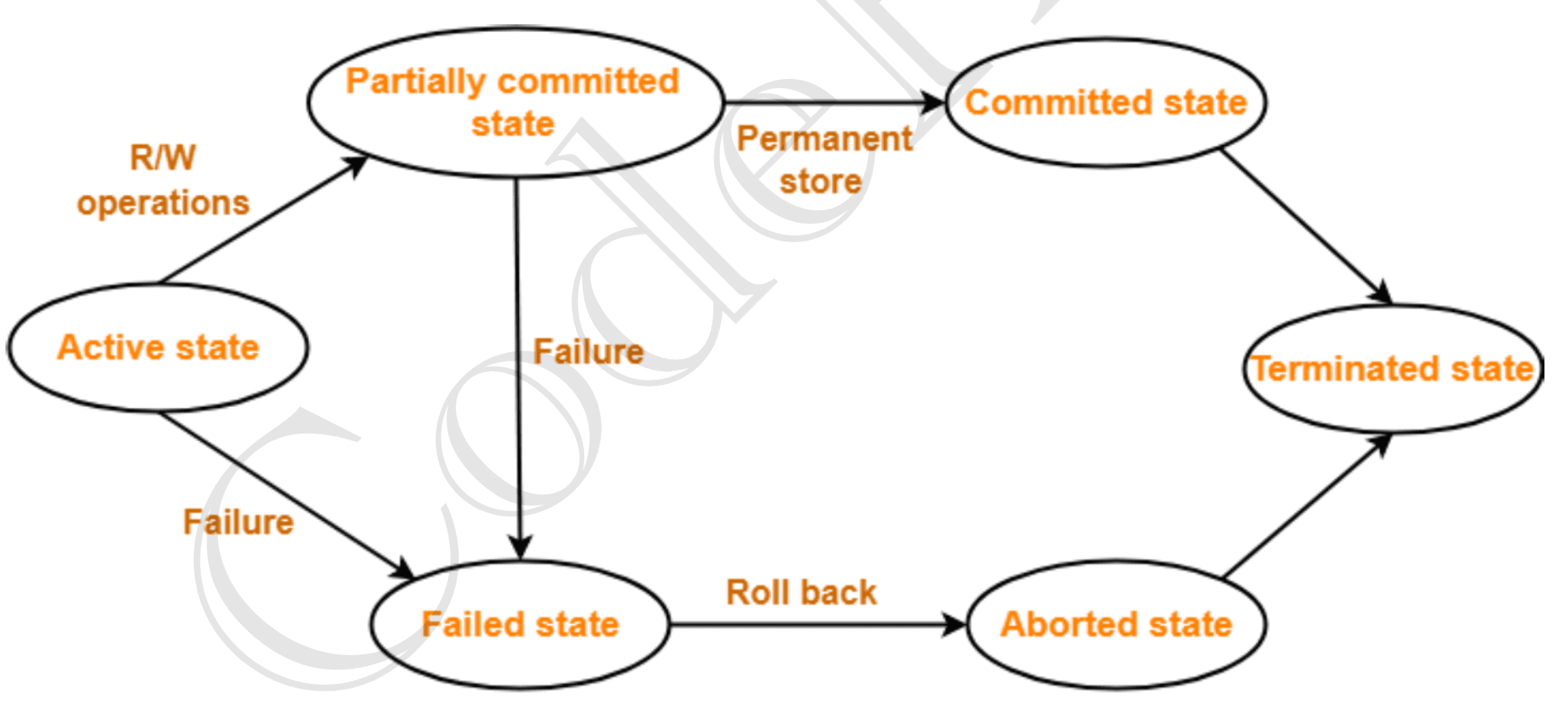
- Active State: The very first state of the life cycle of the transaction, all the read and write operations are being performed. If they execute without any error the T comes to Partially committed state. Although if any error occurs then it leads to a Failed state.
- Partially committed state: After transaction is executed the changes are saved in the buffer in the main memory. If the changes made are permanent on the DB then the state will transfer to the committed state and if there is any failure, the T will go to Failed state.
- Committed state: When updates are made permanent on the DB. Then the T is said to be in the committed state. Rollback can’t be done from the committed states. New consistent state is achieved at this stage.
- Failed state: When T is being executed and some failure occurs. Due to this it is impossible to continue the execution of the T.
- Aborted state: When T reaches the failed state, all the changes made in the buffer are reversed. After that the T rollback completely. T reaches abort state after rollback. DB’s state prior to the T is achieved.
- Terminated state: A transaction is said to have terminated if has either committed or aborted.
Recovery Mechanism (Atomicity and Durability)
Shadow-Copy Scheme
- Core Idea: Maintain two full DB copies—a “current” and a “shadow.”
- Workflow:
- Copy the entire current DB to a new working copy.
- Apply all updates only to the new copy.
- Commit: Flush new copy’s pages, atomically switch the on‐disk pointer to the new copy, then delete the old.
- Abort: Delete the new copy; original remains unchanged.
- Atomicity: If a failure/abort occurs before pointer switch, new copy is discarded ⇒ no partial updates.
- Durability: Once the pointer switch completes (after all new‐copy pages are on disk), changes persist even if a crash follows.
Log-Based Recovery
- Core Idea: Record every update in a write‐ahead log (old‐ and new‐values) before modifying DB pages.
- Key Principles:
- Write‐Ahead Logging (WAL): Log entry must reach stable storage before its data‐page write.
- UNDO/REDO:
- UNDO (using old‐values) for uncommitted transactions whose pages might have “stolen” writes.
- REDO (using new‐values) for committed transactions whose updates might not have hit disk.
- Variants:
- Deferred‐Write (No‐Steal, No‐Force): Delay all page writes until commit—only REDO needed.
- Immediate‐Write (Steal, Force/No‐Force): Allow dirty pages to be written early—requires both UNDO and REDO.
- Atomicity & Durability:
- Before commit, effects can be undone; after commit (log on stable storage), effects are relaunched on crash (redo) or persist on disk (force).
Indexing
Indexing creates a separate data structure (index) that stores sorted copies of selected table columns, with pointers to the actual data, allowing for faster data retrieval by avoiding full table scans.

- Search Key: copy of primary key or candidate key or anything else.
- Data Reference: Pointer holding the address of disk block where the value of the corresponding key is stored.
- Indexing is optional but is always sorted.
Types of Indexing
Primary Indexing (Clustering)
Used when all files are ordered sequentially on some search key (primary index). It could be Primary Key or non-primary key
- Dense Indexing
- The dense index contains an index record for every search key value in the data file.
- Sparse Indexing
- An index record appears for only some of the search-key values.
Primary Indexing can be based on Data file is sorted w.r.t Primary Key attribute or non-key attributes.
- Sorted w.r.t key attribute
- PK will be used as search key in index.
- Sparse index will be formed.
- Sorted w.r.t non-key attribute
- This is dense index as, all unique non-key attribute values have an entry in the index file.
- All attributes with same values will be clustered together.
- E.g., Clustering indexing should be created for all employees who belong to same dept.
Multi-level Index
- Index with two or more levels.
- If the single level index become enough large that the binary search it self would take much time, we can break down indexing into multiple levels.
Secondary Index (Non-clustering)
Secondary indexing is a database indexing technique used to improve the performance of query operations on non-primary key attributes.
- Data is unsorted. Hence, primary indexing is not possible.
- Can be done on key as well as non-key attribute.
- Always dense indexing (one index entry per record or per record‐pointer).
Key Points:
- Purpose: Enhances data retrieval speed for non-primary key columns.
- Structure: Comprises a secondary index file containing pointers to data records in the primary index.
After secondary indexing, key becomes sorted and thus increases performance.
NoSQL
Non-tabular databases that provide flexible schema and scale easily with large amounts of data and high user load.
Advantages
- Flexible - no pre-defined schema, add or remove column without any trouble.
- Horizontal scaling - since data is self-contained, scaling out i.e. sharing load is possible.
- High Availability - auto-replication helps using failure.
- Easy insert and read operation - No joining and flexible schema, helps retrieve and insert data quickly. But updating or deleting data takes longer time.
- Caching.
- Useful for Cloud applications.
Useful for fast paced development, modern applications.
Provides relationships and sometimes even ACID transactions.
Types
- Key-value Stores: efficient indexing, caching. Redis. Oracle NoSQL.
- Column-oriented / C-store: read by column.
- Document Based Stores: JSON - MongoDB, supports ACID.
- Graph Based Stores: focus on relationship b/w data elements. optimized search. Fraud detection.
Disadvantages
- Costly update/delete operations.
- Data redundancy and inconsistency.
- Selective use case.
- Large storage requirement.
- Acid generally not supported.
- Vertical (scale-up) for SQL and horizontal (scale-out) for NoSQL
- SQL requires object-relational mapping while NoSQL doesn't require ORMs.
Types of DBMS
- Relational Database: popular, optimizes, strong but fails to scale out.
- Object-oriented data models: based on OOPS. stores everything in objects. Provides inheritance, abstraction, etc. With attribute (tables) and methods (code). Complex.
- NoSQL DB: not only sql.
- Hierarchical DB: Fixed tree-like structure with root parent. Advantage in disk storage. Disadvantage in relationships between children.
- Network DB: extension of hierarchical with child records freedom to relationship with parent. Graph structure. Slow.
Clustering
Set of servers - replica sets
- Redundancy
- Load Balancing
- High Availability
Partitioning and Sharding
When data is large and too many requests, we distribute data.
Partition is a horizontal scaling where we divide stores database objects into separate servers.
- Vertical Partitioning - need to access different servers to get complete tuples.
- Horizontal Partitioning - independent chucks on tuples stored on different servers.
Advantages Increase parallelism, availability, performance, manageability, reduced cost.
Distributed DB: A single logical database that is, spread across multiple locations (servers) and logically interconnected by network.
Sharding
- Horizontal partitioning
- We split it up and introduce a Routing layer so that we can forward the request to the right instances that actually contain the data.
Disadvantages
- Complex partitioning maps.
- Non-uniformity -> Reshard.
- Not suitable for analytical type of query.
CAP Theorem
Useful properties to know to design efficient distributed systems.
- Consistency: all nodes see same data. (most recent write operation)
- Availability: every request should get response. regardless of individual state of node.
- Partition Tolerance: system doesn't fail even if there is a break in nodes communication.
CAP theorem states that a distributed system can only provide two of three properties simultaneously.
The theorem formalizes the tradeoff between consistency and availability when there’s a partition.

- CA - Single node or no partition databases. (impractical). can't deliver fault tolerance. MySQL
- CP - Only one primary node receives all write requests and other replicate. If primary fail, secondary stands in until fixed. MongoDB. eg: banking.
- AP - on partition (break) all nodes are available, but not with most recent update, until partition is resolved. Hence, eventually consistent databases. Eg: facebook, Amazon DynamoDB.
BASE Properties
Basically Available - always available, even if inconsistent Soft State - temporary inconsistency allowed. Eventually Consistent - might show inconsistent results sometimes, but eventually gets correct.
Master Slave Architecture
Master-Slave is a general way to optimize IO in a system where number of requests goes way high that a single DB server is not able to handle it efficiently.
Master node handles all the write operations (since it has most recent updates) and slave node replicates it to perform read operations.
Replication
- Asynchronous - Data gets updated after a short delay. Eg: youtube comment.
- Synchronous - Data updated instantly. Eg: Banking.
What if slave gets update?
- Ignore/Don't Allow slave to accept updates
- Allow it and somehow update master.
Advantages
- Bank up
- Scale out read operations
- Availability
- Reliable
- Latency decrease
- Parallelism
Database Scaling Patterns
Pattern 1,2,3,4,5,6s balance should be reduce and's balance should increment at the same time. During failure, both balances should return to normal.
- Consistency:
- Guarantees transactions transition the database between valid states.
- Eg: Ones balance shouldn't be negative. Hence a 100failed due to consistency violation.
- Isolation:
- Keeps concurrent transactions independent to avoid interference.
- Dirty read - when a transaction reads data that has been modified by another transaction but that transaction has not yet committed its changes.
- Non-repeatable read - when a transaction reads the same row twice, but the second read retrieves different values than the first.
- Phantom read - when a transaction re-executes a query and finds that the results have changed due to the insertion or deletion of rows by another transaction, even though the initial transaction hadn't modified anything itself.
- Durability:
- Once committed, transaction changes persist even after failures.
- By using Write-Ahead Logging and replication, making changes permanent.
Normalization: 1NF, 2NF, 3NF to reduce redundancy.
- First Normal Form (1NF):
- Each column contains atomic values.
- No repeating groups or arrays.
- Second Normal Form (2NF):
- Meets all criteria of 1NF.
- Eliminates partial dependency; every non-key attribute is fully dependent on the entire primary key.
- Third Normal Form (3NF):
- Meets all criteria of 2NF.
- Removes transitive dependency; non-key attributes depend only on the primary key.
- Boyce-Codd Normal Form (BCNF):
- A stricter version of 3NF.
- Every determinant must be a candidate key.
Core Concepts:
- Transactions: Ensure reliable and consistent operations.
- Concurrency Control: Manages simultaneous transactions.
- Indexing: Improves data retrieval speed.
Architectures:
- Single-Tier: Direct access on a single system.
- Two-Tier: Client-server model.
- Three-Tier: Separates user interface, business logic, and data storage.
Keys:
- Primary Key: Unique identifier for table records.
- Foreign Key: Links records between tables, ensuring referential integrity.
- Candidate Key: Minimal attribute set that can uniquely identify records.
- Composite Key: Combination of two or more attributes forming a unique identifier.
- Alternate Key: Candidate key not chosen as the primary key.
Data Types:
- Numeric:
INT, FLOAT, DOUBLE, DECIMAL. - Character/String:
CHAR, VARCHAR, TEXT. - Date/Time:
DATE, TIME, TIMESTAMP. - Binary:
BLOB, VARBINARY. - Boolean:
BIT, BOOL.
DBMS Architecture
View of Data
- DBMS provide users with an abstract view of data. No details about how data is stored, maintained or accessed.
- Three-level architecture enables personalized view of data.
1. Physical level / Internal level
- Lowest level abstraction.
- Low level data structures are used.
- Physical Schema describes physical storage structure of DB.
- Data compression, encryption, hashing, etc.
- Algorithms to access data efficiently.
2. Logical level / Conceptual level
- Conceptual schema to describe data and it's relationships.
- Doesn't care about physical-level structures. Leading to Physical data independence. Change in physical schema doesn't affect logical schema.
- Database Administration decides what information to keep in DB uses logical level of abstraction.
3. View level / External level
- Highest level of abstraction to provide personalized data view.
- Several schema called subschema for different views.
- Also provides security mechanism to prevent users from unauthorized access.
Instance and Schema
- Instance: Collection of information stored in DB at any given instance.
- Schema: structural description of data.
- Logical schema is most important subschema.
Data models
- Provides way to design DB at logical level by defining data relationships, constraints, semantics, etc.
- Eg: ER model, Relational model, Object-oriented model, object-relational model, etc.
Database Languages
- Data Definition Language (DLL): to define/specify DB schema.
- Data manipulation language (DML): to perform DB queries and updates (CRUD).
- SQL provides features of both languages.
Database access from Application
- An interface is created for two non-compatible languages to communicate with each other.
- API is used to send queries to DB and fetch results.
- Open Database Connectivity (ODBC): C/C++.
- Java Database Connectivity (JDBC): Java.
Database Architecture (DBA)
- Person who has central control of both data and program that access that data.
- Is responsible for:
- Schema Definition.
- Storage structure and access methods.
- Schema and physical organization modifications.
- Authorization control.
- Routine maintenance (periodic backups, security patches, upgrades, etc)
Database Application Architecture
Tier-1 Architecture
- Client, server and database on the same machine.
Tier-2 Architecture
- Client communication with DB server. No third party.
- API standards like ODBC and JDBC are used interact.
Tier-3 Architecture
- Different client, server, and database.
- For business applications. Scalable, Data Integrity, Security.
ER Model
High level data model based on a perception of a real world that consists of a collection of basic objects, called entities and of relationships among these objects.
- ER Diagram is graphical representation of ER Model.
- Entity: Thing or object in real world that is distinguishable from other objects.
- Strong Entity: can be uniquely identified using primary key.
- Weak Entity: can't be uniquely identified, depends on some other strong entity.
- Entity Set: set of similar type of entities that share the same attributes. Eg: Students.
Attribute An entities property(s). Has a set permitted values called domain or value set.
Types of Attributes:
- Simple: can't be divided further. Eg: Phone number.
- Composite: can be divided into further attributes. Eg: Address.
- Single-valued: one value attribute. Eg: Student ID.
- Multi-valued: more than one value. Eg: Phone number.
- Derived: can be derived from other related attributes. Eg: Age from DOB.
Attributes takes null value when no value for it. Eg: Middle name (not applicable). Can also indicate value is unknown (data inconsistency).
Relationships: association among two or more entities. Eg: customer places order.
- Strong relationship: between two independent entities. Eg: Loan
- Weak relationship: between weak entity and it's owner/strong entity. Eg: payment.
- Degree of relationship: number of entities participating in a relationship.
- Unary: only one entity participates. Eg: employee manages employee.
- Binary: two entity participates. Eg: student takes course.
- Ternary: three entity. Eg: Teacher teaches student, teacher teaches subject.
- Relationship constraints
- Mapping cardinality / cardinality ratio:
- One to one: Entity A associates with at most one entity B and vice-versa. Eg: Citizen has Aadhar-card.
- One to many: Entity A associates with N entity B. While entity B associates with at most one entity A. Eg: Citizen has vehicle.
- Many to one: opposite of one-many. Eg: employee and department.
- Many to many: Entity A associates with N entity B. and vice-versa. Eg: Students and course.
- Participation Constraints: Minimum cardinality constraints. Types:
- Partial participation: not all entities are involved in the relationship instance.
- Total participation: each entity must be involved in at least one relationship instance.
- Weak entity has total participation constraints, but strong may not.
- Mapping cardinality / cardinality ratio:
Advanced ER Features
1. Specialization
- Specialization is splitting up the entity set into further sub entity sets on the basis of their functionalities, specialities and features.
- It is a Top-Down approach.
- E.g., Person entity set can be divided into customer, student, employee. Person is superclass and other specialized entity sets are subclasses.
- We have "is-a" relationship between superclass and subclass. Depicted by triangle component.
- It refines the DB blueprint by grouping entities and applying certain attributes to few applicable entities of parent entity set. Removing redundancy.
2. Generalization
- It is just a reverse of Specialization.
- It is a Bottom-Up Approach.
- DB Designer, may encounter certain properties of two entities are overlapping. Designer may consider to make a new generalized entity set. That generalized entity set will be a superclass.
- Eg: Car, Bus, and Jeep can all be generalized as vehicles.
- Makes DB more refined and simple.
Attribute Inheritance
- Both specialization and generalization has attributes inheritance.
- Attributes of higher level entity sets are inherited by lower level entity sets.
- Eg: Customer and Employee inherit attributes of Person.
Participation Inheritance
If a parent entity set participates in a relationship then its child entity sets will also participate in that relationship.
Aggregation
- Abstraction is applied to treat relationships as higher-level entities. Called Abstract entity.
- Avoid redundancy.
Think and Formulate ER Diagrams
- Identify Entity sets
- Identify Attributes and their types
- Identify relationships and their constraints (mapping cardinality, participation)
Relational Model
- Relational Model (RM) organizes the data in the form of relations (tables).
- A relational DB consists of collection of tables, each of which is assigned a unique name.
- A row in a table represents a relationship among a set of values, and table is collection of such relationships.
- Tuple: A single row of the table representing a single data point / a unique record.
- Columns: represents the attributes of the relation. Each attribute, there is a permitted value, called domain of the attribute.
- Degree of table: number of attributes/columns in a given table/relation.
- Cardinality: Total no. of tuples in a given relation.
- Relation Schema: defines the design and structure of the relation, contains the name of the relation and all the columns/attributes.
- Relational Key: Set of attributes which can uniquely identify an each tuple.
- Common RM based DBMS systems, aka RDBMS: Oracle, IBM, MySQL, MS Access.
Properties
- Name of relation/table must be unique.
- Values must be atomic i.e. can't be broken down further.
- Each column/attribute must be unique.
- Each tuple in a table must be unique.
- Sequence of row and column don't matter
- Tables must follow integrity constraints.
RM Keys
- Super Key (SK): Set of one of more attributes that uniquely identifies each tuple.
- Candidate Key (CK):
- Minimum subset of super key, that can uniquely identify each tuple.
- Contains no redundant attributes.
- Shouldn't be NULL.
- Primary Key (PK): Candidate key with least number of attributes. Must be unique as well as non-null.
- Alternate Key: all CK except PK.
- Foreign Key:
- Creates relation between two tables.
- By referencing primary key of another tableinside current table. -Referenced (Parent) relation. -Referencing (Child) relation.
- Composite Key: PK formed using at least two attributes.
- Compound Key: PK which is formed using two foreign keys.
- Surrogate Key: Synthetic PK generated automatically by DB. (usually integer)
- Natural Key: set of attributes that exists in real world and uniquely identify tuple.
Integrity Constraints
-
CRUD operations must be done with some integrity policy so that DB remains consistent.
-
Domain Constraints
- Restrict data type of every attribute.
- Restrict value of attributes i.e define domain.
-
Entity Constraints
- Every relation must have a non-NULL Primary key.
-
Referencial Constraints
- Insert Constraint - Value can't be inserted in the child table, if it isn't present in the parent table.
- Delete Constraint - Value can't be deleted from the parent table, if it is lying in the child table.
> To avoid delete conflict: > ON Delete Cascade - Delete corresponding values in child table when deleting value from parent table. > ON Delete NULL - Set corresponding foreign key value to NULL, when deleting value from parent table.
-
Key constraints
- NOT NULL: Ensures a column in a table must always contain a value. By default attribute can be
NULL. - UNIQUE: Ensure that all values consisting in a column are different from each other.
- DEFAULT: Set default value to the column.
- CHECK: It is one of the integrity constraints in DBMS. It keeps the check that integrity of data is maintained before and after the completion of the CRUD.
- PRIMARY KEY: Defines primary key.
- FOREIGN KEY: Defines foreign key.
- NOT NULL: Ensures a column in a table must always contain a value. By default attribute can be
Transformation from ER to Relational Model
Strong Entity
- Becomes an individual table with entity name, attributes (single-valued) becomes columns of the relation.
- Entity’s Primary Key (PK) is used as Relation’s PK.
- FK are added to establish relationships with other relations.
Weak Entity
- A table is formed with all the attributes of the entity.
- PK of its corresponding Strong Entity will be added as FK.
- PK of the relation will be a composite PK, {FK + Partial discriminator Key}
Composite Attributes
- Handled by creating a separate attribute itself in the original relation for each composite attribute.
- e.g., Address:
{street-name, house-no}, is a composite attribute in customer relation, we addaddress-street-name&address-house-nameas new columns in the attribute and ignore “address” as an attribute.
Multivalued Attributes
- New tables (named as original attribute name) are created for each multivalued attribute.
- PK of the new table would be {FK (PK of entity) + multivalued name}.
- e.g., For Strong entity Employee, dependent-name is a multivalued attribute.
- New table named dependent-name will be formed with columns emp-id, and dname.
- PK:
{emp-id, d-name} - FK:
{emp-id}
Generalization
- Create a table for the higher level entity set. For each lower-level entity set, create a table that includes a column for each of the attributes of that entity set plus a column for each attribute of the primary key.
- For e.g., Banking System generalization of Account - saving & current.
- Table 1: account (
account-number, balance) - Table 2: savings-account (
account-number, interest-rate, daily-withdrawal-limit) - Table 3: current-account (
account-number, overdraft-amount, per-transaction-charges)
- Table 1: account (
Normalization
Normalization is a step towards DB optimization. i.e. minimize redundancy. Divides composite attributes into individual OR large tables into small and links them using relationships.
Functional Dependency (FD)
- Defines relationship b/w attributes where one attribute (usually primary key) determines the value of other attributes.
X -> Y; determinant -> dependent.- Types
- Trivial FD:where is B is a subset of A. Eg:
A -> A. - Non-Trivial FD:where B isn't a subset of A. i.e..
- Trivial FD:where is B is a subset of A. Eg:
- Rules (Armstrong's axioms)
- Reflexive
- Ifthen2. Augmentation
- Ifholds, thenholds too. Wherebeing a set of attributes.
- Transitivity
- Ifandthen$$ A \rightarrow C$.
- Reflexive
Anomalies
Insertion Anomaly When certain data (attribute) can not be inserted without the presence of other data.
Deletion Anomaly When deletion of data results in unintentional loss of other important data.
Updation Anomaly When update of a single data value requires multiple rows of data to be updated.
Types of Normalization
1NF
- Do not use row order to convey information.
- Do not mix data types within the same column.
- Do not design a table without a primary key.
- Do not store repeating group of data items on a single row. i.e. no multi-valued attributes. Only atomic values.
2NF
Each non-key attribute must depend on the entire primary key.
1NF with No partial dependency.
- All non-prime attributes must be fully dependent on PK.
- Not depend on part of PK.
{player_id, item_type} -> item_quantity  ✅
{player_id} -> player_rating             ❌
Add a player table to fix this 2NF violation.
3NF
Every non-key attribute in a table should depend on the key, the whole key and nothing but the key.
2NF with No transitive dependencies allowed.
To fix 3NF violation, we can remove player_rating from player table and create a new player_skill_levels defining skills to rating.
Boyce-Codd NF
Every attribute in a table should depend on the key, the whole key and nothing but the key.
4NF
Multivalued dependencies in a table must be multivalued dependencies on the key.
Notice insert anomalies on adding new color of prairie bird. We also need to add separate style, but allowed still 3NF.
Again split tables to model | color and model | style.
5NF
It must be possible to describe the table as being the logical result of joining some other tables together.
Transactions
Transactions - Logical unit of work that contains one or more SQL statements. Sequence is important. Either the transaction is completely successful (all changes made are permanent) or failure at point results in rollback (all changes done are undone).
ACID Properties: Atomicity, Consistency, Isolation, Durability.
- Atomicity:
- Ensures all operations in a transaction complete successfully or none do.
- Eg: If money is deducted from your account but failed to transfer. Money should rollback.
- Consistency:
- Guarantees transactions transition the database between valid states.
- Eg: Total balance after transaction should remain the same. No loss of money.
- Isolation:
- Keeps concurrent transactions independent to avoid interference.
- Eg: DB should know how to handle transactions from/to same account at the same time.
- Durability:
- Once committed, transaction changes persist even after failures.
Transaction States
- Active State: The very first state of the life cycle of the transaction, all the read and write operations are being performed. If they execute without any error the T comes to Partially committed state. Although if any error occurs then it leads to a Failed state.
- Partially committed state: After transaction is executed the changes are saved in the buffer in the main memory. If the changes made are permanent on the DB then the state will transfer to the committed state and if there is any failure, the T will go to Failed state.
- Committed state: When updates are made permanent on the DB. Then the T is said to be in the committed state. Rollback can’t be done from the committed states. New consistent state is achieved at this stage.
- Failed state: When T is being executed and some failure occurs. Due to this it is impossible to continue the execution of the T.
- Aborted state: When T reaches the failed state, all the changes made in the buffer are reversed. After that the T rollback completely. T reaches abort state after rollback. DB’s state prior to the T is achieved.
- Terminated state: A transaction is said to have terminated if has either committed or aborted.
Recovery Mechanism (Atomicity and Durability)
Shadow-Copy Scheme
- Core Idea: Maintain two full DB copies—a “current” and a “shadow.”
- Workflow:
- Copy the entire current DB to a new working copy.
- Apply all updates only to the new copy.
- Commit: Flush new copy’s pages, atomically switch the on‐disk pointer to the new copy, then delete the old.
- Abort: Delete the new copy; original remains unchanged.
- Atomicity: If a failure/abort occurs before pointer switch, new copy is discarded ⇒ no partial updates.
- Durability: Once the pointer switch completes (after all new‐copy pages are on disk), changes persist even if a crash follows.
Log-Based Recovery
- Core Idea: Record every update in a write‐ahead log (old‐ and new‐values) before modifying DB pages.
- Key Principles:
- Write‐Ahead Logging (WAL): Log entry must reach stable storage before its data‐page write.
- UNDO/REDO:
- UNDO (using old‐values) for uncommitted transactions whose pages might have “stolen” writes.
- REDO (using new‐values) for committed transactions whose updates might not have hit disk.
- Variants:
- Deferred‐Write (No‐Steal, No‐Force): Delay all page writes until commit—only REDO needed.
- Immediate‐Write (Steal, Force/No‐Force): Allow dirty pages to be written early—requires both UNDO and REDO.
- Atomicity & Durability:
- Before commit, effects can be undone; after commit (log on stable storage), effects are relaunched on crash (redo) or persist on disk (force).
Indexing
Indexing creates a separate data structure (index) that stores sorted copies of selected table columns, with pointers to the actual data, allowing for faster data retrieval by avoiding full table scans.
- Search Key: copy of primary key or candidate key or anything else.
- Data Reference: Pointer holding the address of disk block where the value of the corresponding key is stored.
- Indexing is optional but is always sorted.
Types of Indexing
Primary Indexing (Clustering)
Used when all files are ordered sequentially on some search key (primary index). It could be Primary Key or non-primary key
- Dense Indexing
- The dense index contains an index record for every search key value in the data file.
- Sparse Indexing
- An index record appears for only some of the search-key values.
Primary Indexing can be based on Data file is sorted w.r.t Primary Key attribute or non-key attributes.
- Sorted w.r.t key attribute
- PK will be used as search key in index.
- Sparse index will be formed.
- Sorted w.r.t non-key attribute
- This is dense index as, all unique non-key attribute values have an entry in the index file.
- All attributes with same values will be clustered together.
- E.g., Clustering indexing should be created for all employees who belong to same dept.
Multi-level Index
- Index with two or more levels.
- If the single level index become enough large that the binary search it self would take much time, we can break down indexing into multiple levels.
Secondary Index (Non-clustering)
Secondary indexing is a database indexing technique used to improve the performance of query operations on non-primary key attributes.
- Data is unsorted. Hence, primary indexing is not possible.
- Can be done on key as well as non-key attribute.
- Always dense indexing (one index entry per record or per record‐pointer).
Key Points:
- Purpose: Enhances data retrieval speed for non-primary key columns.
- Structure: Comprises a secondary index file containing pointers to data records in the primary index.
After secondary indexing, key becomes sorted and thus increases performance.
NoSQL
Non-tabular databases that provide flexible schema and scale easily with large amounts of data and high user load.
Advantages
- Flexible - no pre-defined schema, add or remove column without any trouble.
- Horizontal scaling - since data is self-contained, scaling out i.e. sharing load is possible.
- High Availability - auto-replication helps using failure.
- Easy insert and read operation - No joining and flexible schema, helps retrieve and insert data quickly. But updating or deleting data takes longer time.
- Caching.
- Useful for Cloud applications.
Useful for fast paced development, modern applications.
Provides relationships and sometimes even ACID transactions.
Types
- Key-value Stores: efficient indexing, caching. Redis. Oracle NoSQL.
- Column-oriented / C-store: read by column.
- Document Based Stores: JSON - MongoDB, supports ACID.
- Graph Based Stores: focus on relationship b/w data elements. optimized search. Fraud detection.
Disadvantages
- Costly update/delete operations.
- Data redundancy and inconsistency.
- Selective use case.
- Large storage requirement.
- Acid generally not supported.
- Vertical (scale-up) for SQL and horizontal (scale-out) for NoSQL
- SQL requires object-relational mapping while NoSQL doesn't require ORMs.
Types of DBMS
- Relational Database: popular, optimizes, strong but fails to scale out.
- Object-oriented data models: based on OOPS. stores everything in objects. Provides inheritance, abstraction, etc. With attribute (tables) and methods (code). Complex.
- NoSQL DB: not only sql.
- Hierarchical DB: Fixed tree-like structure with root parent. Advantage in disk storage. Disadvantage in relationships between children.
- Network DB: extension of hierarchical with child records freedom to relationship with parent. Graph structure. Slow.
Clustering
Set of servers - replica sets
- Redundancy
- Load Balancing
- High Availability
Partitioning and Sharding
When data is large and too many requests, we distribute data.
Partition is a horizontal scaling where we divide stores database objects into separate servers.
- Vertical Partitioning - need to access different servers to get complete tuples.
- Horizontal Partitioning - independent chucks on tuples stored on different servers.
Advantages Increase parallelism, availability, performance, manageability, reduced cost.
Distributed DB: A single logical database that is, spread across multiple locations (servers) and logically interconnected by network.
Sharding
- Horizontal partitioning
- We split it up and introduce a Routing layer so that we can forward the request to the right instances that actually contain the data.
Disadvantages
- Complex partitioning maps.
- Non-uniformity -> Reshard.
- Not suitable for analytical type of query.
CAP Theorem
Useful properties to know to design efficient distributed systems.
- Consistency: all nodes see same data. (most recent write operation)
- Availability: every request should get response. regardless of individual state of node.
- Partition Tolerance: system doesn't fail even if there is a break in nodes communication.
CAP theorem states that a distributed system can only provide two of three properties simultaneously.
The theorem formalizes the tradeoff between consistency and availability when there’s a partition.
- CA - Single node or no partition databases. (impractical). can't deliver fault tolerance. MySQL
- CP - Only one primary node receives all write requests and other replicate. If primary fail, secondary stands in until fixed. MongoDB. eg: banking.
- AP - on partition (break) all nodes are available, but not with most recent update, until partition is resolved. Hence, eventually consistent databases. Eg: facebook, Amazon DynamoDB.
BASE Properties
Basically Available - always available, even if inconsistent Soft State - temporary inconsistency allowed. Eventually Consistent - might show inconsistent results sometimes, but eventually gets correct.
Master Slave Architecture
Master-Slave is a general way to optimize IO in a system where number of requests goes way high that a single DB server is not able to handle it efficiently.
Master node handles all the write operations (since it has most recent updates) and slave node replicates it to perform read operations.
Replication
- Asynchronous - Data gets updated after a short delay. Eg: youtube comment.
- Synchronous - Data updated instantly. Eg: Banking.
What if slave gets update?
- Ignore/Don't Allow slave to accept updates
- Allow it and somehow update master.
Advantages
- Bank up
- Scale out read operations
- Availability
- Reliable
- Latency decrease
- Parallelism
Database Scaling Patterns
Pattern 1,2,3,4,5,6