Components
Components are UI Building boxes
Reusable Building blocks
- Any website or app can be broken box into smaller building blocks, potentially reused
Related code lives together
- Related HTML and JS (and possibly CSS) code is stored together as an element
- which makes code much more manageable and implements DRY
Separation of Concerns
- Different components handle different data and logic, simplies complex apps
JSX
Javascript Syntax eXtension: Declarative Code : It’s used to create DOM elements which are then rendered in the React DOM.
A component is really just a Javascript Function
- Function Name starts with Uppercase Character
- Returns “Renderable” Content
React Component
Returns JSX
Must have one parent div.
If default, can only export one function.
- App.jsx
export default function App() {
  return <h1>Hello</h1>;
}- Main.jsx Nicely replaces content inside root with
renderedreact component
import ReactDOM from "react-dom/client";
// import { default as App } from "./App.jsx";
import App from "./App.jsx"
const root = document.getElementById("root");
ReactDOM.createRoot(root).render(<App />);- Index.html
  <body>
    <div id="root"></div>
    <script type="module" src="src/main.jsx"></script>
</body>- Use brackets for multi-line JSX.
- To insert another component into default component. Use html tag of same name. Use self closing to avoid both opening and closing tags.
- Like how we render App component.
function Extra() {
  return (
    <div>
      <h3>Goli</h3>Lorem ipsum dolor sit amet, consectetur adipisicing elit.
      Enim, provident?
    </div>
  );
}

export default function App() {
  return (
    <>
      <h1>Hello Moto</h1>
      <Extra />
    </>
  );
}
Component Tree
- The Root component,
Main.jsxin this case, is first analyzed and rendered by React. - Then it’s nested components (children) are rendered step by step, making it a Hierarchy
ReactDOM.createRoot(root).render(<App />);- Here ReactDOM Library, renders custom components into an existing HTML element
- That’s why we use Capital Letter to start custom components, so that react knows it’s not a build-in component
Q. What does React do with the components you use in the JSX code? • It derives a component tree that's then used to perform commands that update the website DOM
Q. How do you typically use custom components? • You use custom components like HTML elements inside of JSX code
Dynamic Value
Like template literals, simply put calc. expression into curly braces
const dudes = ["Himanshu", "Malik", "Angel"];
function getRandIdx(size) {
  return Math.floor(Math.random() * size);
}

function Extra() {
  const name = dudes[getRandIdx(dudes.length)];
  return <h3>My name is {name}</h3>;
}- We can also import css, images and other stuff using the same build process.
CSS
- We can maintain our code by splitting each component into multiple
.jsxfiles, and import/export them accordingly - We can also assign CSS to each component individually, even though the CSS will be applying globally.
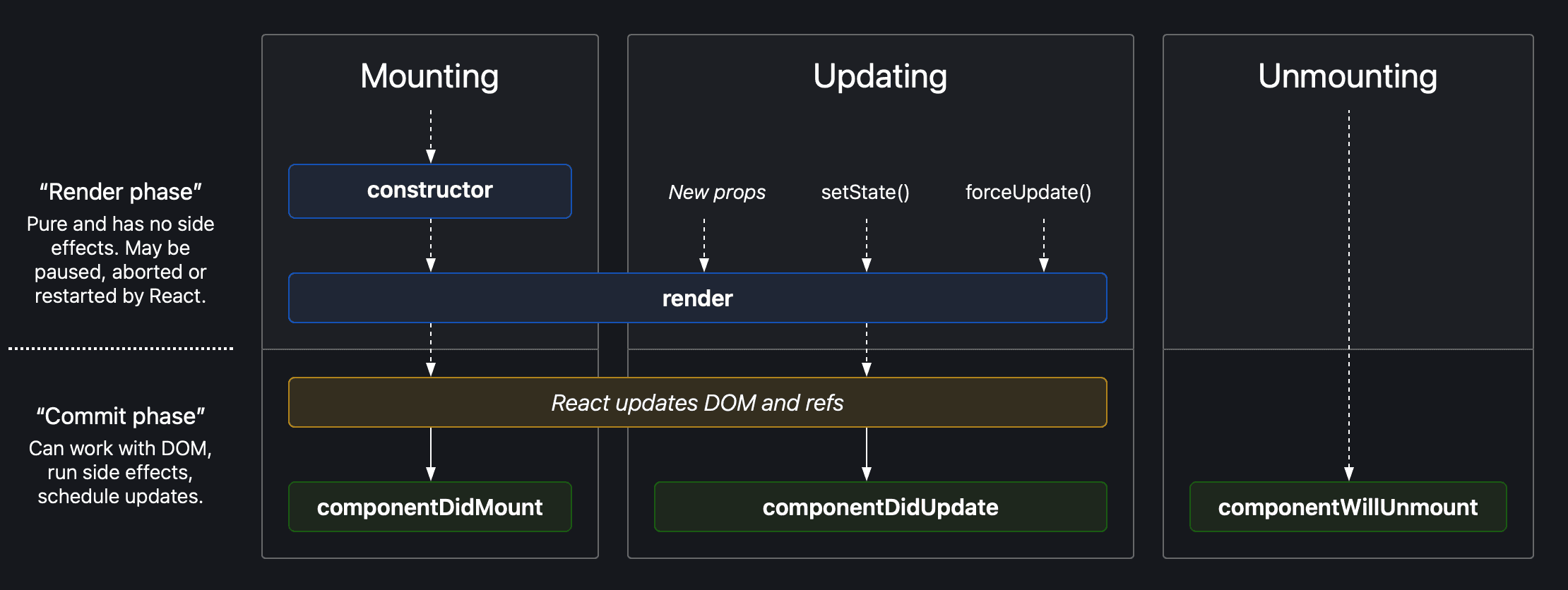
Component Life Cycles
Series of events that happen from the mounting of a React component to its Unmounting.
- Mounting: Birth of Component
- Update: Growth of Component
- Unmount: Death of Component
When a component is mounted. An instance is created and it's inside states are managed. Those states do not change externally as long as component remains mounted. You can update that instance externally if you want.
But as soon as the component is unmounted. Due to dynamic conditions or change of key. That instance is destroyed with every state inside it.
And on remounting. A new instance is created with initial value states.
- React's state is scoped to the component instance.
- React handles unmounting and remounting of components by discarding old state and re-initializing the component's state.
Methods in React Component Lifecycle
- The render) method is used to render HTML of the component in react. This method is required for a class based component to render the DOM. It runs during the mounting and updating of your component. Render) method should be pure ie you cannot modify state inside it!
- The componentDidMount() method runs after the component output has been rendered to the DOM.
- The componentDidUpdate() method is invoked as soon as the updating happens. The most common use case for the componentDidUpdate() method is updating the DOM in response to prop or state changes.
- The componentWillUnmount() lifecycle method is called just before the component is unmounted and destroyed. Usually used to perform cleanups