React
Dynamic Styling
#react
-
JSX inputs camel Casing => uses
className=””to add classes to elements -
TabButton.jsx
export default function TabButton({ children, onSelect, isActive }) {
  return <button className={isActive ? "active" : ""} onClick={onSelect}>
		{children}
	  </button>;
} // pass true or false condition based on active- App.jsx
<TabButton
  onSelect={() => handleSelect(1)}
  isActive={selectedTopic === "components"}
>
  Component
</TabButton>
//use state as condition (big brain)
JSX can output Array of renderable data
let arr = ["a", "b", "c", "d"];

//return {[arr]};
return (
  <div>
    {[<p>Hello</p>, <p>Himanshu</p>]}
    <p>Aggarwal</p>
  </div>
);
But our data.js file has Array of Objects. Which must be transformed into JSX.
export const CORE_CONCEPTS = [
  {
    image: componentsImg,
    title: 'Components',
    description:
      'The core UI building block - compose the user interface by combining multiple components.',
  },
  {
    image: jsxImg,
    title: 'JSX',
    description:
      'Return (potentially dynamic) HTML(ish) code to define the actual markup that will be rendered.',
  },
];- We can map each object (item) in
App.jsand dynamically generate data according to no. of data objects. Hence will work even if you remove/add objects
{CORE_CONCEPTS.map((item, index) => (
  <li key={index}>
    <img src={item.image} alt="Cool image" />
    <h3>{item.title}</h3>
    <p>{item.description}</p>
  </li>
))}- We can also use custom CoreConcept component with spread operator
{CORE_CONCEPTS.map((conceptItem, index) => (
  <CoreConcept key={index} {...conceptItem} />
))}
Each item in the list should have a unique “key” prop.
Don’t need JSX in React
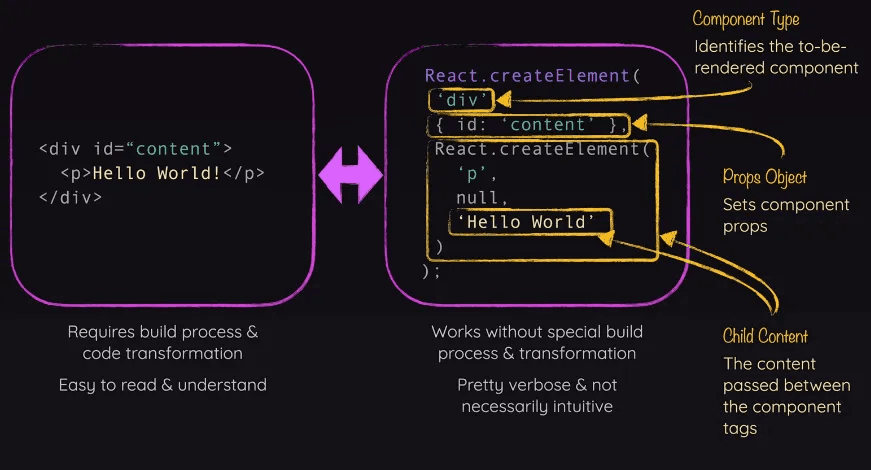
import React from "react";
import ReactDOM from "react-dom/client";
import App from "./App.jsx";

const entryPoint = document.getElementById("root");
// ReactDOM.createRoot(entryPoint).render(<App />);
ReactDOM.createRoot(entryPoint).render(React.createElement(App));