Context Api
Prop Drilling
Passing props is essential for sending data through the UI tree to the components that need it. However, it can get cumbersome when passing props deeply, leading to "prop drilling."
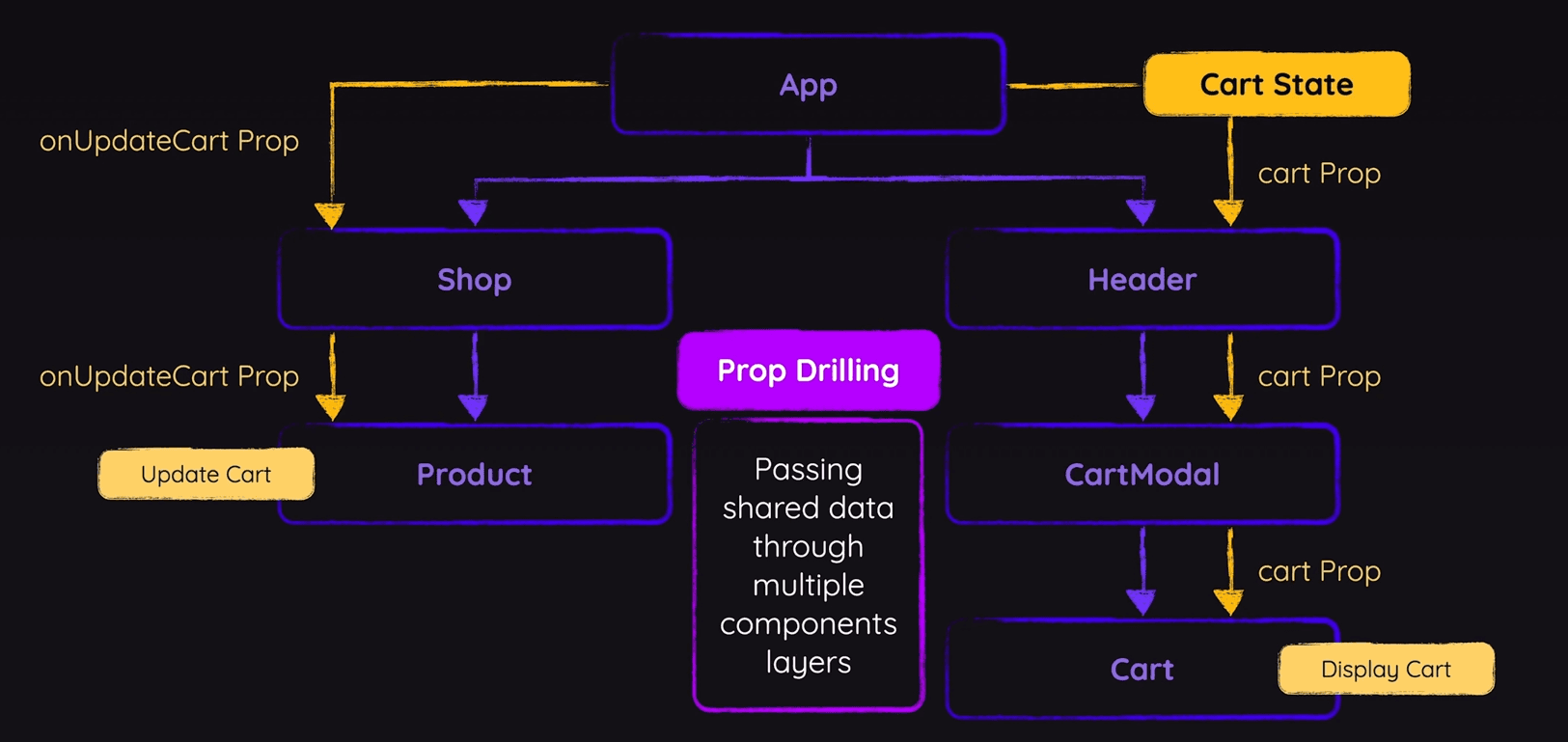
Context: an alternative to passing props
React’s context feature allows you to "teleport" data directly to the components that need it without passing props through every level of the tree.

To Create context
Use createContext to create a context outside any component:
- CartContext.jsx
import { createContext } from "react";

export const CartContext = createContext({
  items: [],
});
CreateContext contains a react component. And we can pass a default value for better intellisense.
Wrap all components that need context with Context.Provider and provide the necessary value.
- App.jsx
// ...
import { CartContext } from "./store/cart-context.jsx";

export default function App() {
  // ...
  return (
    <CartContext.Provider value={{ items: [] }}>
      <Header
        cart={shoppingCart}
        onUpdateCartItemQuantity={handleUpdateCartItemQuantity}
      />
      <Shop onAddItemToCart={handleAddItemToCart} />
    </CartContext.Provider>
  );
}
Consuming contexts
Now useContext to consume context inside required component.
- Cart.jsx
import { useContext } from "react";
import { CartContext } from "../store/cart-context";

export default function Cart({ onUpdateItemQuantity }) {
  const { items } = useContext(CartContext);

  return (
	  // ...
  );
}
Alternative: Context.Consume
// import { useContext } from "react";
import { CartContext } from "../store/cart-context";

export default function Cart({ onUpdateItemQuantity }) {
  // const { items } = useContext(CartContext);
  return (
    <CartContext.Consumer>
      {({ items }) => { // destructuring context
        return (
          <div id="cart">
	          {/* code using items */}
          </div>
        );
      }}
    </CartContext.Consumer>
  );
}
Linking Context to State
But right now. Context is static. We can't modify it. We need to attach state to it with updating functions, so that we can remove prop drilling while making it dynamic.
- App.jsx
import { CartContext } from "./store/cart-context.jsx";

export default function App() {
  const [shoppingCart, setShoppingCart] = useState({ items: [] });

  const handleAddItemToCart = (id) => {
    // update shopping cart logic
  };

  const ctxValue = {
    items: shoppingCart.items,
    addItemToCart: handleAddItemToCart,
  };

  return (
    <CartContext.Provider value={ctxValue}>
      <Header
        cart={shoppingCart}
        onUpdateCartItemQuantity={handleUpdateCartItemQuantity}
      />
      <Shop onAddItemToCart={handleAddItemToCart} />
    </CartContext.Provider>
  );
}
Now we use this function instead of passed down handler to update cart
- Product.jsx
import { useContext } from "react";
import { CartContext } from "../store/cart-context";

export default function Product({ id, image, title, price, description }) {
  const { addItemToCart } = useContext(CartContext);

  return (
  <button onClick={() => addItemToCart(id)}>Add to Cart</button>
  );
}
Should also add function to CartContext.jsx for intellisense
Passing state directly to Context doesn't update it; functions must be passed separately to handle state changes.Component renders like useState when Context Value changes
Separate Provider
You can separate entire Provider code to keep App.jsx clean
import Header from "./components/Header.jsx";
import Shop from "./components/Shop.jsx";
import CartContextProvider from "./store/cart-context.jsx";

function App() {
  return (
    <CartContextProvider>
      <Header />
      <Shop />
    </CartContextProvider>
  );
}

export default App;
Transfer entire context setup and functions to cart-context.jsx
import { useState, createContext } from "react";
import { DUMMY_PRODUCTS } from "../dummy-products.js";

export const CartContext = createContext({
  items: [],
  addItemToCart: () => {},
  updateCartItemQuantity: () => {},
});

export default function CartContextProvider({ children }) {
  const [shoppingCart, setShoppingCart] = useState({
    items: [],
  });

  function handleAddItemToCart(id) {/*code*/}
  function handleUpdateCartItemQuantity(productId, amount) {/*code*/}

  const ctxValue = {
    items: shoppingCart.items,
    addItemToCart: handleAddItemToCart,
    updateCartItemQuantity: handleUpdateCartItemQuantity,
  };

  return (
    <CartContext.Provider value={ctxValue}>{children}
    </CartContext.Provider>
  );
}